RFI Response: How to Write & Automate Winning RFI Responses (+ Examples)
An RFI response is your answer to a buyer’s request for information. Learn what to include, how to write it, how long it should be and see practical examples
Written by

Technical Account Manager, AutoRFP.ai
- Updated
- Reading time
- 19 min
A strong RFI response gives a buyer enough confidence to keep your company in the conversation. For vendors, that means answering clearly, showing where your solution fits, and backing up claims with the details buyers actually need to evaluate you.
This guide focuses on vendors responding to buyer RFIs, not construction RFIs used to clarify drawings, specifications, or site work.
We’ll break down how to structure a strong response, what buyers look for, the mistakes that weaken good submissions, and how automation can make the process faster and easier to manage.
What Is an RFI Response?
An RFI (Request for Information) response is a document a supplier submits to answer a buyer’s questions about its products, services, capabilities, and experience. It helps buyers understand what potential vendors can offer and assess their suitability before moving further into the procurement process.
RFIs typically appear during the early stages of the buying process, when organizations are researching solutions and comparing potential suppliers. After reviewing the responses, buyers may shortlist vendors, request demonstrations, or issue a more detailed Request for Proposal (RFP).
A strong RFI response provides clear, accurate information supported by relevant evidence, helping buyers determine whether your company is worth considering for the next stage.
What’s the Difference Between RFI, RFP, and RFQ Responses?
Many teams use Request for Information (RFI), Request for Proposal (RFP), and Request for Quotation (RFQ) interchangeably, but they serve different purposes. Understanding these differences helps you respond the right way at the right time.
Think of them as different types of requests in your client’s decision-making process, each requiring specific information depending on what the buyer needs.
Here’s how they differ:
| Criteria | Request for Information (RFI) | Request for Proposal (RFP) | Request for Quotation (RFQ) |
|---|---|---|---|
| Purpose | Show your company’s expertise, experience, and capabilities so the buyer can gather information and shortlist suitable vendors. | Present a complete solution with a full scope, methodology, and value that differentiates you from competitors. | Provide precise pricing, lead times, and commercial terms to help the buyer make a purchase decision. |
| Timing | Typically used early in procurement to research options and assess potential suppliers. | Used when the buyer has defined requirements and wants detailed proposals, sometimes after shortlisting. | Used when specifications are clear and the buyer needs comparable pricing, whether or not earlier requests were issued. |
| Detail level | Usually concise; focus on capabilities, strengths, and relevant experience. | High detail; include a structured proposal addressing requirements, timelines, and pricing models. | Straightforward detail; confirm specifications, quantities, and total costs. |
| Response style | Clear, brief, factual answers that highlight your suitability. | Persuasive, solution-oriented writing that connects features to outcomes. | Concise, structured, and transparent responses focused on numbers and terms. |
What Buyers Want to Learn From Your RFI Response
Buyers issue RFIs to understand the market, evaluate potential suppliers, and identify suitable vendors before moving further into procurement. Knowing what they’re looking for helps you provide relevant information instead of generic company descriptions.
Here’s what buyers typically want to learn and what your RFI response should demonstrate:
| Reason | Buyer’s intent | What to show in your response |
|---|---|---|
| Understand the market | Explore available technologies, solutions, and pricing before making commitments. | Explain your solution, its use cases, key capabilities, and pricing approach where requested. |
| Identify qualified vendors | Screen suppliers based on expertise, certifications, and capacity before inviting full proposals. | Provide relevant experience, customer examples, certifications, and evidence of your ability to deliver. |
| Compare capabilities | Understand how different vendors solve similar challenges beyond marketing claims. | Describe specific features, integrations, implementation approaches, and how your solution addresses their requirements. |
| Reduce risk | Assess vendor reliability, compliance, and stability to avoid unsuitable partnerships. | Include verified security certifications, compliance documentation, support arrangements, and relevant evidence of business reliability. |
What Should Be Included in an RFI Response?
A strong RFI response should give buyers the information they need to evaluate your company’s capabilities and suitability. Always follow the buyer’s requested format first, then use the sections below as a checklist where applicable.
1. Cover Letter
When submitting an RFI, you may also attach a brief cover letter if the buyer allows additional documentation. A cover letter helps demonstrate that you understand the buyer’s challenges and priorities. Highlight what makes your solution relevant without forcing them to search for it.
A well-written cover letter reminds the buyer that there’s a real person behind the response, someone who understands what they need, why it matters, and how your company can help.
Unlike an RFP cover letter, an RFI cover letter should focus on introducing your company and establishing relevance rather than presenting a detailed proposal.
2. Executive Summary
If the RFI is lengthy or complex, include a short overview highlighting the key points of your response. Summarize your company’s relevant capabilities, unique strengths, and how your approach aligns with the buyer’s objectives.
Keep it concise, ideally around one paragraph. The goal is to help buyers quickly understand your company’s suitability without repeating every answer in the questionnaire.
3. Company Background
Provide a concise overview of your company’s mission, history, team size, and areas of specialization.
You can also mention notable achievements, long-term clients, or industry milestones that demonstrate stability and trustworthiness.
Keep it factual. The goal is to provide a clear snapshot of who you are and why your organization is qualified to meet the buyer’s requirements.
4. Relevant Capabilities
Highlight your industry-specific experience, certifications, key clients, and capabilities that directly relate to the buyer’s needs. This establishes credibility and demonstrates your understanding of their sector.
Avoid listing every product feature or service your company offers. Focus on the capabilities that help buyers assess whether you’re a suitable vendor.
Pro tip: Include short case studies or examples of similar projects you’ve completed successfully. This helps buyers assess your track record and reliability.
5. Main Response Content
Provide a clear and direct answer to each question. Keep your responses concise, factual, and supported by relevant data or examples.
Mirror the structure of the RFI and follow any instructions on formatting, word limits, or supporting documents. Restating each question, where appropriate, helps evaluators follow your answers.
Pro tip: Include technical specifications, performance metrics, and key features relevant to the RFI. Use charts or diagrams when they help explain complex information, but avoid adding unnecessary detail.
6. Security, Compliance and Certifications
Many enterprise and SaaS RFIs ask about security and compliance before buyers proceed to a formal RFP. These questions may cover data protection, access controls, regulatory requirements, certifications, and how your company handles sensitive information.
Provide accurate details about your security practices and include relevant evidence, such as SOC 2 Type II reports, ISO 27001 certificates, or approved security documentation, where requested.
Make sure certifications are current, describe their scope accurately, and only reference controls your organization has implemented. Where sensitive supporting documents are required, follow your company’s approved sharing procedures.
Pro tip: Work with your security or compliance team to maintain current, approved answers to recurring security questions. This helps you respond consistently across RFIs without relying on outdated certifications or making unsupported compliance claims.
Winning RFP response examples
Download 7 winning RFP response examples, cover letters, executive summaries, and Q&A responses that close deals.
7. Clarifications and Supporting Documents
If any RFI requirements are unclear or your company cannot fully meet them, explain the assumptions, limitations, or exceptions in your response. This helps buyers understand your capabilities without making commitments you cannot support.
Include relevant supporting attachments where requested, such as product specifications, security certifications, case studies, or company credentials. Team qualifications and client references may also be useful, particularly for service-based RFIs.
Pro tip: Only attach documents that directly support the buyer’s questions. Make sure information is current and approved, and obtain permission before sharing client contact details.
RFI Response Template (Copy and Paste)
Use this simple RFI response template to organize your answers. Adapt it to the buyer’s requirements, and follow their requested questionnaire format where provided.
1. Cover Letter (Optional)
Dear [Buyer Name], thank you for considering [Company Name]. We’re pleased to share information about our capabilities and experience in [Relevant Area].
2. Executive Summary (Optional)
[Briefly summarize your company’s solution, relevant strengths, and suitability for the buyer’s needs.]
3. Company Background
[Introduce your company, industry experience, core services, team size, and relevant credentials.]
4. Relevant Capabilities
[Describe relevant products, services, technical capabilities, and examples of similar projects.]
5. Main Response Content
[Copy each RFI question and provide a clear, factual answer supported by relevant evidence.]
6. Security, Compliance and Certifications
[Summarize relevant security practices, current certifications, and approved compliance information, where requested.]
7. Clarifications and Supporting Documents (If Applicable)
[Explain any assumptions, exceptions, or limitations, and list relevant supporting documents, team qualifications, or approved client references requested by the buyer.]
RFI Response Examples
Below are three sample RFI responses from ExampleCo Analytics, a fictional B2B software company. All company details and capabilities are illustrative, not verified customer information or responses generated by AutoRFP.ai.
How to Write an Effective RFI Response
A strong RFI response starts with understanding the buyer’s requirements, gathering accurate information, and making it easy for evaluators to assess your capabilities.
Follow these seven steps to prepare a clear, well-supported response.
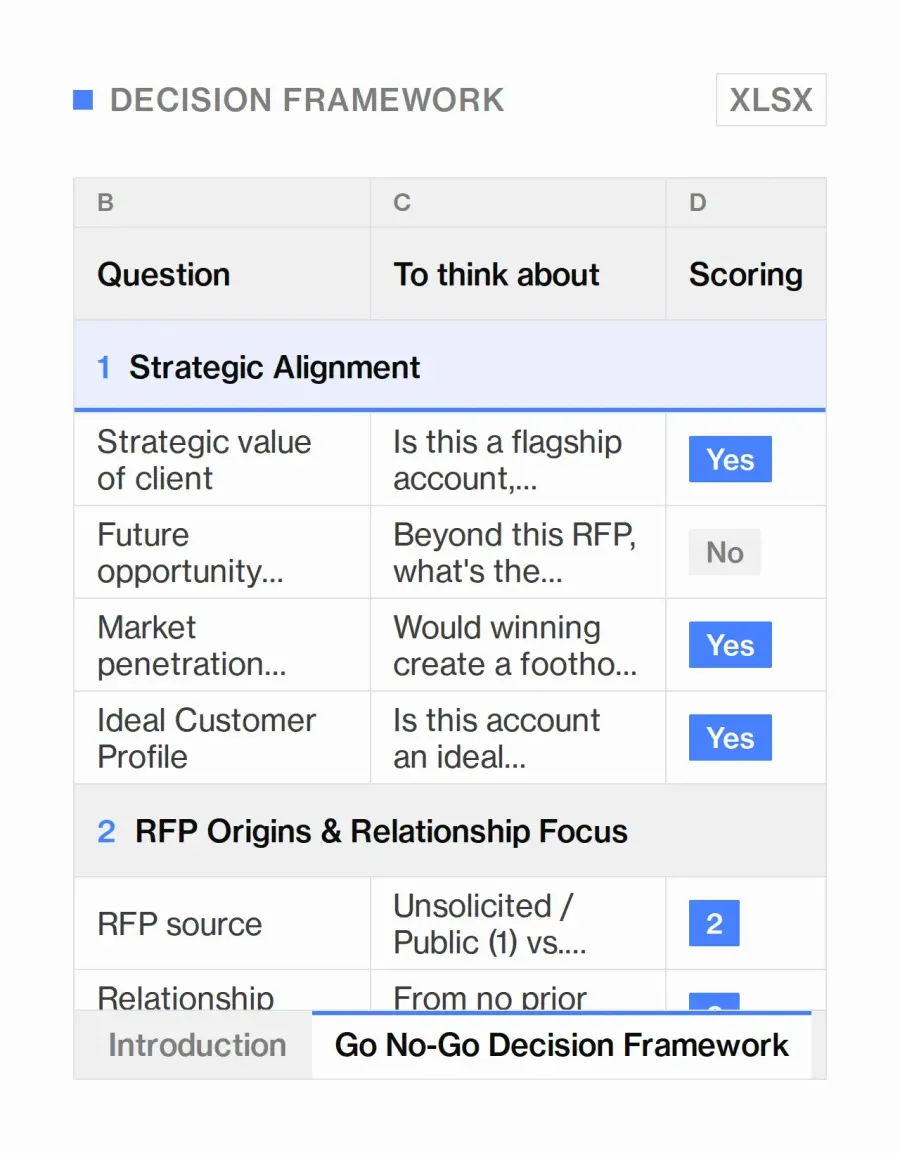
1. Qualify the RFI With a Go/No-Go Framework
Even though an RFI is primarily an information request, preparing a response still requires time and resources. Before committing, evaluate the opportunity against three questions:
- Does the buyer match your ideal customer profile? Consider their industry, size, requirements, and potential fit with your business.
- Can your company meet their needs? Check whether the requested capabilities align with your existing products, services, and expertise.
- Is there strategic value in responding? Consider opportunities to enter a new market, develop a significant account, or establish a long-term relationship.
A good fit across these areas supports a go decision. If significant gaps remain, assess whether the opportunity justifies the effort before assigning resources.
Free template: Use our Go/No-Go Decision Template to evaluate opportunities consistently.
2. Read and Understand the RFI Carefully
Review the entire RFI before drafting. Identify the buyer’s priorities, evaluation criteria, submission deadline, required documents, and formatting instructions.
Pay particular attention to questions requiring technical, security, financial, or legal input. Flag unclear requirements early so the appropriate subject matter experts can provide accurate information.
As DE Consulting explains:
“RFIs are not just information requests; they’re your first impression. When an agency releases an RFI, they’re not merely gathering data; they’re assessing who’s paying attention, who responds, who understands the scope, and who has relevant experience. Ignoring an RFI means missing the chance to introduce your company early, help shape the future RFP, get on the radar before things get competitive, and build a breadcrumb trail of engagement.”
3. Assemble a Team for RFI Responses
RFI responses often require a smaller team than formal RFPs, but each contributor should have a clear responsibility.
| Role | Responsibility |
|---|---|
| Proposal Writer | Structures answers, maintains clarity, and ensures consistency throughout the response. |
| Technical SME | Verifies technical information, product capabilities, and implementation requirements. |
| Business Development/Sales Lead | Aligns the response with buyer priorities and the opportunity’s strategic value. |
| Legal/Compliance Team | Reviews relevant contractual, security, regulatory, and compliance statements. |
Not every RFI requires all four roles. Match the team to the complexity of the request and assign one person overall responsibility for coordinating the submission.
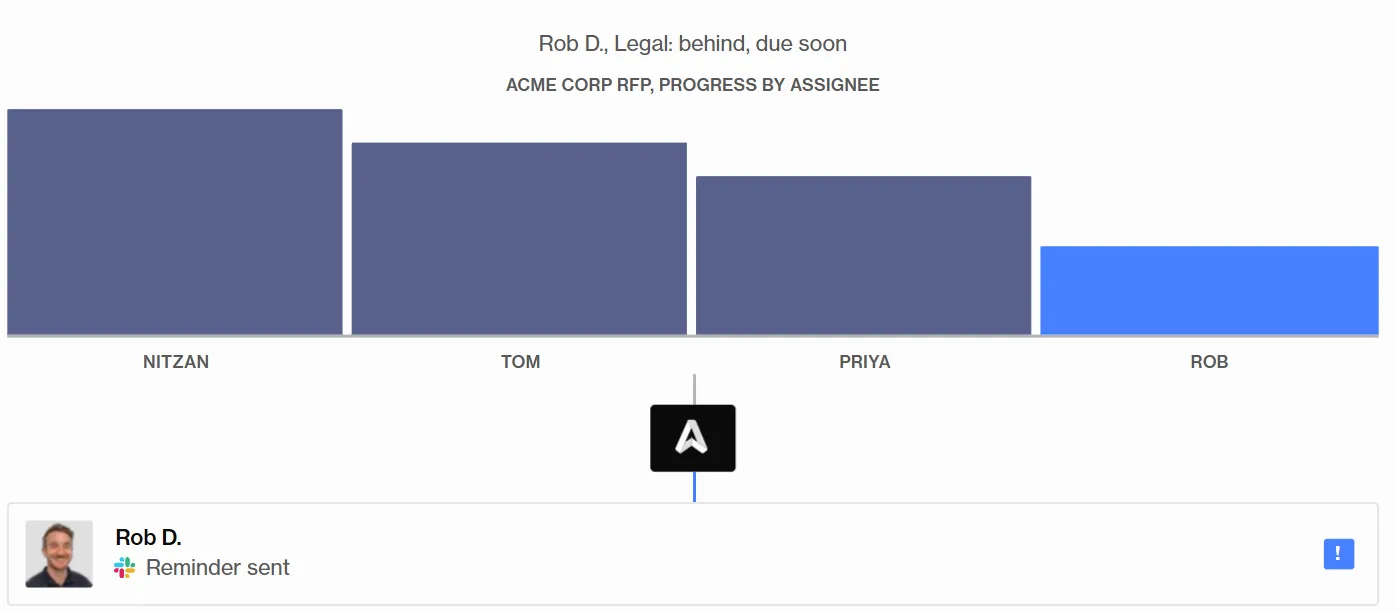
For teams handling multiple RFIs simultaneously, AutoRFP.ai can help response owners track assignments, deadlines, and team capacity across projects.
4. Align Your Content With the Buyer’s Goals
Tailor your answers to what the buyer is trying to understand, rather than providing generic product descriptions.
For example, if the buyer asks about implementation, explain your deployment approach, expected dependencies, and required resources. If security is the priority, provide relevant controls and current supporting documentation.
Use the buyer’s terminology and connect your capabilities to their stated requirements without making unsupported promises.
5. Keep It Structured and Easy to Read
Follow the RFI’s original structure so evaluators can find and compare answers easily. Use clear headings, concise explanations, and supporting evidence where relevant.
| Response element | What to include |
|---|---|
| Direct answers | Address each question immediately before providing additional context. |
| Supporting details | Explain capabilities, specifications, or implementation requirements where necessary. |
| Evidence | Include relevant metrics, certifications, customer examples, or approved documentation. |
| Clarifications | Identify assumptions, limitations, or requirements that need further discussion. |
| Formatting | Follow the buyer’s numbering, word limits, document structure, and attachment instructions. |
Pro tip: Avoid vague language. Clearly state the information you’re providing, keep answers as brief as possible without sacrificing completeness, and remove unnecessary jargon.
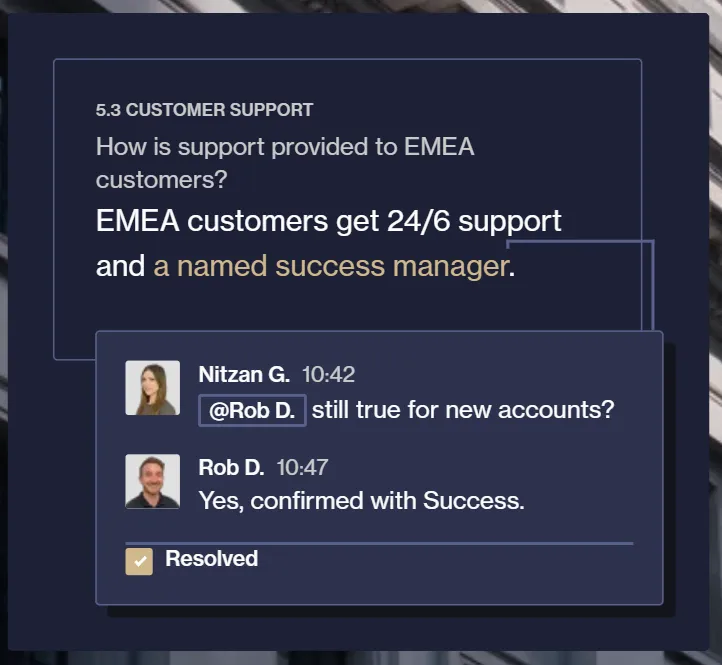
6. Collaborate and Review
Establish a straightforward review process before the submission deadline. Assign each question to the appropriate contributor and ensure technical, security, and commercial statements are checked by the people responsible for them.
Keep feedback, revisions, and approvals in a shared workspace where possible, rather than circulating separate document versions.
Side note: AutoRFP.ai supports real-time collaboration, editor and reviewer assignments, and structured approvals, helping teams coordinate RFI responses without relying on lengthy email threads.
7. Review for Clarity, Compliance, Consistency and Submit
Before submitting, complete a final review to confirm that:
- Every question has been answered accurately and completely.
- Technical claims, certifications, and supporting information are current and approved.
- Responses are consistent across sections, with no contradictory statements.
- All required attachments are included and the submission follows the buyer’s format.
- The completed response is approved and submitted before the deadline.
In government procurement, an RFI can also help suppliers establish visibility before a formal solicitation.
As Nicole Triputti, Senior Federal Acquisition Strategist at Matrix Design Group, Inc., notes:
“RFIs aren’t a waste of time, they’re your chance to show that you understand the buyer’s mission, influence how the requirement is shaped, strengthen your case for a potential set-aside, and get noticed before the RFP is even released.”
How Long Should an RFI Response Be?
RFI responses should be concise and proportional to the request’s complexity. As a general guideline, a straightforward RFI response might be two to five pages, although some may be shorter or significantly longer.
Always follow the page limits, word counts, and formatting requirements specified in the RFI first.
The goal is to provide relevant information without going into unnecessary technical detail.
Focus on quality over quantity, answering every question clearly while avoiding unnecessary elaboration or filler content.
Common Mistakes to Avoid When Writing a Response to an RFI
Even a well-qualified vendor can weaken its chances of being shortlisted through avoidable mistakes. Here are four common errors and how to prevent them:
| Common mistake | Why it’s a problem | How to avoid it |
|---|---|---|
| 1. Reusing old responses without updating them | Outdated examples, inaccurate claims, or irrelevant details may not reflect the buyer’s current requirements. | Review reused answers against current, approved company information and tailor them to the new RFI. |
| 2. Writing too much or too little | Long, unfocused answers bury important information, while overly brief responses may leave key questions unanswered. | Answer each question directly, then provide enough supporting detail to demonstrate your capabilities. |
| 3. Rushing the review process | Incorrect data, inconsistent statements, and overlooked requirements can undermine credibility. | Assign reviewers, verify important claims, and complete a final accuracy and compliance check before submission. |
| 4. Forgetting to add a human touch | Generic, overly formal, or robotic answers can make it difficult for buyers to understand your company’s relevance. | Use clear, natural language and specific examples that reflect the buyer’s priorities. |
Side note: RFI automation tools can help reduce these mistakes by generating drafts from approved company knowledge, providing supporting sources, and helping teams identify answers that need review. However, human verification remains essential before submission.
How to Automate RFI Responses With AutoRFP.ai
Responding to RFIs manually often means extracting questions from documents, searching for past answers, and verifying information before submission.
While manually responding to RFIs can work, it can’t match the speed, precision, and flexibility that automation provides. Let’s look at how a tool can help you achieve that.


Video transcript
Did you know the average RFP can take thirty-two hours of manual grueling work? Now, in this video, in under ten minutes, I'm gonna show you how you can use AI RFP automation to drastically reduce the amount of time it takes to get to a first draft for your RFP, DDQ or security questionnaire using AutoRFP.ai. Sick. Let's jump into it. So at AutoRFP, we're an AI RFP software automation platform, across the globe with hundreds of customers using our software every day, battle-tested AI to help you automate RFPs. First, what's the problem? So an RFP or request for proposal or due diligence questionnaire or security questionnaire is a pain felt across all industries, whether it's construction, software, technology, finance, healthcare, anyone selling
to government or private businesses. And these glorified question and answers take hours and hours for people to complete, for them to win new business. It's a crucial part for your business to win enterprise and government contracts, which really help you grow sustainably and quickly. But when you go to bid on one, you are met with the RFP. Average response times are thirty to forty hours, usually involve five to eight people, seventy percent of content is reused but hard to find, and the average win rate across all industries is only forty-three percent. So you're spending hours with uncertainty that you may win, which is where efficiency and writing better responses, leveraging AI helps you win more faster. Now, looking into RFP automation, you have a number of options.
You can pick up a legacy RFP software. They've been around since the late nineties. They brought software to the RFP problem. Effectively, a glorified question and answer bank, like a database. You upload Q&A pairs, and then they try to use keyword matching to find the most relevant to then help you answer questions that you get in your new RFPs and tenders. You can also do AI builds yourself. So you might use ChatGPT or Claude, and you can see our other videos about how you can potentially use them. But effectively, you hit a ceiling where it's hallucinating, it's taking more time now to fix things than it should, and just doesn't have enough context to find the right answer most of the time. Or you can choose an actual AI native leader like AutoRFP.ai. Built from AI from the get go and have built the engine around zero
hallucination, multimodal architecture to leverage the latest models across all your major providers, self-maintaining library approach, so it doesn't take a lot of time to maintain the system, really high automation rates and enterprise security built in from day dot. So why do teams choose AutoRFP.ai? The reason is your knowledge is always current. We integrate with over twenty different systems, and we pull in from all your various file management and different software to make sure that your data is always up to date, and you don't have to maintain it across multiple different places. We're most accurate in the category because we leverage the different models, including specialized re-ranker models, embedding models, search models, and your large language models where they're best. And our team of over fifteen software engineers and AI engineers make sure that this is battle-tested, evals are correct, and it produces the correct answer based off your source context. And it's one platform for every stage of the RFP journey, from intake to new RFP
to AI-powered go/no-go to drafting to reviewing and using agents to review and update your RFP response, translation to collaboration across SMEs and different team members, ensuring that they can easily collaborate in an easy-to-use platform, and then exporting as well. Let's start with the AI native auto library. This is the core of the platform where your different content sources and past projects and up- and web scraping all live in the one place and- Any question that comes up, whether it's in an RFP or a team member asking the question, can be automatically answered with trust-based scores, specific semantic search, and ensures that the correct answer is found and used to then answer and generate an appropriate response. Then effectively, you upload a blank RFP.
The AI-powered response engine then automatically generates responses, translates it and everything to have the correct answers. Then your team can very easily edit, review, integrates with Slack and Teams, and everyone's notified on project deadlines. Now, I've spoken enough. Let's jump into the actual product, and you can see AI RFP automation from the start. We start by creating a project, which is a new RFP. We've got our portal agent that can scrape your requirements from web portals like SAP, Ariba and others, automatically ingesting those answers into your AutoRFP.ai instance, and then automatically drafting responses for you to easily enter back into the portal. Or you can upload a zip that contains a PDF, Excel, Word doc of your RFP and import that into the platform.
First we have our AI go, no-go. This ask different questions of your RFP based on your company context to ensure that should we actually bid on this RFP before we start it. It'll automatically grab out key details and link it to our CRM via our integration with Salesforce and so on. And here it's answered each question, and you can see it has confidence levels, it has trust built in, and you can then look back and see where the original source and what, for instance, table or other information. Our AI importer automatically selects every requirement, child requirements, dropdown pick lists response cells, everything else that's required for that RFP. We can manually change it if needed, but it automatically pulls that in. Then we can choose what content from our library or just choose every content, and our intelligent tagging and hierarchy system will make sure that the most relevant content is used for that response. And then I can create my project.
Next, the AI response engine then automatically starts sourcing the correct content from your auto library, re-ranking and finding the most relevant information, using that to then draft, redraft, and edit responses vi- with AI, and then provide those responses back to you in matter of seconds. And you can see here my thirty or so requirements automatically being filled out across the entire project. It's chosen the relevant pick lists, and each one of these have trust scores that I can understand further where this came from. It also has our AI-powered feedback score, and this is where AutoRFP is different to other systems. We don't wanna just help you source the correct answers. We wanna help you write better responses. And this goes into our feedback loop, where as you use the platform and write better responses, the AutoRFP system learns from those responses, and continually, your responses get better to help you win more faster.
Here we can do inline comments, so I can notify my team and so they can jump in, get notifications. I can submit, approve, add attachments, and everything else I can do in this platform. Finally, we have our project overview, which is our project management HQ for this particular RFP, making sure everyone understands deadlines. You can send reminders out to team members and just know when something needs to be completed by and when completed by and who is completing it, making sure that your RFP response is submitted on time and you're not faced with five PM Friday deadlines, calling someone to make sure you can get the correct answer to the correct question that's our short introduction to AutoRFP.ai. There's a lot more in RFP automation and AI RFP software that you can learn but feel free to reach out to our team. We'd love to provide a detailed demonstration to you so you can understand if this is a good fit for your business Already, AutoRFP.ai is in forty-four-plus countries across the globe with hundreds
of customers across different industries like technology, finance, and healthcare, and our customers are winning more faster. One of our customers like Shana Sweeney from SugarCRM won fifteen of their top twenty-five enterprise customers using AutoRFP.ai. They're using AI RFP automation to win more today, and it's a competitive advantage for their businesses. Our pricing is incredibly transparent. You can find more information on our website, to get in touch with our team, head over to our website, AutoRFP.ai. Book in a demo today and learn more and see if we can help you win more faster.
Using AutoRFP.ai
AutoRFP.ai automates much of that repetitive work by generating source-grounded responses from approved company knowledge, while keeping reviewers in control.
It also supports RFPs, security questionnaires, and DDQs, allowing teams to reuse approved information across different stages of the buying process.
1. Generate RFI Responses From Approved Company Knowledge
AutoRFP.ai’s AI Response Engine generates first-draft answers using your company’s approved content, including past responses, product documentation, security policies, and connected knowledge sources.
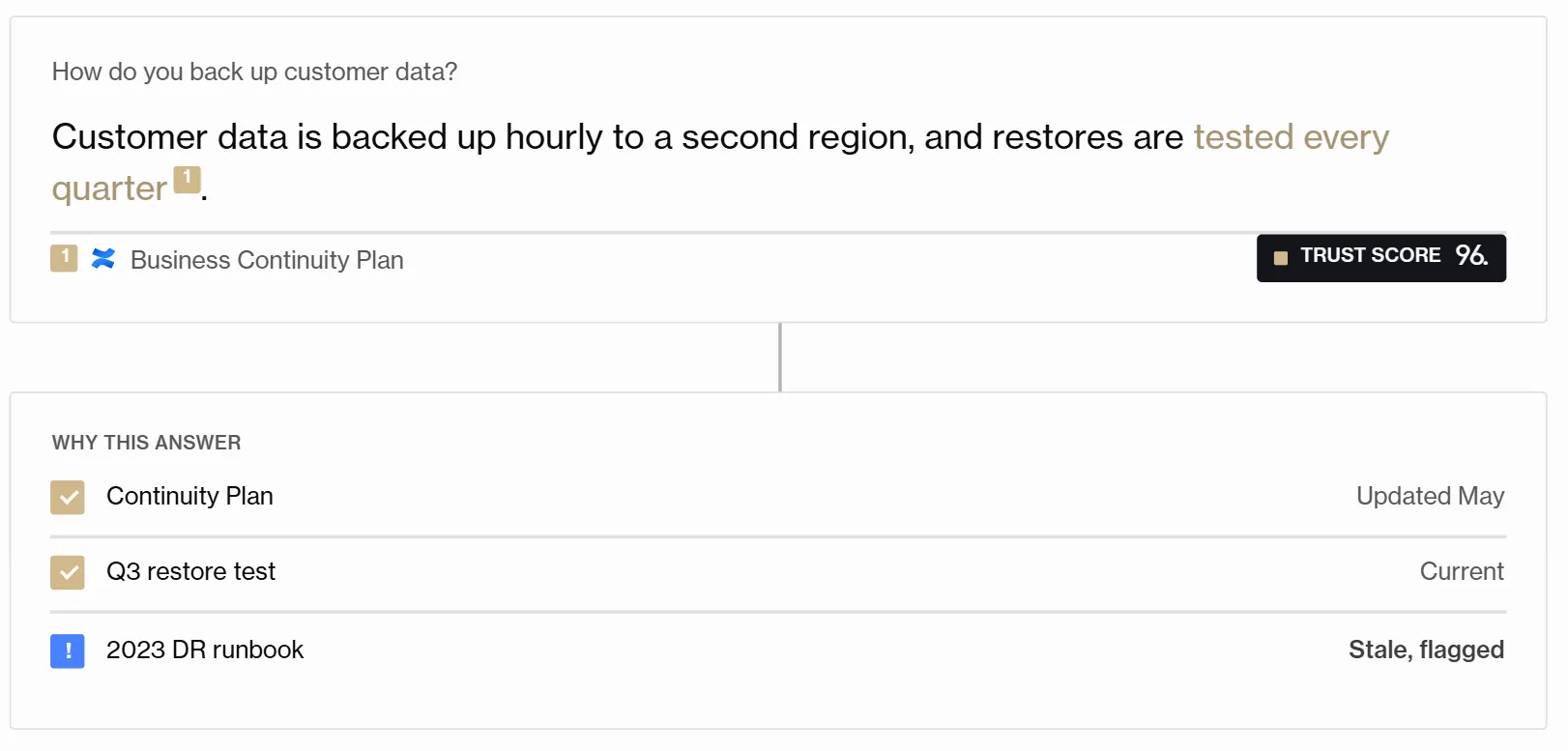
Instead of relying on generic AI-generated information, the system uses semantic retrieval and a multi-step process involving re-ranking, drafting, and checking to identify relevant information.
Each answer includes citations to its supporting sources, helping reviewers verify claims before approving them.
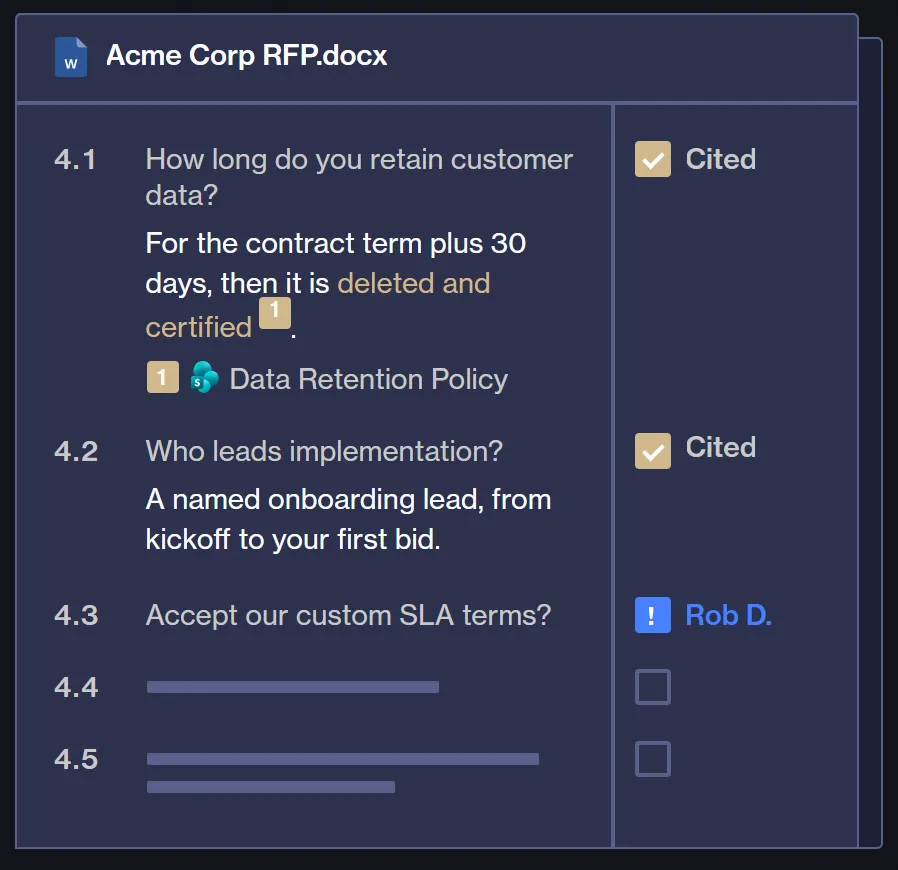
For example, when a buyer asks about integrations, implementation, or support capabilities, AutoRFP.ai can retrieve relevant information from existing company documentation instead of making your team write the answer from scratch.


Video transcript
AutoRFP.ai is like having a team member that never sleeps. We've responded to more than double the number of RFPs after implementing AutoRFP.ai than we did the year before. I'll look back on 2025, we'd saved something like 949 hours. It was mind-blowing. Oh my gosh, this can be done automatically. Being able to answer those consistently and accurately puts us in a position to be a trusted vendor for our clients.
Using AutoRFP.ai has definitely helped me increase my closing ratio. Before, we were using Google Drive to store all of our library content and previous responses. It was a very manual process. If the keyword was there, you would find it. If not, then you wouldn't. I would say 60% of the deals that come through in my market are RFP bids.
But as the team was scaling, it quickly became apparent that this wasn't sustainable. I, of course, looked at tools that we had available to us in-house. Became clear that it worked in some ways, but it wasn't built to respond to complex RFPs with multiple questions and moving parts. So what was different about AutoRFP.ai is that we're able to upload multiple documents in all different formats, PDF, Word, Excel, and it will ingest all of those documents and pull out the requirements, even tables within documents instantly.
The Excel sheets just blew our mind because we hadn't seen this anywhere else. As we work in multiple regions, the ability of AutoRFP.ai to translate into multiple languages is really impressive, and it really felt like it was going to be a partnership rather than a transaction. We spend a lot more time now focusing on the strategy for a bid.
The bids are a lot more tailored and a lot more focused on the prospect in a way that we couldn't do before. The quality of our output is just completely different. Do you feel like it's gonna blow their mind because they're like, "Oh, you've said exactly what we needed to hear." Thinking back to that particular deal in Q3, the deadline was coming up.
Having missed the deadline would have meant for me not hitting my quarter, but I also didn't wanna let down my team. Having a bank of information of answers that I could trust really allowed me to just push everything out as quickly as possible, knowing that what I was saying was accurate and true.
Trusting that when that is submitted, more than 50% of the job is done, and I'm really excited to say that, yes, we did win the deal, made me look like a hero, so thank you. We've been able to respond to 20 to 30% more RFPs quarter on quarter. We've been able to increase the capacity of the team. We've saved 45% of the time it would've taken us to respond to the same number of RFPs.
Our shortlist rate has been outstanding, and it just gets better and better I would say don't wait until volumes spike and quality starts to drop. Every bid that your team submits manually is costing you more than you think, not just in hours, but in quality and consistency There's absolutely no way we would want to go back to the previous way AutoRFP.ai is like having a team member that never sleeps, keeps getting smarter, and allows my team to focus on the stuff that they're really good at
2. Prevent Unsupported Answers With Zero Hallucination by Design
AutoRFP.ai follows a zero hallucination by design approach, focusing on generating answers supported by approved company information rather than inventing missing details.
Its response verification system uses two distinct scores:
- Trust Score: Indicates how strongly the available sources support an answer, with citations and content-age information to help reviewers verify it.
- Feedback Score: Evaluates how completely the answer addresses the buyer’s question, helping identify missing details or requirements.
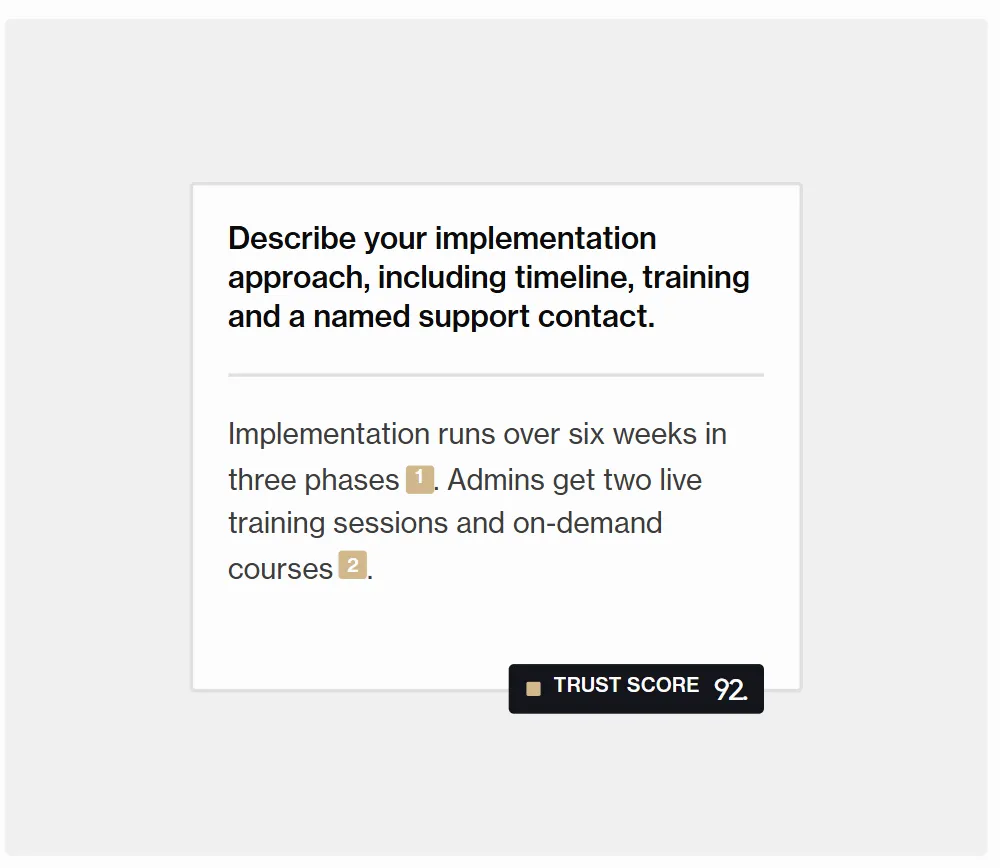
When the system cannot find sufficient supporting information, it leaves the answer blank (abstains) and flags the question for human review rather than guessing or hallucinating an answer.
This is particularly useful for RFIs containing security, compliance, and technical questions where an inaccurate answer could create problems later in procurement.
These safeguards help teams prioritize verification, but final accuracy and approval remain human responsibilities.
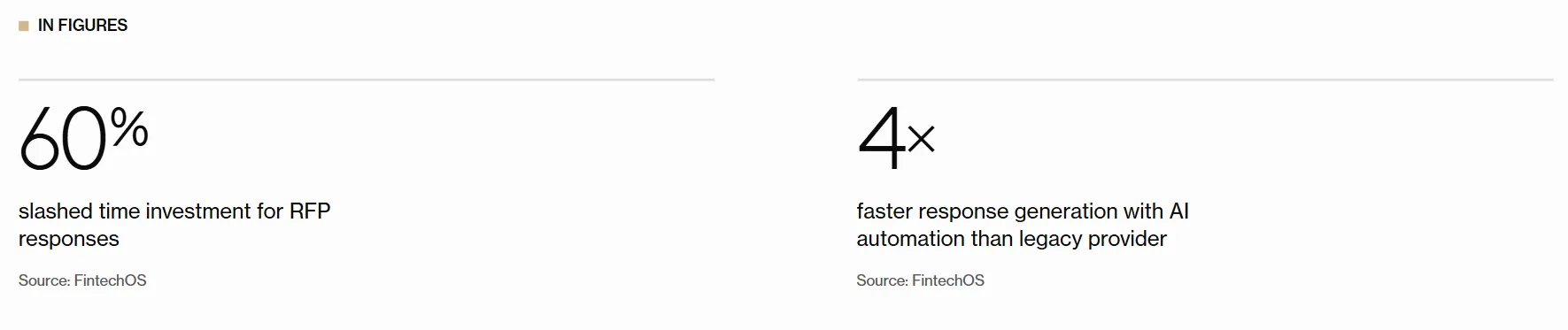
Mihai Popa, Bid Manager at FintechOS, said, “AutoRFP.ai is saving more than 60% of the time allocated before using the tool. The stakeholders involved can allocate this time to more strategic tasks.”
3. Build a Content Library That Maintains and Improves Itself
One challenge with RFI responses is keeping reusable information current as products, services, and company policies change.
AutoRFP.ai’s content library captures approved responses for future reuse. Its semantic search identifies relevant information even when different buyers ask similar questions using different wording.
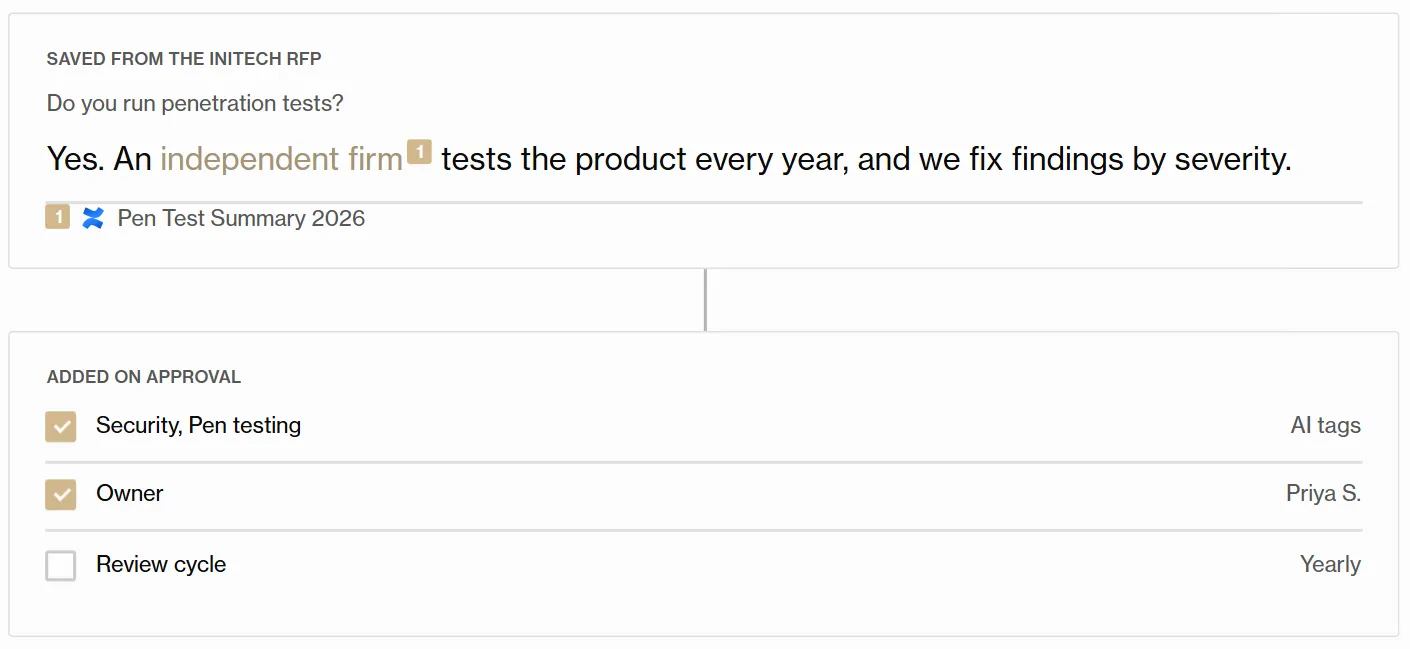
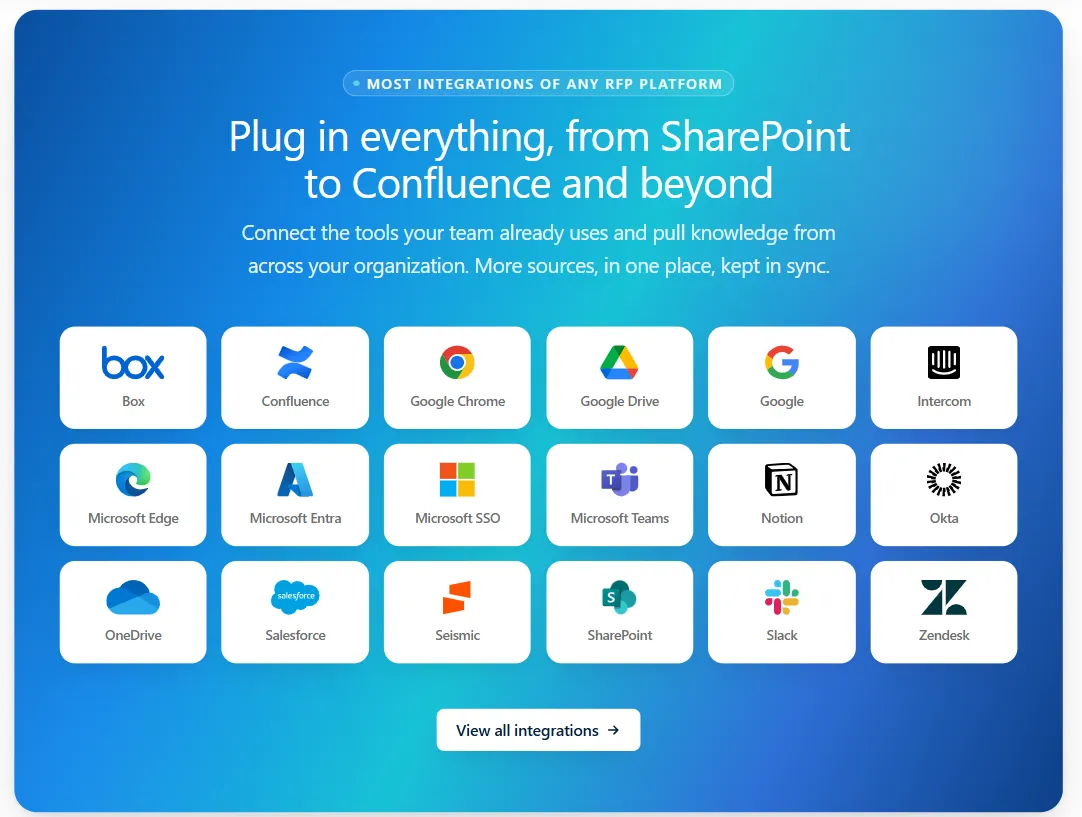
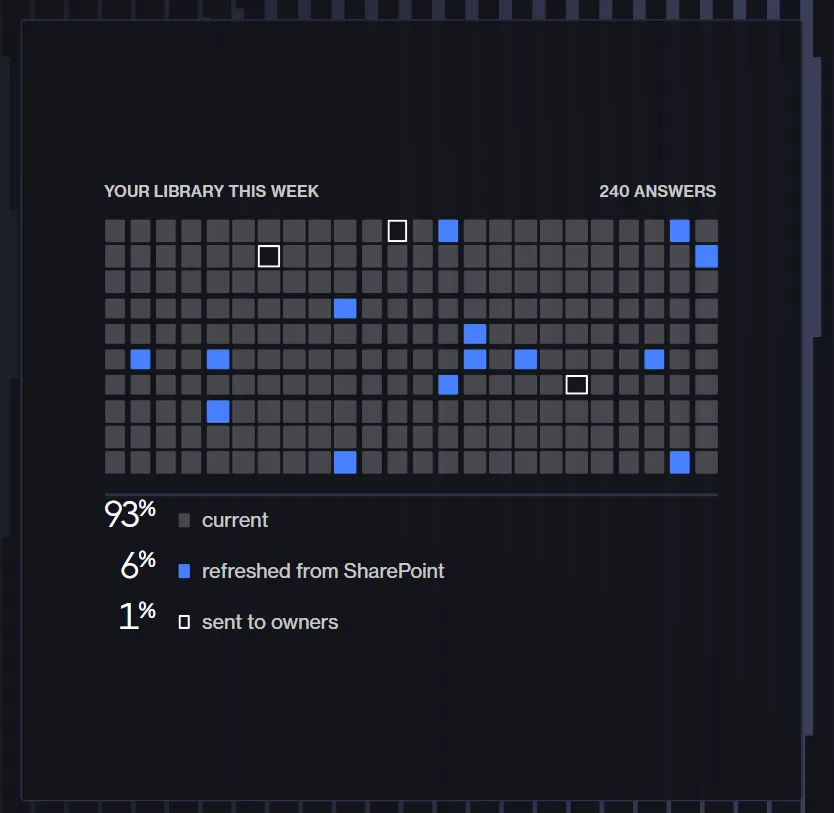
The library also supports AI-assisted categorization and updates from connected sources such as SharePoint, Google Drive, OneDrive, and Confluence.
As your team completes more RFIs and approves new responses, that knowledge becomes available for future projects without requiring every answer to be manually recreated.
Content owners retain control over shared-library approvals, review cycles, and updates, so automation doesn’t remove the need for content governance.
Webinar replay
How Winning Teams setup their Content Libraries

4. Import and Export RFIs Without Reformatting Documents
RFIs can arrive as Word questionnaires, complex Excel spreadsheets, PDFs, or ZIP folders containing multiple documents.
AutoRFP.ai’s AI Document Importer identifies questions, requirements, sections, and supporting context in these files. It also handles complex structures such as nested tables, multi-tab spreadsheets, and hidden rows.
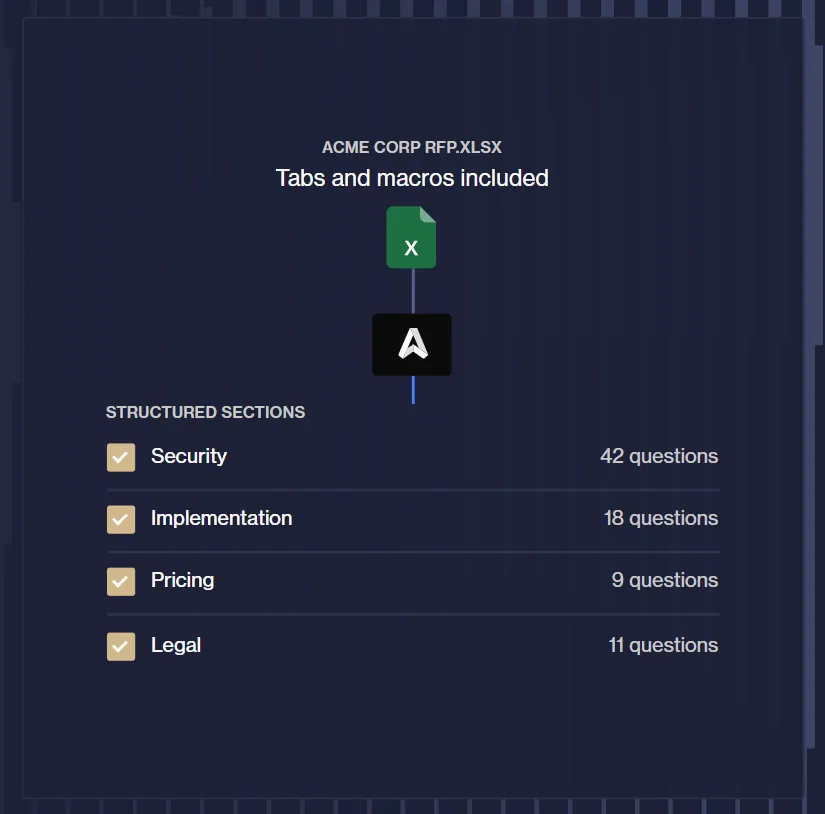
Once the responses are reviewed and approved, AutoRFP.ai can export them back into the buyer’s original Excel or Word structure, preserving elements such as formulas, macros, dropdowns, and formatting.
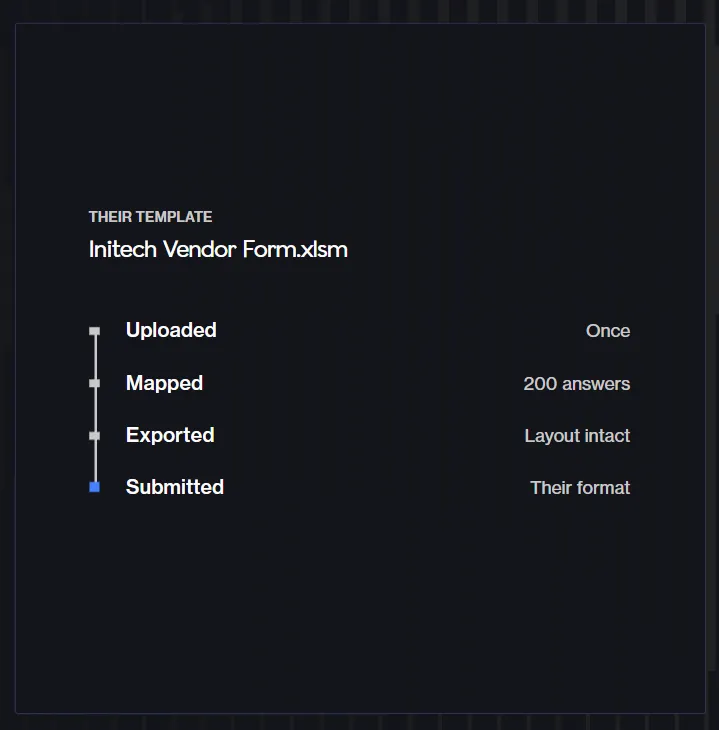
Important: PDF documents can be imported, but completed PDF questionnaires are exported as Word documents rather than returned as editable versions of the original PDF.
This reduces the manual work involved in transferring answers between documents and preparing completed files for submission.
5. Automate Portal-Based RFI Responses With the Portal Agent
Some buyers require vendors to answer RFIs directly inside procurement or vendor assessment portals, without providing downloadable questionnaires.
AutoRFP.ai’s Portal Agent helps teams handle these requests through a browser extension that recognizes questions in supported portals, including SAP Ariba and UpGuard.

The agent captures portal requirements and generates source-grounded responses using the same approved company knowledge available in AutoRFP.ai.
Reviewers can check the suggested answers and copy them into the relevant portal fields with one click, rather than manually retyping questions and transferring responses between systems.
The team still controls final review and submission. The Portal Agent assists with completing portal questionnaires; it does not independently submit them.

Other AutoRFP.ai Features That Support RFI Automation
Beyond these five core capabilities, AutoRFP.ai offers additional features for managing and improving response workflows.
| Feature | How it helps your RFI workflow |
|---|---|
| Automated go/no-go screening | Evaluates uploaded requirements against configurable deal-breaker criteria to support opportunity qualification when an RFI contains sufficient detail. |
| Project Agent | Applies changes across multiple responses, checks consistency, and proposes edits that reviewers can inspect before approving. |
| Q&A Agent | Lets employees retrieve source-backed answers from company knowledge directly within Slack or Microsoft Teams. |
| One-click editing and translation | Helps reviewers shorten, simplify, rewrite, or polish responses and supports translation into 44+ languages. |
| CRM and workplace integrations | Connects response workflows with tools such as Salesforce, Slack, Microsoft Teams, and company knowledge systems. |
| MCP integration | Allows compatible AI assistants, including ChatGPT and Claude, to access relevant AutoRFP.ai knowledge and project information through authenticated connections. |
| Automation and ROI reporting | Tracks response automation levels, editing effort, estimated time savings, and trends across completed projects. |
| Gap analysis reporting | Identifies recurring requirements that the organization cannot fully meet, helping teams spot capability or compliance gaps across bids. |
| Enterprise security and governance | Provides role-based permissions, SSO, audit trails, and regional hosting options. AutoRFP.ai is ISO 27001:2022 certified and SOC 2 Type II audited, and customer data is not used to train AI models. |


Video transcript
Transcript is auto-generated and may contain minor errors.
Hey, I'm Rob from autoRFP.ai. What is autoRFP.ai? Well, autoRFP.ai is an AI software as a service or SaaS application that does AI for proposal or RFP responses. That includes RFIs, like request for informations, includes due diligence questionnaires or DDQs, and includes security questionnaires. So, you can find all about us at autoRFP.ai. So, we're a technology company. We have offices all across the globe including Brisbane, Australia, Vancouver as well. And effectively, our tool allows, whether it be bid managers, sales people, proposal writers, RevOps team members, sales leadership, answer complicated request for proposals. So, what is a request for proposal? You can see one of our other videos below in the description. But effectively, our system
looks something like this. And it lets team members, and you can have unlimited number of people log in to autoRFP.ai, good product, allows people to go in, create projects, which would be for instance an RFP. I can go in here, create my information from my zip file, and that includes, you know, like an Excel spreadsheet, PDF, Word doc. We can run an AI go no go project analysis on the RFP. And then effectively from that, we can bring in all the information in terms of what are the questions, where our AI automatically scans the documents and figures out what is being asked of the RFP, whether it's multiple tabs in an Excel spreadsheet and everything else, whether it's drop-downs. And that all happens automatically through the power of AI. Then, we generate our response, and we can do it in in 40 plus different languages and adding languages all the time. Once you've imported your RFP into order rfp.ai,
you can collaborate with your team members assigning different people to answer the questions, review the questions, looking at an overview of the entire project and project managing due dates. Now AI effectively starts automatically answering those different questions based on your knowledge documentation. So that might be your website, your help docs, your technical documentation, your past RFP answers or security questionnaires, your security policies. But effectively all that different company information you import into order RFP and then our AI leverages that to create an AI first draft of an RFP response. Once we're happy with all those requests, we can approve it. That goes into the model to learn from and add to. So your current responses are automatically used for new responses and then you can export that as well. And then the final cool thing about order RFP is you have a lot of different
integrations that you can pull in, whether it's knowledge documentation from places like Notion, Google Drive and so on. So that's order RFP. We're an AI SaaS app. Uh you can host globally. We do not use customer data for training purposes or to send it back to LLMs. So we're secure and private. We have our ISO 2701 certificate and our SOC 2 certificate and then you can find up-to-date pricing and information on our website. Or if you came to learn more, you can book a demo and schedule time with our team. Thanks.
Reduce Manual RFI Work With AutoRFP.ai
AutoRFP.ai helps response teams spend less time on repetitive drafting and more time reviewing answers, addressing buyer requirements, and improving submissions.
Its customers have reported measurable improvements in their RFP workflows:
- Workforce.com doubled its RFP participation rate, with 80% of customer questions answered automatically in the first draft. The company also reported winning more than 50 bids using AutoRFP.ai.
- ecoPortal reduced RFP first-draft time by 60% and increased team engagement by 30%, allowing more employees to contribute to responses.
- IMTC reduced RFP response time by 80%, achieving up to 90% automation on initial drafts and automatically answering 71% of responses across 12 months of RFPs.
These results come from RFP workflows, but AutoRFP.ai supports RFIs using the same source-grounded drafting and review capabilities.
Book a demo to see how AutoRFP.ai can reduce manual work in your next RFI response.
About the author

Technical Account Manager at AutoRFP.ai. Background in asset management completing institutional RFPs and DDQs; now implements AutoRFP.ai for some of the company's largest accounts.
LinkedIn
