ChatGPT or Claude vs Purpose-Built RFP Software: Pros And Cons
Yes, you can use ChatGPT or Claude to write RFP responses. Both draft and summarize well but lack your approved content, citations and review workflow.

Co-Founder & CTO, AutoRFP.ai··18 min read
The question is not whether ChatGPT or Claude can help with RFPs. They can. The question is how far you can realistically take them. General-purpose AI works well for drafting, rewriting, and one-off questions, but structured RFP work introduces source control, approvals, document handling, SME collaboration, and auditability.
This guide compares both approaches, shows where each works best, and helps you decide when a general AI assistant is enough and when purpose-built RFP software becomes the better fit.
Can You Use ChatGPT or Claude to Write RFP Responses?
Yes. ChatGPT and Claude can help you write RFP responses using the buyer’s requirements and supporting information you provide. Both tools can work with uploaded documents, giving you a starting point for turning product documentation, approved answers, and subject matter expert notes into a draft.
The quality of that draft depends heavily on the context behind it. The buyer’s question tells the AI what to answer. Your approved company information provides the evidence. Details about the buyer’s priorities help make the response relevant to the opportunity.
For example, a buyer might ask how your team supports implementation. With an approved implementation plan and relevant project notes, you can ask either tool to explain the stages, responsibilities, and support available. Any proposed timeline or service commitment still needs confirmation from the people responsible for delivering it.
Treat the output as a draft that needs verification before submission. Check that each answer addresses the full question, reflects your current capabilities, and supports its claims with evidence. Where information is missing, ask the tool to flag the gap for an expert to resolve. A polished paragraph is useful only when your team can stand behind what it promises.
What ChatGPT and Claude Do Well in RFP Work
ChatGPT and Claude are useful for making sense of RFP documents, developing draft answers, and improving existing copy. Both can work with documents you supply, helping you turn scattered information into material your bid team can develop and review.
1. Break Down the Buyer’s Requirements
A lengthy RFP can spread important instructions across several sections. Ask either tool to organize the supplied material into a working brief covering:
- What the buyer wants to achieve.
- Mandatory requirements and requested evidence.
- Evaluation criteria and any stated weightings.
- Submission instructions, deadlines, and response limits.
This gives your team a starting point for planning the response and identifying questions to clarify with the buyer.
Pro tip: Ask for the original wording and document location alongside each extracted requirement. Check these against the RFP, especially where “must,” “should,” and “may” carry different meanings.
2. Turn Expert Notes Into Clear Draft Answers
Subject matter experts often provide technically useful information in bullet points, meeting notes, or short explanations. ChatGPT and Claude can help shape that material into an answer that opens with a direct response, explains the relevant capability, and includes supporting evidence.
For example, implementation notes could become a structured answer covering onboarding stages, customer responsibilities, and available support. Give the tool the buyer’s exact question so the draft addresses what was asked.
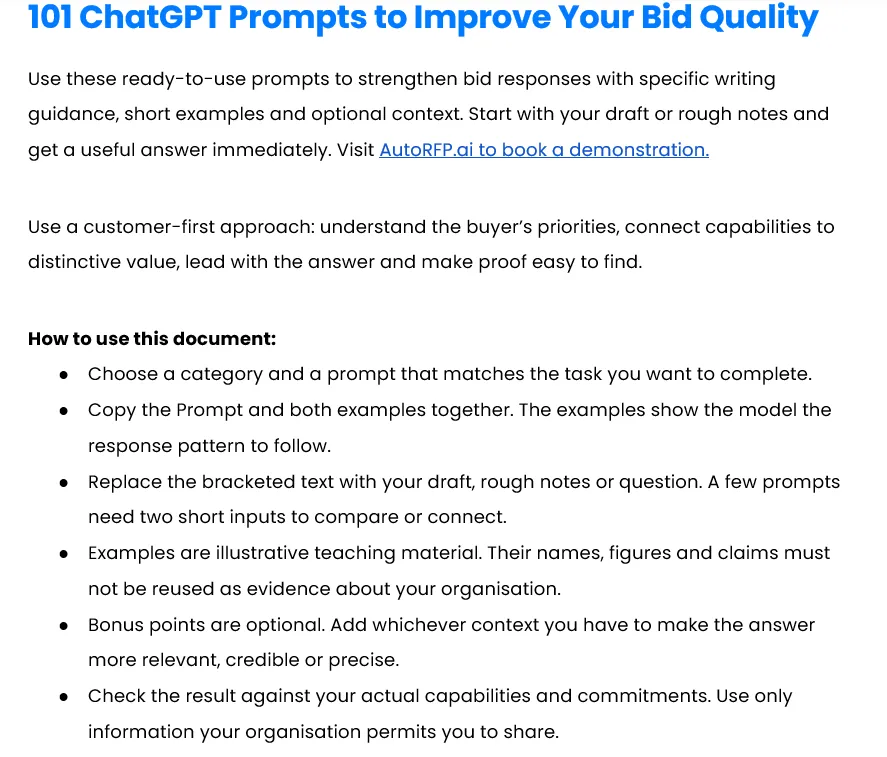
Download the ChatGPT prompt library: Use 101 ChatGPT Prompts to Improve Your Bid Quality for prompts covering buyer research, executive summaries, technical answers, and draft reviews. Choose one that matches the task and add your own source material.
3. Develop Win Themes Around the Buyer’s Priorities
Use either tool to explore connections between the buyer’s stated priorities and your documented strengths. This can help you develop candidate win themes: the reasons the buyer should choose your solution, supported by relevant evidence.
If a buyer emphasizes a smooth rollout, for example, ask for a theme built around your approved onboarding approach and a relevant customer implementation. Your team can then judge whether that theme is persuasive and sufficiently supported.
4. Tighten Responses and Challenge Weak Arguments
Once a draft exists, give the AI a specific editing or review task. Useful requests include:
- Shortening an answer to meet a word limit while preserving qualifications.
- Replacing jargon with language the evaluator can understand.
- Comparing the answer with every part of the buyer’s question.
- Highlighting vague claims, repetition, and statements that need evidence.
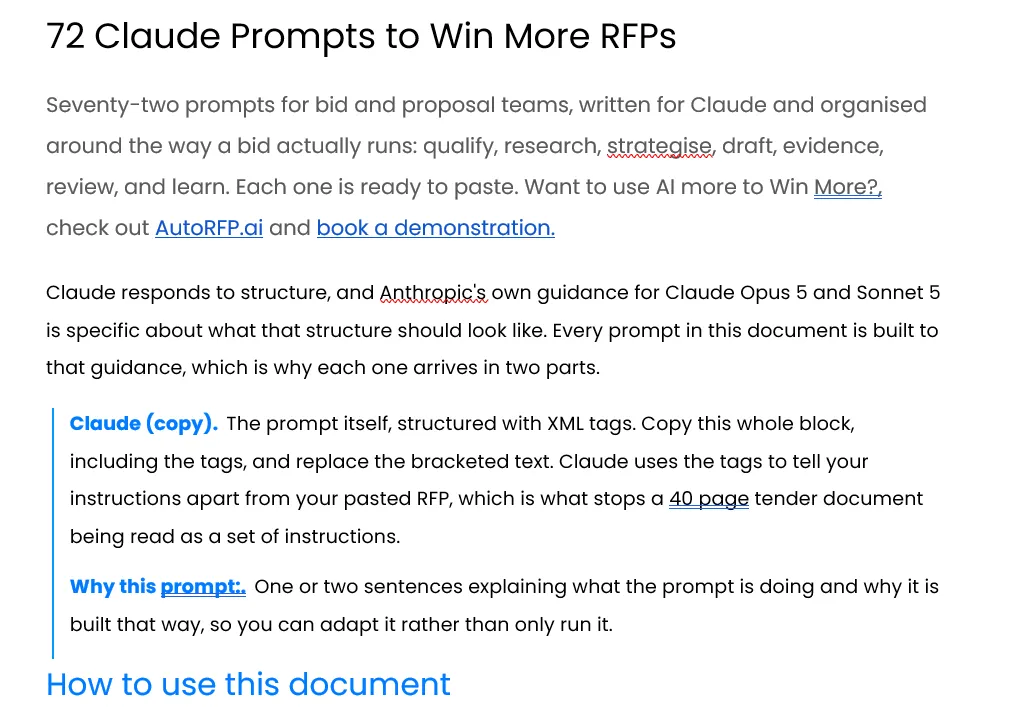
Download the Claude prompt library: Explore 72 Claude Prompts to Win More RFPs, organized across seven bid stages from qualification to debrief. The prompts use XML tags to separate instructions from your input material; replace the placeholders and investigate any gaps flagged in the output.
How to Write RFP Responses With ChatGPT or Claude
Start by giving the AI approved company information and clear response instructions. Then work through the buyer’s requirements, generate your draft, and verify the answers before submission. The walkthroughs below show two practical approaches.
How to Respond to an RFP With Claude
The Claude workflow covers five stages, from setting up company context to producing a first draft. It uses reusable skills to guide tasks such as qualification, compliance mapping, and win-theme development.

Video transcript
Your RFP has just landed. Now you're wanting to use Claude to respond to that RFP in an effective and efficient manner. I'm gonna show you the crucial five steps you need to take in Claude for responding to your RFP. We're gonna go into setting up your own project with all your company context so that Claude has the right information on how to respond to your RFP. We're then going to go into AI go, no-go, so you can decide even before you start whether you want to bid on that RFP. We're gonna go through looking at the compliance matrix and do you even have a shot against the evaluator's criteria before going in. And then we're gonna go into generating win themes with AI and finally responding to the RFP. This is all so important, and you can actually use Claude skills along every step of the RFP to really nail your output.
And of course, as always, keep the human in the loop and ensure that your answers are accurate, and not only are you going to respond, but help you actually win. My name's Rob Dickson, I'm from AutoRFP.ai, and let's jump into it all. So how to respond to an RFP with Claude. So looking at qualifying, mapping, drafting, and finally getting that information out to your subject matter experts to help you win. Before we go into it, what is a go, no go? Effectively, it's looking into should we bid on this RFP or not. We ran a survey across over 100 winning bid teams with Stargazy, a bid manager community, and what we found is that 71% of teams that win more than fifty percent of their RFPs run a dedicated go, no go step. This is so important, and AI is really great for this. So let's jump into how Claude can help you with this.
But first, I have set up a fake company with a fake RFP for today's video. We have a Claude project. You can see here in setup in Claude or cowork with all the relevant documentation of that company. It has memory, and it has instructions. These instructions you can actually download in the description below and you wanna of course, make them relevant to your company, how you write and everything else. Other documents and context I'd put here is like technical information past RFP responses. If you have a library of historical context, that could be your security documents and policies, it could be your websites, it could be a bunch of like markdown files that are relevant to your company. I would really ensure you have examples of great responses. AI works really well when not only it doesn't have context about your company, but it also has examples of how you would actually respond.
Best way to do that is past RFPs or tenders you have responded to, and make sure that they're labeled correctly, and in your project instructions, point out to those different contexts and when to refer to it. What I'd recommend is almost having a context file called project context map.md and ask Claude to write and list all of the context that you have in the project file. And this can be something that Claude, in its instructions, is pointed to and uses consistently to find the most relevant context. Kinda like a knowledge graph or map for it. Once you've got your project set up, let's get into actually responding to an RFP. So I have my RFP. I go into Claude. I'm gonna use my go, no-go skill. So what your skills are, and every single skill I'm gonna cover off today, you can download in the description below off AutoRFP.ai's website. We have a skill library that is incredibly useful to use across all different kinds of parts of the RFP process, and you can download them all for free
on our website at AutoRFP.ai/skills or in the description below. So what is a skill? Effectively, a skill is just a predetermined instructions for your AI, in this case, Claude, on what it needs to do and steps it needs to take. This includes an overview, includes content. So here's the instructions of the skill, and this one also uses a go, no-go decision framework. So it's a built-in framework and even a spreadsheet file that it can use to then ensure that effectively it's generating consistency, consistent output. Again, you wanna make sure you customize these skills to your organization, and then you can share them across your entire Claude tenant, so everyone can use and share the same skill. So I've invoked this skill. You can generally invoke skills just with a backslash. For instance, AI Go/No-Go. And here I've used the skill, uploaded the RFP, and that's all I need to do. I don't need to worry about some complicated prompt.
Effectively, that skill is my complicated prompt that is saved in my organization, and it repeats and gives Claude a really repeatable way to get me a consistent output. So it's gone through, and it's scaled it as a conditional go at seventy-seven percent, so seventy-seven out of a hundred. The reason is because based off the scorecard of my Go/No-Go decision framework, it's looked at what we need to worry about. It looks at my past contacts or what we've promised to them in the lead-up to the RFP. It's looked at the references here. Are there any named references that are actually relevant to the prospect? So can we win this thing? Have we done this kind of work before? It looks at relevant pricing, and it looks at a whole bunch of other stuff as well, especially around contradicts contradictions and so on. And then it generated me my Go/No-Go analysis report, and then I could bring that to my team, and we can discuss that in detail about whether that is accurate and whether we actually want to proceed with this RFP or not. So that's the important first step.
I have not written a word. I've maybe read the RFP. But before I even go to start writing my, on my blank draft, I've done my Go/No-Go. Once you've done your Go/No-Go, really useful one is then Compliance Matrix Builder. This is, again, another skill that you can download in the description below. And what this does it pr- effectively goes through after the Go/No-Go and checks whether we are gonna meet the compliance. It's gonna give me a mock evaluation score based on that. So anything that I need to look at, it's gone through, given me my project submission instructions what needs attention, and effectively what I need to action. So going in here, I can then see my submission checklist to everything I actually need to do, so effectively my own RFP submission checklist, which is really helpful ensuring the bid gets in on time, works really well in delegating those tasks to different team members, and ensure that we're a clean and efficient team to ensure we get through that. My evaluation criteria, so it's effectively extracted that from
the RFP document and looked at where, what the scoring matrix is. Because effectively, when you write an RFP to win, you don't only need to be compliant, but you need to make sure you achieving maximum marks as possible against their evaluation criteria. And then it's made some observations about the RFP as well as the requirements matrix. So it's exported and shredded that RFP for me and got everything ready to ensure that we can start writing. So we've decided to bid. We know what we need to achieve and do in the RFP. Let's get to writing it, actually winning the thing. That's where our next skills works. So firstly, we wanted to generate win themes. The win theme is what is the unique competitive positioning and reasons behind what we understand about the prospect, so l- putting it in their own language and everything else to ensure about why we're competitive and why we will win this bid.
So for instance, my talent acquisition software, we can look about what they're waiting, so what's important to them. We should-- I also have a lot of information about this RFP 'cause we've done prior conversations with the prospect. Talking about why now, so why are they actually looking to b-build, why are they looking to acquire my solution? Mapping all the stakeholders, so important. What does each stakeholder actually care about? Also very important. It's gone into the competitive field effectively and then it's generated my win themes. Gone into my second theme, consolidate hiring as well, and then gone into my third theme, board-ready numbers and hiring retention. So reporting is important to them. Then what it does is each of those themes that it generates, it maps those themes to the different sections, also take into account the evaluation criteria and everything else. Once we have our themes, then it's actually time to respond to the RFP. You've noticed most teams may start with a blank RFP and straightaway start writing.
I've used AI to do a lot of heavy lifting before that step to ensure that when we actually go to start writing, A, we know we want to bid on it, B, we know we're competitive and have a chance to win, and C, we know why we can win this and what we need to weave into every single respond to win the RFP. That's where Claude is really useful across the entire RFP response process and responding to the RFP to actually get you to win the RFP. So then we go in and effectively it started responding to the RFP, and it's given me the, that output in the prospect's original documents. And then I can go in, I can have a look. And then it's effectively it's started responding to that RFP. I can go down here. It's given me gaps, so like certain things that it can't answer, it's highlighted that. It's gone in to write me an executive summary. It's started responding each of this information. Again, you can see what context it has a gap for.
It actually has a lot of gaps. That gives me an indication I need to strengthen my content library in my Claude project. 'Cause if the AI can't find the answer, we've made sure that this skill for responding to the RFP will actually mean that instead of trying to guess and make something up that could potentially be incorrect, it's instead made sure it's highlighted that it doesn't have the information, and that's for me to go in and respond to So then I've given all that information, it's responded to everything. I would upload this to Google Docs or SharePoint for Microsoft Word, then I would tag the relevant team members and get everyone involved, and we start to respond to this RFP. And then once I've completed, I ensure that I go back to Claude, upload my completed RFP, and make sure that is saved to my context, so the next time we get these questions, it can pull from my completed RFP to then use that information to respond to the RFP. So that's how you can use Claude. I still have a lot of work in front of me, but Claude and a really strong bid process
helped me streamline getting started, get- gotten my first AI draft, generated my win themes, and even before we did all that, it helped me decide whether we want to bid on this and then what we need to do to submit and meet the evaluator's criteria. So I'm Rob from AutoRFP.ai. You can visit our website. We're an AI RFP software. So generally, if you're doing more than, say, thirty bids a year, and winning is incredibly important to your organization, getting accurate and quality responses in to actually win the RFP, you definitely wanna check out AutoRFP.ai. You can visit our website. Our pricing is transparent, and you can book a demo. Where Claude can sometimes fall short, and this is where teams will pick up AutoRFP.ai, is when they have a lot of different team members responding to that RFP. You'll notice in Claude, collaboration is incredibly difficult.
Second, you have content that lives in a lot of different places, and you wanna make sure that can be centralized into your AI content library. Claude, although you can give it information, it's not the best at actually finding the most relevant information. You could see in my completed RFP that it had a lot of gaps, and I said maybe it doesn't have that information, or maybe it did and it just didn't try hard enough to find it. And you'll also find a lot of times when talking to Claude, you might have to ask, "Hey, where did you get that answer from?" Because you're not necessarily confident that it didn't just make it up. Even if you give all the great prompts and skills in place, you wanna make sure that you're still asking it to validate those answers, and occasionally you will get back, "Yeah, you're absolutely right. I made that up." That's where AutoRFP.ai is really strong in that we do AI citations, so every single sentence generated by AI, you can see exactly where it came from. You never have to ask where it came from, and the AI is validating that on every single output. And then secondly, you're not necessarily locked into Claude.
You-- We use all the best models from GPT-6 to Gemini 4 to Sonnet 4.5 and 5.5 And effectively, we use across every single model what they're best at in- across the entire RFP process to help you respond incredibly efficiently, as well as quality responses you can trust that actually will help you win the RFP. So I've been Rob from AutoRFP.ai. In the description below are all the different links for the skills and the proposal win rate report I mentioned at the start. And yeah, hope you have learnt something today about how you can use Claude to help you win RFPs efficiently. Thanks.
Follow Rob Dickson from AutoRFP.ai as he uses Claude to assess an opportunity, map requirements, develop win themes, and draft a response.
1. Set Up a Project With Your Company Context
Create a Claude project and add the reference documents it should use across your bid work. Include current product documentation, security policies, relevant customer stories, and approved past RFP responses. Add project instructions explaining your company, writing style, and how to handle missing information.
Past responses serve two purposes: they provide factual context and demonstrate what a good answer looks like. Label them clearly so customer-specific commitments are distinguishable from standard capabilities.
Pro tip: Create a project context map listing each source file, what it covers, and when to consult it. Point Claude to this map in your instructions and update it when your reference material changes.
2. Run a Go/No-Go Assessment
Upload the new RFP and assess whether the opportunity is worth pursuing before drafting. Use your organization’s qualification criteria to examine delivery fit, relevant experience, commercial considerations, and unresolved requirements.
In the video, Claude produces a conditional recommendation with supporting analysis. Review that recommendation with your team and resolve the conditions before committing resources. Any score is a decision aid, not a probability of winning.
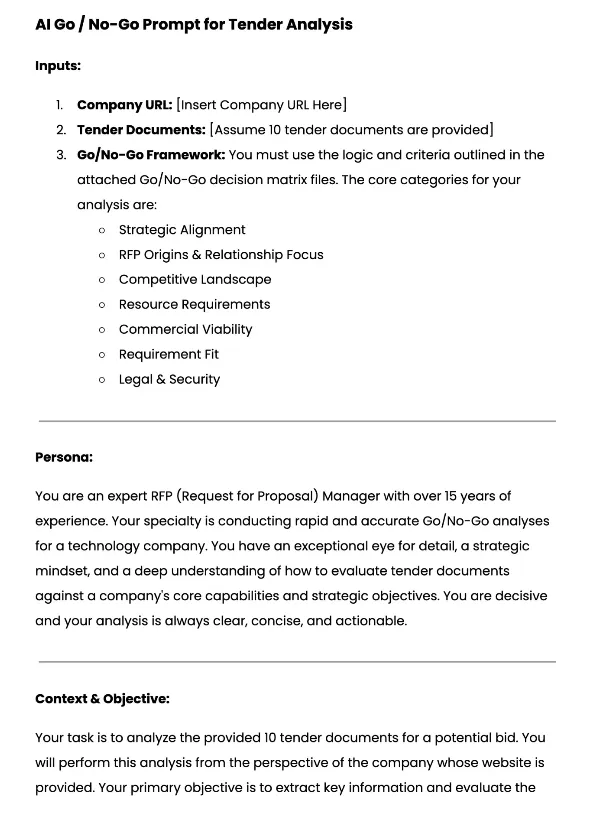
Try the prompt: Use the AI Go/No-Go Prompt for RFP Tender Analysis as a starting point for assessing the tender against qualification criteria and reviewing the supporting evidence.
3. Build a Compliance Matrix and Submission Checklist
Once you decide to bid, ask Claude to extract the requirements into a working matrix. Capture:
- Each requirement and its location in the RFP.
- Evaluation criteria and stated scoring weights.
- Required evidence, attachments, and response formats.
- Submission deadlines and outstanding actions.
Check the matrix against the original documents, then assign owners to unresolved items. This gives your team a practical plan for completing the bid.
4. Develop Win Themes From Buyer Priorities
Combine the RFP with approved discovery notes and relevant customer context. Ask Claude to identify what matters to the buyer, which stakeholders influence the decision, and which documented strengths support your case.
Then map the proposed win themes to the response sections where they belong. A theme about implementation confidence, for example, should be supported by your delivery approach and relevant experience.
5. Draft, Review, and Save Approved Responses
Ask Claude to draft against the requirements and agreed themes, flagging questions where supporting information is missing. Investigate those gaps: the evidence may be absent, outdated, or present in a source Claude overlooked.
Move the draft into your team’s review environment, such as Google Docs or Word in SharePoint. Have the relevant experts verify claims, resolve gaps, and approve commitments.
After approval, add reusable material back to the project’s knowledge base, clearly identifying its date and any customer-specific terms.
How to Respond to an RFP With ChatGPT
The ChatGPT walkthrough focuses on setting up a reusable response project, adding company documents, and drafting answers to an Excel questionnaire. Its final review also shows why checking instructions and exported files matters.


Video transcript
Transcript is auto-generated and may contain minor errors.
Hey there. My name's Rob, and I'm from Auto RFP.ai. Today, we're going to be jumping into how you can use Chat GPT projects and the powers of Chat GPT's latest models to answer all of your requests for proposals, your requests for informations, requests for quotes, security questionnaires, and any expression of interest you might get from your potential buyers. Let's jump into it. So, here I'm going to create a new project. We're going to call that our RFP response project. And in this project, what are we going to be doing is pulling in all of our relevant company information, whether that be things like our policies and procedures, for instance, our business continuity policy. We're going to pull in other relevant information like our customer stories or case studies. We're going to pull in and most importantly, our past RFP responses. If you don't have any past RFP responses, potentially if you have other areas like your help documentation or
service documentations in relation to what kind of services or products you offer, that might be really helpful for kind of like functional or non-functional requirements that you might get in a request for proposal. All righty, let's jump into it. So, first we're going to start with instructions. Now, I've got one pre-planned here. And in an instruction, what that is is providing Chat GPT a lot of context and kind of like a master prompt that it uses in every single time it looks to answer any of our additional requests res- prompts in a chat. And so, it's really important to set up a master prompt or uh instruction here for success. So, what we have here is I'm giving it what part is it playing? So, it's a B2B SaaS sales professional cuz my fake company is a HR tech company in the US. We're an RFP manager and response writer, And its primary responsibility is to complete RFPs, RFIs, security questionnaires, and other relevant
information for this SaaS company. It's only going to be using official content provided and uploaded project files. So, I'm being really restrictive here in my instructions to really try to reduce the chance of hallucination. What I don't want happening is the AI to provide an incorrect response that it's made up on one of my RFPs. Of course, I'm going to be checking it before I submit it to the customer, but I want to make sure it's still pulling the information from the relevant files rather than just giving me kind of made up and hallucinated answers. So, I've provided a bunch of different prompts here and instructions to really make that less likely. Then, and then here, what I have is what kind of answers do I want ChatGPT to give? So, yes or no, one to two sentence explanations. I always like where it's, you know, yes, {comma} and then has information for that RFP. So, that's what I'm asking here. I'm going to click save, and I've just added that instruction to my ChatGPT
project. And you can see it here, and that's going to always going to use that when I'm going forward. Next, I want to add my files. Your files might be things in relation to your company like your company pro overview, your policies, your procedures, customer stories or case studies, and most importantly is your past RFP responses. So, if you've previously done RFPs or and proposals and so on, you want to make sure you're providing that information there. Again, make sure the information is timely, relevant, and don't provide too much here. Although I just said provide as much as possible, if you have too much, you're going to wait A, potentially hit the context window of the the token limit of ChatGPT when it goes to answer, and might not be able to look through all the documents, but B, it's actually more likely that you hit the limit that you can have in a project. But, start by giving it as much as possible, and then try to remove things if it's not as relevant for those
particular answers, or when you go to answer particular RFP, ask it to only refer to certain project files that are relevant for that RFP. So, here I'm going to add my documents. So, I have past RFP answers and business continuity plan, and I have a company document that's all really relevant for my request for proposals. So, I'm going to add that in, and then like I said, ChatGPT will be able to search those documents. Uh these are all in document .docx, they could be in PDF, PowerPoint, and so on, Excel, and it's going to then use that what I'm going to answer. And you can see there, there's my project files. Next, I'm going to be trying to answer a new RFP here. Can you help me answer this RFP? So, I'm going to add that file, and here's my fake RFP. This RFP is a fake library in the United States, uh and they're looking for HR tech,
specifically applicant tracking software, which is what my software, or fake software company, provides. Jumping in here, it's going to And you can see there, I haven't provided much of a prompt. Usually, if when I'm using ChatGPT, I provide a lot more information, but because I have those custom instructions and project files, it's using all that context when answering this particular information. So, even though this is quite straightforward, it's actually going to be looking through and then try to answer that information. It's now looking at You can see here, it's going through and analyzing. It actually did pick up that my fake RFP had two sheets. So, I've got a sheet for my non-functional requirements and a sheet for my functional requirements. And it's going to be going through here and answering that information. And there we go. It's answered that. So, let's have a quick look at it. So, I'll download that information.
Great. So, ChatGPT has gone through there that project instructions and looked to answer all of the Excel questions. So, jumping in here, we can see that it's completed the functional RFP responses. And you can see that I've kind of chatted through and asked it to have a look at all the relevant information. It's gone through and answered that information. And then I can kind of download those relevant CSVs. This one's a little bit confusing cuz I've had multiple tabs. So, it's kind of worked through all separately and then yeah, it tried to answer each one as it can. And you kind of see this information here. It's It's done pretty well. There's some pretty useful information. Uh and once I export that and pull it back together into a spreadsheet, I can have a look at what my functional and non-functional requirements look like. So, here I have my requirements. And you can see here it's kind of answered those different details. So, does my system support SSO integration with active directory? Uh yeah, it says it's a pre-built AD connectors are available. Um
whether this analysis is my fake customer, so whether this is correct or not, I'm not sure. So, I gave it some fake information to base it off. But, you can kind of work through it. And obviously, you would know your company best whether this information was actually correct. It hasn't really followed my instructions too well in terms of yes, {comma}. It's kind of just provided more generic description and comments. But, I can obviously go through here and answer those. Either way, it saved me a lot of time. It saved me from having to either A, manually go through and find those answers, or B, it saved me time from having to look back and kind of copy and paste between those responses. That's pretty good for a $20 a month subscription. Now, if you're doing anything larger than this, or if you want to save even more time, so I'm Rob and we're from AutoRFP.ai. We're an AI RFP software. So, you can kind of see here, we do everything that ChatGPT might be helping you with and a lot more. We have great collaboration
features, built-in trust scores, so you know how reliable that answer is, and not just and no project limit in terms of how many different content items you can have. You can load as many as you'd like. You can upload PDFs, Word docs, automatically answer and generate responses for you. We're trusted by some of the world's largest companies from startups to Fortune 500s, including software companies like Sugar CRM, Red Rover, or Fintech OS. And we're rated 4.9 stars and more on G2, Gartner, and other review sites. But, you can find out all about us at AutoRFP.ai. And if you're interested in learning more, you can of course book an online demonstration. I'm Rob from AutoRFP and I hope you found that run-through really interesting around RFP response with ChatGPT projects.
See how Rob uses ChatGPT Projects to draft questionnaire answers from company documents, then checks and assembles the exported responses.
1. Create an RFP Response Project
Select New project in ChatGPT and give it a recognizable name. Use the project to keep your response instructions, reference files, and related chats together, so each new task can draw on that context.
2. Define the Response Instructions
Add project instructions explaining the role ChatGPT should perform and the rules it should follow. In the demonstration, Rob specifies the company context, restricts answers to supplied content, and requests concise responses.
Your instructions should cover:
- Which sources to use for factual claims.
- How to flag missing or conflicting information.
- The required answer format, tone, and length.
- When to provide a direct yes/no answer with an explanation.
These instructions guide drafting; they do not guarantee factual accuracy or consistent formatting.
3. Upload Relevant, Current Reference Files
Add approved past responses, product or service documentation, policies, and relevant customer examples. If you have no previous RFPs, start with the documentation that explains your offering.
Keep the source set focused. Remove superseded versions and tell ChatGPT which documents are relevant to the current bid. Avoid carrying an old customer’s pricing or delivery commitments into a new response.
4. Upload the RFP and Generate Draft Answers
Start a chat inside the project, attach the buyer’s RFP, and ask ChatGPT to answer using the approved reference material.
For a spreadsheet, ask it to identify every worksheet containing questions before drafting. Specify the response columns and retain the original question identifiers so you can match each answer back to its requirement.
5. Verify the Answers and Assemble the Submission
Check the draft against both your source material and the buyer’s instructions. Confirm that every question has been addressed and that unsupported claims are flagged for review.
Inspect your own output before submission: verify worksheet coverage, answer placement, formatting, and factual accuracy, then obtain the necessary expert approvals.
Where ChatGPT and Claude Fall Short on RFPs
ChatGPT and Claude can produce useful drafts, but your team still needs to manage accuracy, source quality, approvals, and submission requirements. That work becomes more demanding as bids involve more documents, reviewers, and overlapping deadlines.
| Limitation | What this means for RFP responses | What your team still needs to do |
|---|---|---|
| Unsupported or incorrect claims | Both tools can produce convincing answers that contain factual errors. Instructions to use approved information help guide the response but should not be treated as a guarantee. | Verify capabilities, commitments, and supporting evidence before approving an answer. |
| Citations still require verification | Both can provide citations, but a reference alone does not establish that the source supports the entire answer or is approved for this bid. | Check the cited passage, its context, and whether it applies to the proposed solution. |
| Relevant evidence can be overlooked | A flagged gap may mean information is missing, or that the AI failed to find or apply it. Uploading a document does not prove every relevant detail informed the response. | Investigate unanswered questions and direct the tool to the relevant material before escalating to an expert. |
| Content freshness needs oversight | Uploaded copies can become outdated. Connected sources can improve access to current information, but your team must still determine which material is approved and reusable. | Retire superseded content, resolve conflicting versions, and distinguish standard capabilities from customer-specific commitments. |
| Collaboration needs a defined approval process | Shared projects support teamwork, but sharing files and conversations does not by itself establish who owns each answer or who has approved the final wording. | Assign reviewers, track outstanding questions, and record sign-off against the final responses. |
| Output may need formatting and reassembly | Answers may depart from the requested structure or require additional work before submission. In the ChatGPT walkthrough, separate CSV outputs needed reassembly, and the requested answer format was not consistently followed. | Check worksheet coverage, question identifiers, response placement, and the buyer’s required submission format. |
| Reusable workflows need maintenance | Prompts, skills, and context maps help standardize tasks, but they also need updating when your products, source documents, or response requirements change. | Assign ownership for the workflow and check that updates produce the intended results. |
ChatGPT or Claude vs Purpose-Built RFP Software
Purpose-built RFP software brings drafting, approved knowledge, review assignments, and submission preparation into a dedicated response workflow.
ChatGPT and Claude offer flexible tools for research and writing; RFP platforms organize that work around the requirements your team must answer. Capabilities vary by vendor, so focus on the functions your bid process needs.
| Area | ChatGPT or Claude | What to look for in purpose-built RFP software |
|---|---|---|
| Drafting | Flexible analysis, brainstorming, and writing using supplied context. | Draft answers mapped to individual requirements in the buyer’s RFP. |
| Company knowledge | Project files and connected sources provide reference material. | An approved response library with content owners, review schedules, and controlled reuse. |
| Answer verification | Sources and explanations can support checking; the review process needs configuring. | Evidence displayed alongside answers, with clear signals for uncertainty and missing information. |
| Team coordination | Shared projects support collaboration around files and conversations. | Question-level assignments, reviewer responsibilities, approval status, and progress tracking. |
| Submission preparation | File creation and editing can help assemble the response. | Import and export workflows designed around the buyer’s documents and response fields. |
Review Answers Alongside Their Supporting Evidence
Look at what a reviewer can see when checking an answer. The supporting passage, its age, and any uncertainty should be easy to inspect.
AutoRFP.ai, for example, generates responses from approved content and displays source citations, content-age information, and a Trust Score alongside each answer.
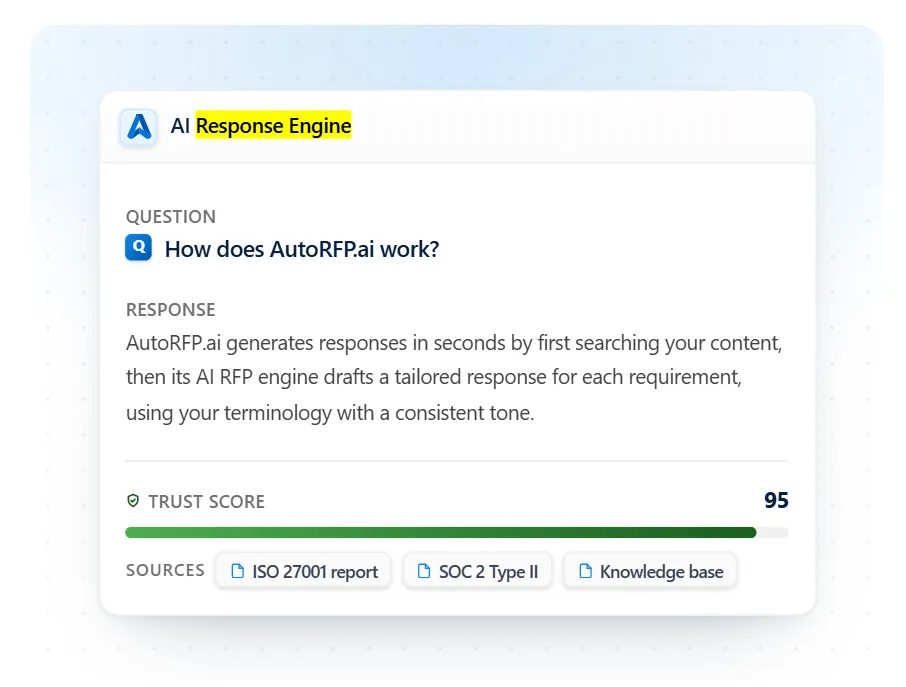
It also flags low-confidence questions for attention. These features help reviewers locate the evidence and prioritize the answers that need closer examination.
When evaluating a platform, test a question your source material cannot answer. Check whether the system makes that gap visible and gives your team a clear way to resolve it.
Build on Approved Knowledge Across Bids
An existing response library represents work your team has already researched, checked, and approved. A dedicated platform should help preserve that investment and make it more useful as products, policies, and customer requirements change.
AutoRFP.ai supports a library that maintains and improves itself through approved-answer capture and updates from connected sources when enabled.
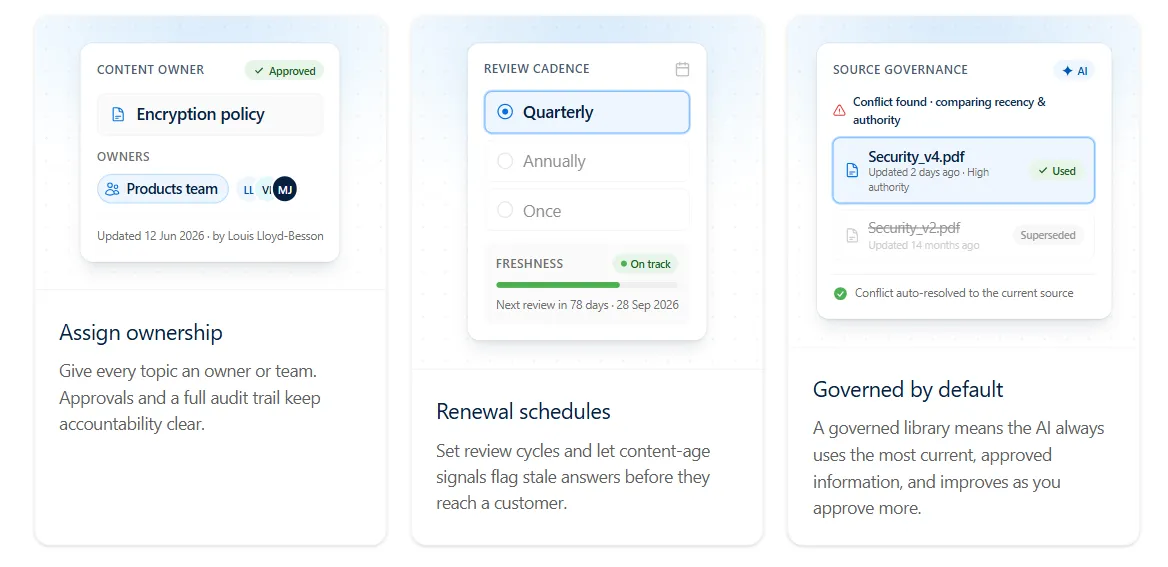
Content owners retain control through ownership, review schedules, and approval processes. This helps knowledge developed during one bid support future responses.
Check how a platform handles an updated policy, a conflicting answer, and a commitment that applies to only one customer. Those details determine whether reuse remains reliable.
Coordinate Expert Review Through to Submission
A completed draft may still need input from product, security, legal, and sales. Look for a workflow that makes responsibility and approval status visible at the individual response level.
AutoRFP.ai supports team collaboration, reviewer assignments, Slack and Microsoft Teams notifications, and approval records.
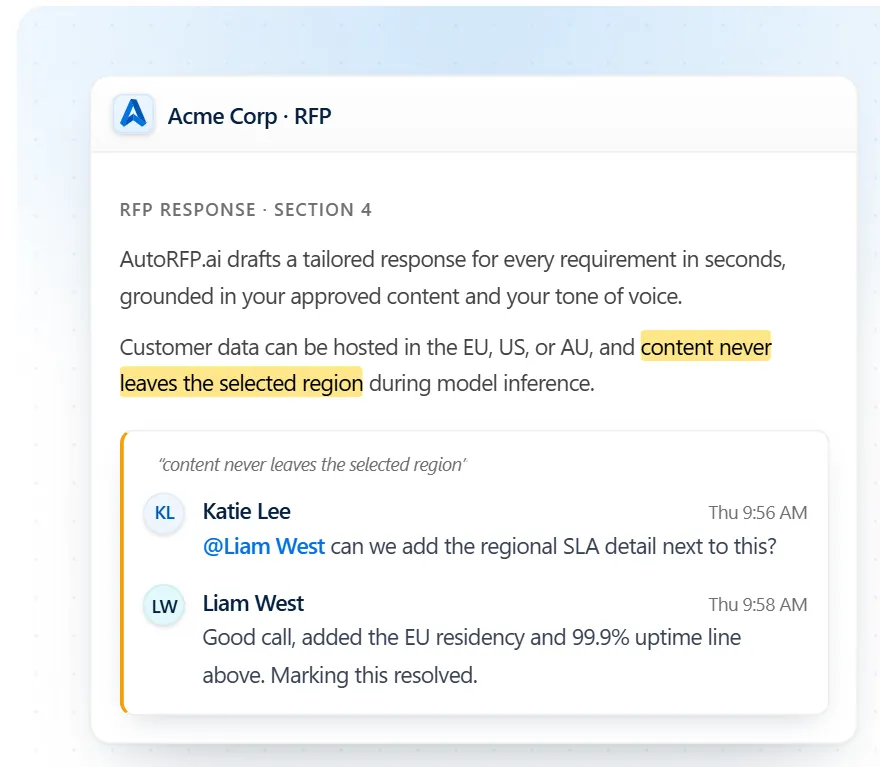
It also supports importing a buyer’s Excel or Word document and exporting completed answers back into the original file format.
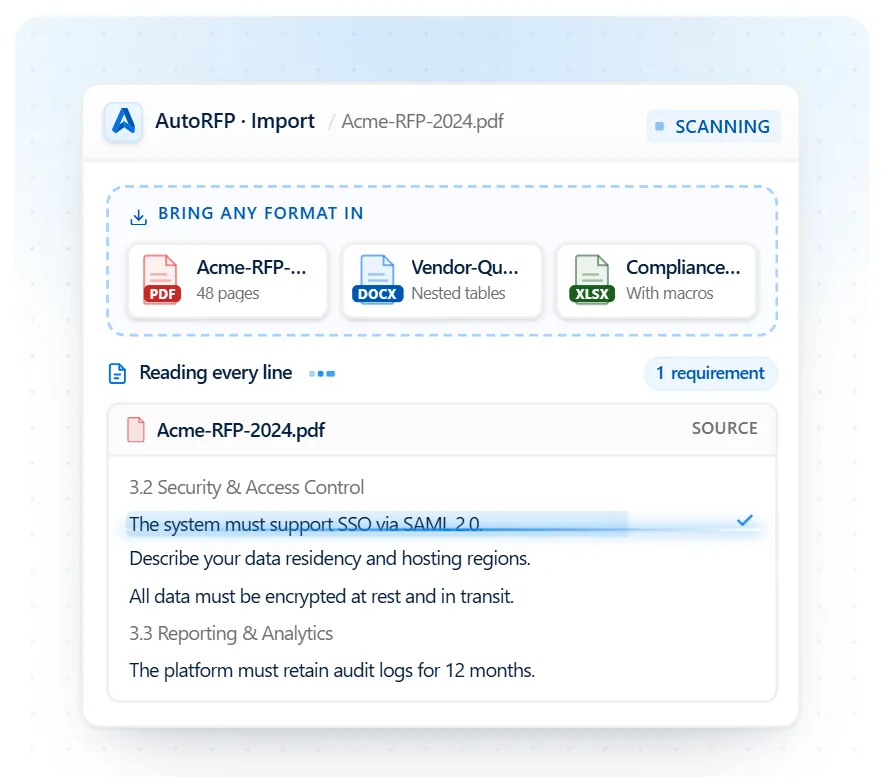
Together, these functions help the bid owner track outstanding decisions and prepare the submission. Test them with one of your actual questionnaires so you can assess the review process and inspect the exported document.
When a General AI Tool Is Enough and When It Is Not
ChatGPT or Claude may be enough when your team can reliably manage the evidence, reviews, and submission work around each draft. Consider purpose-built RFP software when recurring bids, content upkeep, or approval requirements make that coordination difficult to sustain.
| Decision factor | A general AI tool may be enough when… | Consider purpose-built RFP software when… |
|---|---|---|
| Bid workload | You handle occasional bids, with enough time to check answers and prepare each submission. | Overlapping deadlines leave your team repeatedly searching for answers, chasing reviewers, or rebuilding submission files. Assess workload against available capacity rather than using a fixed annual bid threshold. |
| Content reuse | Your approved reference material is manageable, and keeping it current takes little effort. | Repeated questions and changing documentation make manual reuse difficult. In AutoRFP.ai’s Proposal Win Rate Report, 29% of teams with content automation fell into the lowest win-rate group, compared with 51% without it. |
| Expert involvement | A clear owner can gather expert input and track reviews without creating bottlenecks. | Multiple specialists need assigned questions, review deadlines, and visible approval status. 94% of the report’s high-win cohort used either joint collaboration or proposal-team drafting with SME review, reinforcing the importance of an organized review process. |
| Evidence and approval requirements | Your existing process reliably records supporting evidence, checks commitments, and captures sign-off. | You need those controls attached to individual answers across multiple bids, products, or business units. A single complex, high-value bid can justify closer evaluation even when overall volume is low. |
| Cost of maintaining the workflow | Your prompts and project setup remain simple, and the time saved outweighs the effort of maintaining them. | Your team is building integrations, managing source retrieval, maintaining custom instructions, and troubleshooting exports. Include that ongoing work when comparing the cost of your options. |
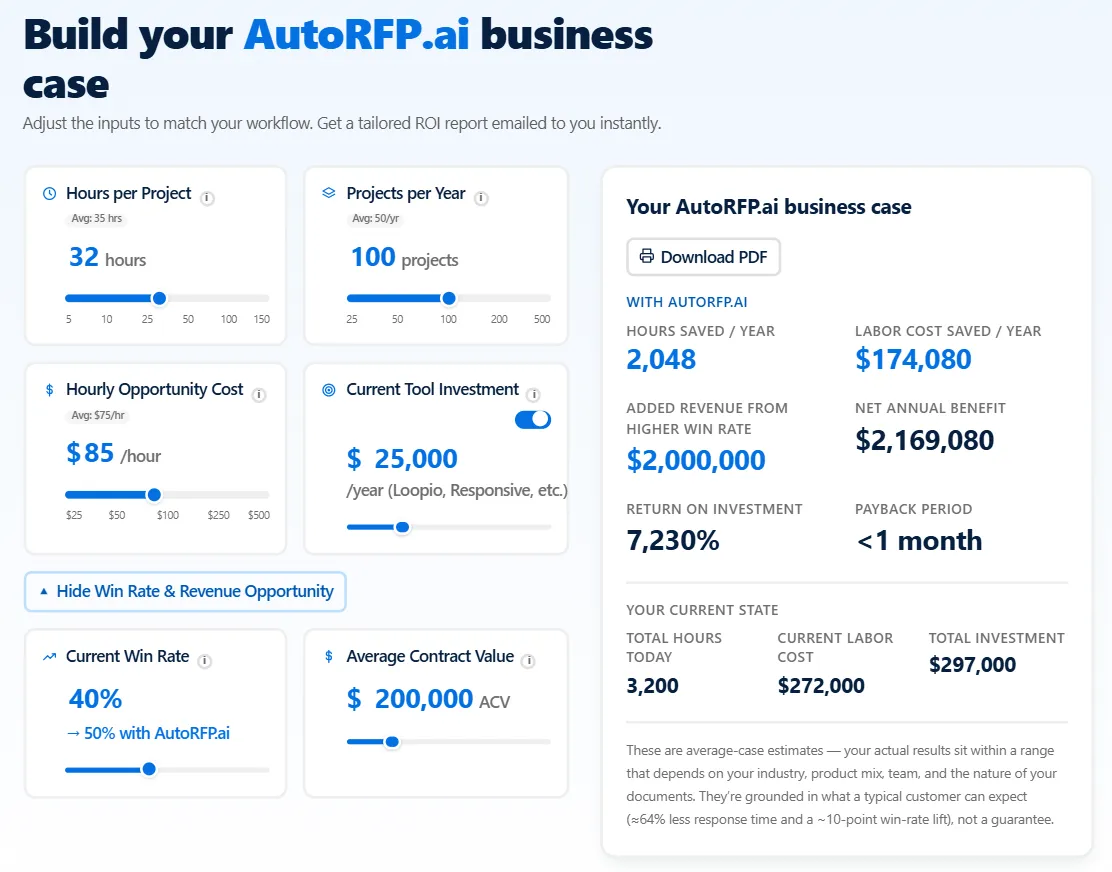
Put numbers behind the decision. Use AutoRFP.ai’s ROI calculator to estimate potential savings using your response volume, hours per project, and team costs.
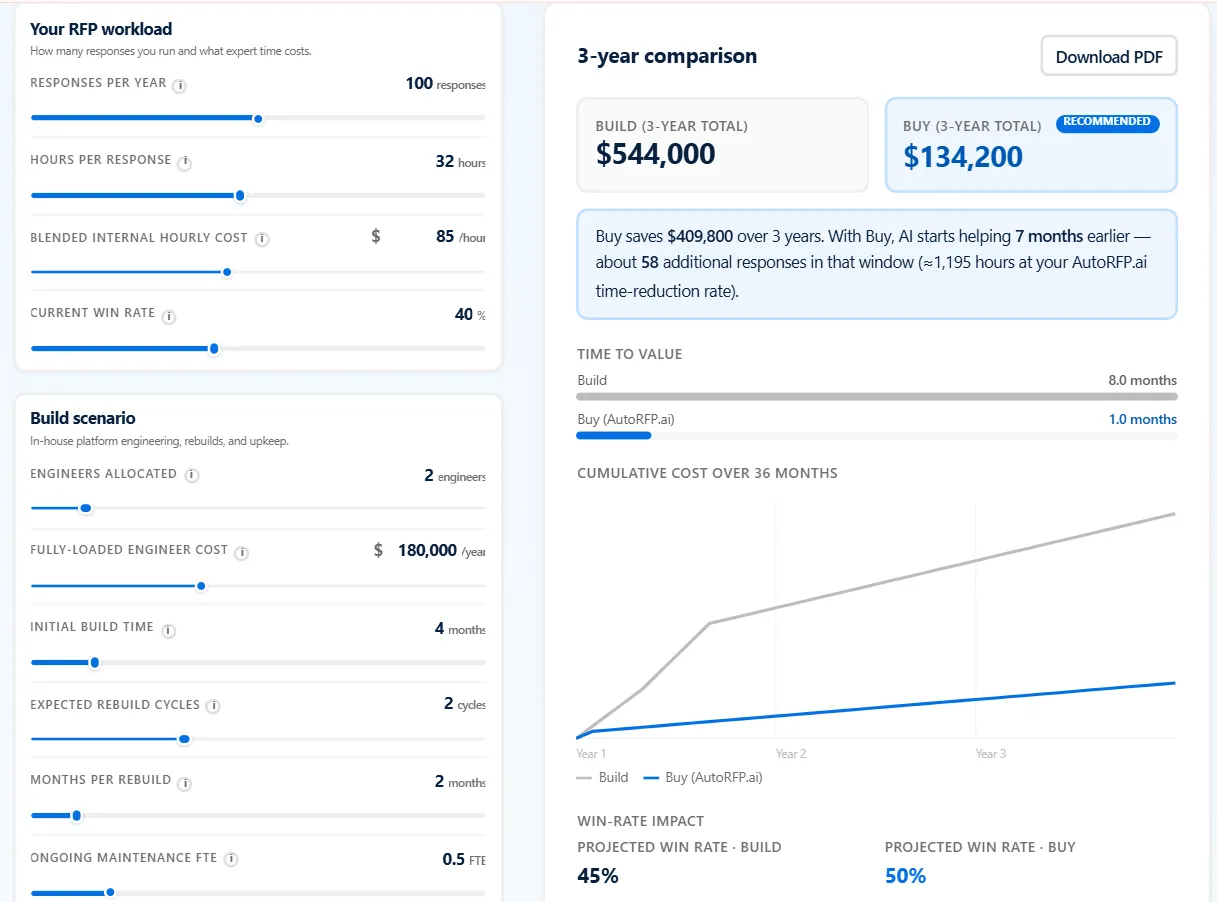
If you’re considering building an internal AI response platform, the Build vs Buy calculator compares three-year costs, including engineering, maintenance, infrastructure, and implementation. Use your own inputs and treat projected savings and win-rate changes as assumptions to test.
Using ChatGPT or Claude Together With RFP Software
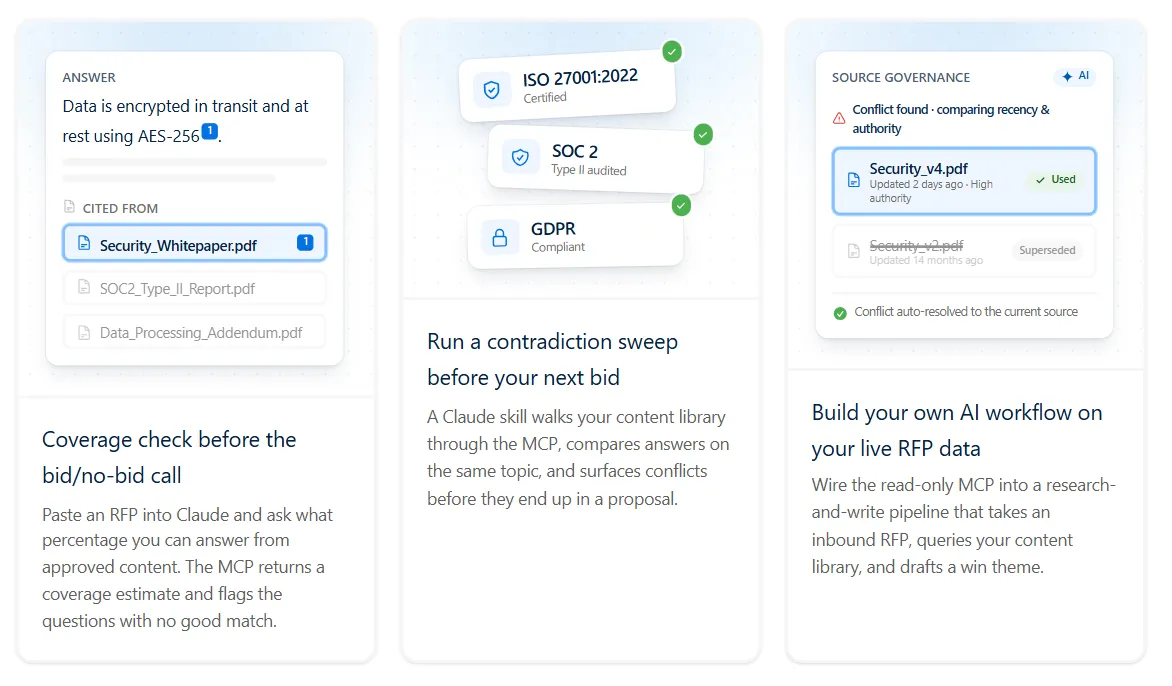
You can use ChatGPT or Claude for research, analysis, and writing while drawing on the approved knowledge held in your RFP platform. AutoRFP.ai supports this through its MCP server. MCP, short for Model Context Protocol, lets an AI assistant connect to external tools and information.
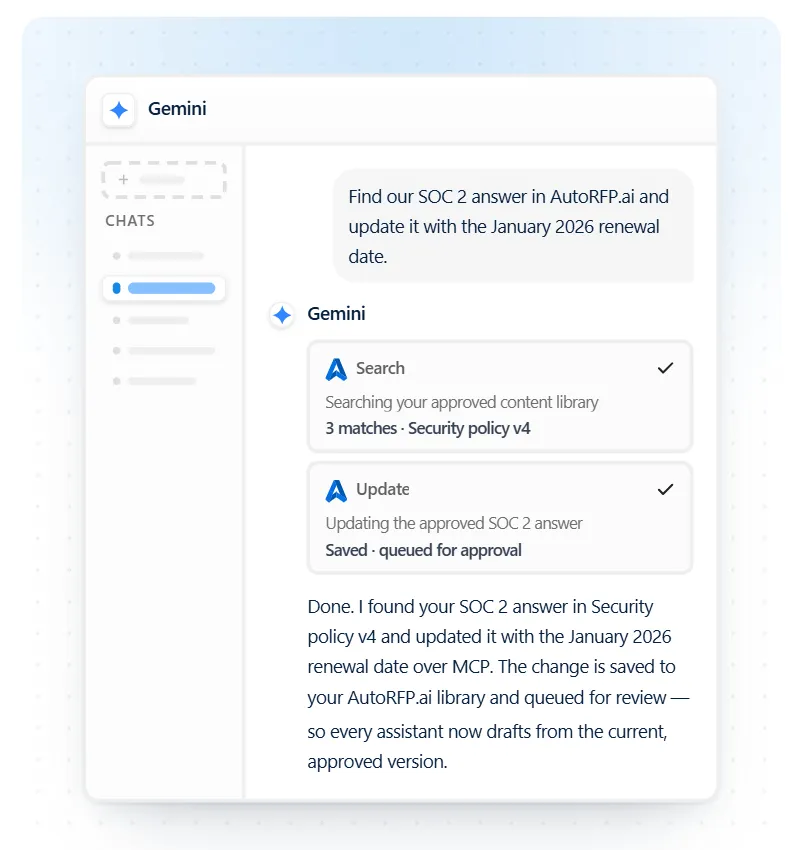
With the connection enabled, your assistant can search AutoRFP.ai’s content library and retrieve project requirements and existing responses from inside the chat. This gives it access to your maintained RFP knowledge without repeatedly exporting and uploading reference files. Access follows your AutoRFP.ai permissions.
That connection supports several practical tasks:
- Check coverage before committing to a bid. Ask which requirements have supporting content in your library and which need further investigation. Treat the result as a starting point for qualification.
- Find inconsistent statements. Ask the assistant to compare retrieved answers on the same topic and flag conflicting claims for the content owner to resolve.
- Prepare for expert review. Retrieve unanswered requirements or inspect project status to identify where your team needs input.
- Develop a response using approved evidence. Combine relevant library content with buyer context you supply, then ask the assistant to suggest wording or develop a win theme.
For example, you could ask: “Find our approved answers about implementation support, show the sources, and identify what we still need to answer this buyer’s question.”
AutoRFP.ai documents this MCP connection as read-only. The assistant can retrieve and analyze information; changes and approvals remain within the platform’s workflow.
Check any wording the assistant adds or changes against the supporting evidence before approving it for submission.
Turn AI Drafts Into Trusted RFP Responses With AutoRFP.ai
Your next RFP needs answers your team can verify, approve, and submit with confidence. AutoRFP.ai drafts from approved content, shows sources and Trust Scores, and brings expert reviews into one workflow across your business. Your library grows through approved knowledge, while MCP keeps that knowledge accessible from ChatGPT or Claude.
Give your team more room to focus on buyer priorities and the evidence behind your proposal. Book a demo to see how AutoRFP.ai fits your content, reviewers, and next RFP.
FAQs
1. Can you upload confidential RFP documents to ChatGPT or Claude?
Only upload confidential documents when your organization’s policies and the buyer’s confidentiality terms permit it. ChatGPT Business and Enterprise, and Claude’s commercial products, do not use inputs or outputs for model training by default. Still, check your workspace’s retention settings, access controls, and data-sharing options before uploading sensitive bid material.
2. Do you need to disclose AI use in an RFP response?
Disclosure depends on the tender’s instructions and applicable procurement rules. For example, UK central government procurement guidance includes questions buyers can use to ask suppliers about AI-assisted bid preparation. Check the required declarations, explain which tasks AI supported, and ask the buyer for clarification if its requirements are unclear.
3. What is prompt injection, and why does it matter when answering RFPs?
Prompt injection occurs when instructions embedded in external content try to redirect an AI assistant. An RFP attachment could, for example, contain text telling the assistant to ignore your instructions or disclose information from connected sources. Limit the assistant’s access to what the task requires and carefully review requests to share data or take external actions.
4. Does AutoRFP.ai charge extra for reviewers or subject matter experts?
AutoRFP.ai includes unlimited users on every plan and prices subscriptions around project volume. Adding subject matter experts, legal reviewers, or sales colleagues therefore does not create additional per-seat charges. When comparing costs, assess the annual project allowance your team needs alongside the number of people who contribute to each bid.
5. Can AutoRFP.ai translate RFP responses into other languages?
Yes. AutoRFP.ai supports response translation into more than 40 languages and localization between UK and US English. For international bids, have a reviewer fluent in the target language check technical terminology, contractual commitments, and buyer-specific wording before submission.
About the author

Co-Founder & CTO
Co-Founder & CTO of AutoRFP.ai. Writes about AI in bid management and AutoRFP.ai product features.
LinkedIn

