AutoRFP.ai vs Responsive (RFPIO): Comparison
Compare AutoRFP.ai with Responsive (RFPIO) on accuracy-first AI, source-grounded answers, compliance, implementation weight, integrations, and pricing.
Written by

Ops Lead, AutoRFP.ai
- Updated
- Reading time
- 17 min
AutoRFP.ai applies an accuracy-first, AI-native design to RFPs, security questionnaires, and DDQs. It writes from content your team has approved and keeps the sources visible on every answer.
Responsive is the heavyweight for proposal ops; AutoRFP.ai delivers the governance outcomes without the implementation weight. Responsive runs a wider pursuit operation. AutoRFP.ai centers the response: grounded drafting, review by evidence, and finished work returned in the issuer’s file.
Responsive’s about page dates the company to 2015, when the founders launched RFPIO. They spent the next decade building a large library, workflow, and proposal-operations suite. Generative AI arrived after that product was already in the market, so today’s AI work refactors a large platform that was already serving proposal teams.
AutoRFP.ai’s about page dates the company to Brisbane in 2022, with the first public release in March 2023. The product assumed large language models from that first script and has been built on them since day one. The homepage heading states the same architecture: Founded for AI. Not bolted on 10 years later.
Responsive remains one of the broadest suites in the category. AutoRFP.ai keeps RFPs, security questionnaires, and DDQs on one path: bring in the request, draft from approved company material, review with the sources visible, and return the finished work in the format the issuer sent. That difference matters more than a long feature checklist.
This comparison uses public documentation available on August 26, 2026. Responsive facts come from its product packages, pricing page, and help center. AutoRFP.ai facts link to the relevant product, pricing, integration directory, and Trust Center pages. For the wider shortlist, see the Responsive alternatives guide or the full best RFP software roundup.
The short answer
| If this decides the purchase | Start with | Why |
|---|---|---|
| Accuracy and compliance review of AI drafts | AutoRFP.ai | Approved-source drafting, cited passages, separate Trust and Feedback Scores, and unsupported questions routed to a person. |
| An AI-native response platform | AutoRFP.ai | Generative AI shaped the product from its first release instead of being added to an existing library suite. |
| Complex Excel or Word returned in the issuer’s file | AutoRFP.ai | Original-file export preserves workbook structure, formulas, macros, and validation dropdowns. |
| Lower library-administration burden | AutoRFP.ai | Approved responses feed reuse automatically, with meaning-based retrieval across multiple source types. |
| Company-wide sourced Q&A in Slack and Teams | AutoRFP.ai | Admins can let unlimited users ask the Q&A Agent, with permissions applied to every answer and source. |
| Project-based pricing and unlimited collaborators | AutoRFP.ai | Every public plan follows annual project capacity and includes unlimited users and all features. |
| Switching from an established Responsive library | AutoRFP.ai | Migration is included at no extra charge. A recognized export lands in as little as 48 hours. |
| Custom reports, proposal building, or multi-business-unit administration | Responsive | Its project, content, reporting, and governance stack is deeper and more configurable. |
| Issuing, scoring, and negotiating RFPs with vendors | Responsive | Request Projects cover the buy side of procurement. AutoRFP.ai is a response platform. |
| Long-form sales proposals and recipient portals | Responsive | Proposal Builder assembles branded documents and shares them through a recipient portal. |
| RFQs and quote-driven procurement | Responsive | Responsive documents Request for Pricing workflows. AutoRFP.ai deliberately does not serve this lane. |
Responsive is the honest pick when a large proposal function wants a configurable operating system and has the administrators to run it. AutoRFP.ai is the better fit when a responding team wants governed, source-backed answers without carrying the same implementation and content maintenance model.
Core response workflow
The first capability cut covers the operating model buyers feel on every project: how the platform was built, how much library administration remains, what happens to customer files, and how much of the commercial package is public.
| Capability |  AutoRFP.ai AutoRFP.ai |  Responsive Responsive |
|---|---|---|
| AI-native platform (built on generative AI, not added later) | Yes | PartialAI added to a legacy suite |
| Zero hallucination by design (100% source-grounded answers) | Yes | NoLibrary-only and mixed generation modes |
| A library that maintains and improves itself | Yes | NoScheduled owner reviews and moderation |
| Public, transparent pricing | Yes | NoOnly an Emerging starting point is public; the configured total requires a quote |
| Unlimited collaborator users (no per-seat fees) | YesLive co-editing, comments, and assignments | PartialPaid seats, free guests |
Accuracy and compliance deserve their own buying row
A winning response is correct, complete, and in your company’s voice. Every draft carries a Trust Score for the evidence behind it and a Feedback Score for whether it answers the full requirement, and the wording follows the approved language your team already uses.
Zero hallucination by design: AutoRFP.ai writes only from approved content, attaches the exact sources behind each answer, scores how strongly those sources support it, and routes anything it cannot support to a person. That makes it the AI-native platform that passes compliance review. Buyers can inspect the evidence and the quality decision instead of accepting one undifferentiated confidence label.
Responsive documents enterprise security, governance, and its TRACE confidence score. Its deeper project controls remain valuable. The proof-of-concept question is narrower: can the reviewer see source support and answer completeness as separate signals, and what happens when the available content cannot justify an answer?
New answers from approved material
Responsive starts with governed Q&A records and adds AI across the library and response workflow. AutoRFP.ai takes a generation-first path. When a strong approved answer fits, it can pass through unchanged. When it does not, AutoRFP.ai writes a new response from the approved library, documentation, and past projects, then keeps the supporting passages attached for review.
That distinction matters when the issuer asks a question the library has never stored in the same words. Buyers should test whether each platform finds a nearby snippet, writes a complete answer from approved evidence, or asks a person to fill the gap.
What Responsive genuinely does better
A balanced comparison starts with the work Responsive covers that AutoRFP.ai does not try to replace.
Proposal operations and reporting
Responsive documents question- and section-level ownership, Any, All, and Sequential review paths, project dashboards, intake, executive dashboards, standard reports, and a custom report builder. Its custom reporting can combine project, content, client, user, and intake data into scheduled dashboards. That depth matters when proposal operations reports into revenue leadership and every business unit needs its own controls.
The official platform package page also documents BI feeds, business units, sandbox environments, custom roles, event reporting, and premium deployment options. AutoRFP.ai has workload, automation, gap, and scheduled reporting, but Responsive offers the broader analytics and administration surface. Our Responsive vs Qvidian comparison covers that incumbent proposal-operations lane in more detail.
| Capability | AutoRFP.ai | Responsive |
|---|---|---|
| Enterprise Reporting | Yes | YesCustom reports across 100+ data points |
| Workload Reporting | Yes | YesProject activity, assignments, time spent, dashboards |
Buy-side procurement
Responsive Request Projects let an organization issue an RFP, invite vendors, collect clarifications, score proposals, negotiate, and publish an open request URL. Its request settings documentation explicitly includes Request for Proposal, Request for Pricing, and DDQ types.
That is a genuine category boundary. AutoRFP.ai helps a seller respond to an incoming RFP, security questionnaire, or DDQ. It does not run vendor sourcing, RFQ, or quote-driven procurement.
Long-form proposal assembly
Responsive Proposal Builder uses section templates, Word theme files, merge tags, document sharing, and a recipient portal to create tailored sales proposals. AutoRFP.ai can generate project collateral and export through company templates, but Responsive is the better fit when persuasive document assembly and recipient presentation are the main job.
Trust Center and portal auto-fill
Responsive sells a standalone Trust Center that shares documents and pre-completed questionnaires with viewer verification and engagement analytics. AutoRFP.ai publishes its own security documents through a Trust Center, but it does not sell a customer-facing Trust Center product.
Responsive’s current third-party portal automation is also credible. The beta extension can find questions, generate answers, auto-fill supported portal fields, export questions into a Responsive project, and apply finalized answers back to the portal. AutoRFP.ai’s Portal Agent imports questionnaires from major procurement and security portals, then returns answers beside the portal for controlled one-click copy. Automatic write-back is planned for September 2026. Buyers who need direct field population today should test Responsive’s beta on their actual portals.
Public product chronology
Release sequence shows who reached the market first. It does not prove copying.
| Capability | AutoRFP.ai | Responsive |
|---|---|---|
| AI file-to-project workflow | Initial platform release, March 2023 | Guided Projects, May 2025 |
| Answer confidence scoring | Trust Score shipped May 2023 (AutoRFP.ai product history) | TRACE announced April 9, 2025 |
| Browser extension for portal detection and question extraction | Portal questionnaire automation shipped in 2025 (AutoRFP.ai product history) | Portal automation launched in beta, March 2026 |
AutoRFP.ai reached the market first on the file-to-project workflow, Trust Score, and automatic portal detection and question extraction. Responsive offered browser-based library access first through LookUp in 2021. Its March 2026 portal automation beta is the like-for-like comparison for detecting and extracting questions from web portals. Release order does not determine which implementation works better on a buyer’s actual questionnaires.
Feature breadth versus day-to-day coherence
Responsive’s breadth is real. The buyer question is whether each control earns the setup, training, and daily navigation it introduces.
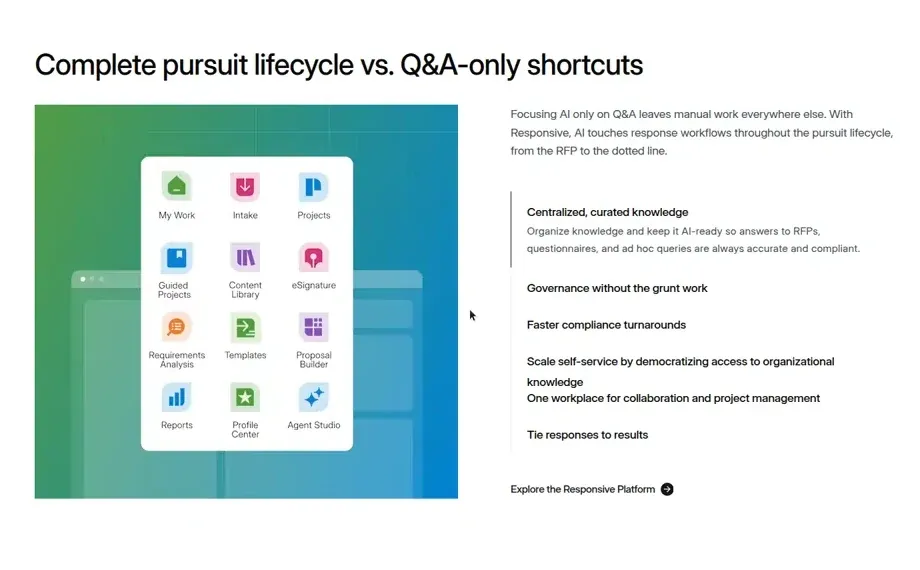
Most teams will use only part of that surface. Responsive layers Business Units over users, projects, and library content, then adds hierarchical tags, scheduled review cycles, and separate Response and Guided Project paths. Each layer solves a real enterprise requirement. Together they require someone to design the operating model, maintain it, and teach contributors which path applies.
During a proof of concept, assign an occasional SME one question. The useful test is whether that person can review it and leave without learning the surrounding content system.
Adoption is the real enterprise test
In a verified September 1, 2022 Software Advice review, Amanda, a daily user for more than two years, reported “inconstancies with the new and legacy UI functionality” and said some fixes took months. Responsive can work well for trained proposal operators while still creating friction for a different contributor model.
AutoRFP.ai customer evidence points to broader participation. The ecoPortal story reports a 30% increase in team engagement as less-technical staff joined the workflow. The BDS Solutions story documents 20 users being onboarded at short notice.
Adoption depends on the path an occasional reviewer sees
AutoRFP.ai keeps a reviewer on the assigned answer. Responsive can route work through a configured project, section, and review model.
Conceptual comparison based on each platform’s documented review workflow.
AutoRFP.ai also supports categories, hierarchical tags, owners, and review queues. Its tagging guide treats tagging as optional, while meaning-based retrieval searches approved responses, documentation, and past projects. Both products expose enterprise controls. Their defaults ask people to perform different amounts of routine filing.
| Capability | AutoRFP.ai | Responsive |
|---|---|---|
| Enterprise Permissions | Yes | YesCustom roles, Business Units, audit trail |
| Single sign-on (SSO) | Yes | YesSAML 2.0 SSO |
| Okta SSO | Yes | YesPublished Okta SAML setup |
| SCIM provisioning and deprovisioning | YesOkta and Microsoft Entra | YesOkta SCIM provisioning |
| Enterprise administrative audit trail | Yes | YesAdministrators can export activity audit trails |
| SOC 2 Type II certified | Yes | Yes |
| ISO 27001 certified | Yes | Yes |
Content library upkeep
Responsive offers mature library intake and governance. Teams can import Q&A pairs from standard Excel or Word templates, then attach owners, tags, collections, review cycles, moderators, privacy rules, ratings, and flags. That precision is valuable when a dedicated content team owns the library.
The intake path also determines what stays current. Responsive’s Google Drive guide says imported documents are checked daily for updates, but a person must apply the newer version. For Q&A file imports, it states that later changes in Google Drive “are not reflected in your Content Library.” The imported Q&A becomes another governed Responsive record.
Its scheduled review documentation says Q&A pairs, documents, sections, and catalogs “must be periodically reviewed” by content owners. Admins configure review timing, reminders, and Any, All, or Sequential approval. Changing the default process affects upcoming reviews while existing content keeps the former process.
Duplicate cleanup has several paths for the same job. The standard deduplication report finds exact matches. The Duplicate Content Cleaner typically refreshes once every 24 hours. The semantic Duplicate Assistant is currently a beta feature for Responsive AI customers and does not yet merge documents or merge metadata with AI. Three overlapping tools mean administrators have to explain which one applies, when it refreshes, and what it still cannot merge. That extra surface area makes the same cleanup work harder to understand, train, and use.
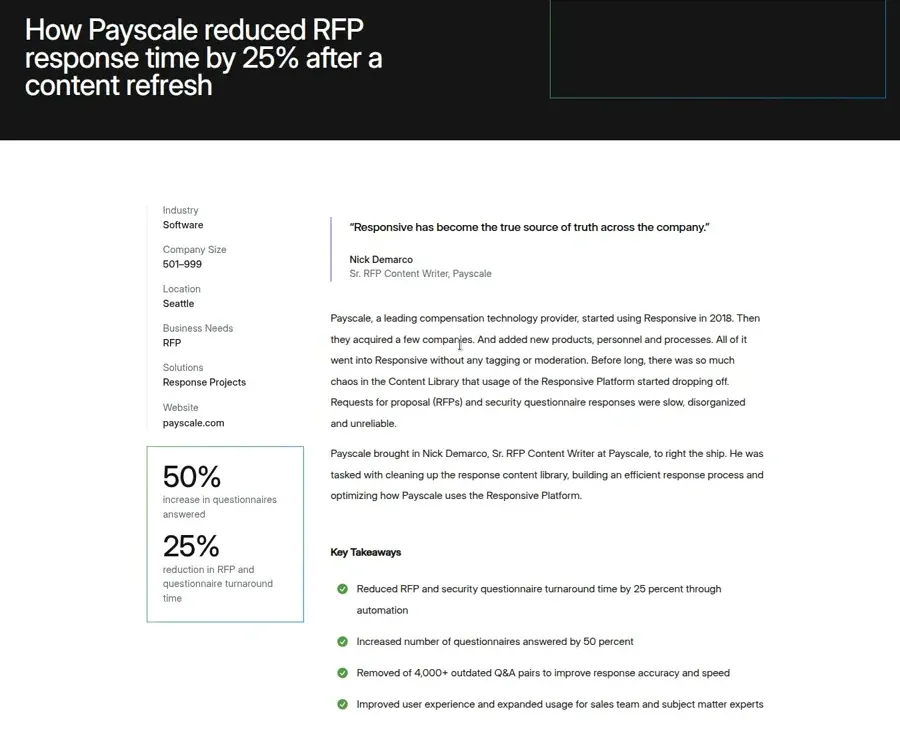
Responsive’s own Payscale customer story shows the failure mode when that process loses an owner. The story says untagged and unmoderated content created “so much chaos in the Content Library that usage of the Responsive Platform started dropping off.” Payscale assigned a senior content writer to lead a six-month refresh, removed more than 4,000 outdated Q&A pairs, validated more than 1,800 replacements, and left more than 1,000 under review. The recovery succeeded, and Responsive credits its customer-success team as an active partner. It also demonstrates the operating cost behind a healthy library.
AutoRFP.ai’s content-management workflow lowers the filing burden. Approved responses are saved for reuse automatically at project level, near-identical approvals do not create another copy, and teams promote their best material into the shared library behind an optional review step. Search matches on meaning across approved library content, documentation, and past projects. Connected documentation sources continue to re-sync, so the drafting layer can use the knowledge where the team already maintains it.
AutoRFP.ai still needs a content owner to make judgment calls. That person approves what should become shared knowledge, while routine approval and reuse handle more of the filing. The Loopio vs Responsive review is useful if a library-first operating model is already your preference.
File import and original-file export
Both platforms import Word, Excel, and PDF and can export responses back to a source file or template. The meaningful difference is what happens to a difficult customer file.
Responsive auto-configures standard questionnaires such as SIG and CAIQ. For less standard files, its import cheat sheet says mapping typically takes 30 to 60 minutes and can take longer. The same guide says Responsive “does not recognize content control/developer console contents or macros,” may override Excel macros on export, and identifies only the first question when several appear in one Excel row. Its formatting guide adds that hidden Excel columns are not imported.
Export has its own boundaries. Responsive’s export guide says using the application font on a source export “often results in lots of manual cleanup.” Manually added Q&A sections export to a default Word template rather than the source file. Its source-update guide also warns that changing a response in the re-uploaded file can duplicate that response.
AutoRFP.ai maps Word and Excel requirements automatically, then patches approved answers into the original file. For Excel, it preserves worksheets, formulas, macro-enabled workbooks, and validation dropdowns. PDFs import for answering and export as Word, which is the important scope boundary.
Ask both vendors to process the ugliest workbook in your archive. Check macros, hidden sheets, content controls, conditional questions, and answer placement after export.
Collaboration, integrations, and governance
Both products cover the systems most response teams already use. The difference is the job each connection performs and how it is packaged. The rows below come from the AutoRFP.ai integration directory and Responsive’s integration directory.
| Workflow | AutoRFP.ai | Responsive |
|---|---|---|
| CRM | Salesforce native app; HubSpot, Microsoft Dynamics 365, and DealCloud through MCP | Salesforce, Microsoft Dynamics, Zoho, HubSpot, Pipedrive, and PipelineDeals |
| Knowledge and documentation | SharePoint, OneDrive, Google Drive, Box, Confluence, Notion, Zendesk, and Intercom feed one drafting and source layer | Box, Google Drive, OneDrive, SharePoint, Dropbox, Confluence, and external websites |
| Team collaboration | Slack and Microsoft Teams assignments, reviews, comments, reminders, and Q&A | Slack, Microsoft Teams, and Google Chat notifications and collaboration |
| Sales enablement | Seismic and Highspot | Seismic and Highspot |
| AI assistants | MCP access from Claude, ChatGPT, Microsoft Copilot, and Gemini | MCP access from ChatGPT, Microsoft Copilot, and Claude |
| Portals and security tools | Portal Agent plus SAP Ariba, OneTrust, Vanta, and Drata workflows | LookUp, Whistic, Door, and Portal Automation beta |
| Identity and access | SAML SSO through Okta, Microsoft Entra, or Google Workspace; SCIM through Okta or Entra | SSO, SAML, SCIM, and custom-domain controls, with availability varying by edition |
AutoRFP.ai includes integrations and SSO on every public plan. Responsive’s package documentation varies identity, CRM, sales-enablement, and cloud-storage access by edition or purchasable package.
Responsive remains stronger where a buyer wants its wider suite around those connectors: Business Units, sandbox environments, BI feeds, Proposal Builder, Request Projects, and the customer-facing Trust Center. AutoRFP.ai keeps integrations focused on intake, sources, review, identity, and returning the response.
The collaboration row contains a more specific distinction. Admins can open AutoRFP.ai’s Q&A Agent to unlimited users, so a teammate can ask in Slack or Teams and receive an answer with permission-aware sources. The public Responsive integration materials reviewed for this comparison document collaboration and notifications in those channels. They do not document an equivalent sourced Q&A Agent.
| Capability | AutoRFP.ai | Responsive |
|---|---|---|
| Slack | Yes | Yes |
| Microsoft Teams | Yes | Yes |
| Q&A Agent in Slack and Teams | YesUnlimited users can ask sourced questions | NoNo documented sourced Q&A Agent in Slack or Teams |
Migrating from Responsive
Send a Responsive library export. AutoRFP.ai recognizes it, imports the categories, metadata, and answers, and includes that work at no extra charge. White-glove onboarding brings the content across in as little as 48 hours.
SharePoint, Google Drive, and Confluence can keep syncing as approved sources after the import. The old Responsive library does not stay linked.
Implementation and support
| Area | AutoRFP.ai | Responsive |
|---|---|---|
| Rollout | Included. White-glove onboarding and a first project in as little as 48 hours. | Paid Professional Services: Core Admin team, content worksheet, deployment plan, and scheduled onboarding. |
| Training | Included. Guided onboarding, Learning Center, and direct implementation support. | Paid or edition-based: Academy coursework and training sessions. |
| Migration | Included at no extra charge. Recognized Responsive exports import in as little as 48 hours. | Paid Professional Services: sample load, full migration, quality assurance, and customer validation. |
| Ongoing work | Included. Approved responses feed reuse. Connected documentation sources continue to sync. | Customer-run content reviews, duplicate cleanup, workflow design, templates, and adoption administration. |
| Support | Included. 24/6 support, implementation, and online training on every public plan. | Standard 24/5 support; Severity 1 is 24/7. Premium support packages are extra. |
Responsive sells rollout, training, and data migration as Professional Services. AutoRFP.ai includes the same work at no extra charge: white-glove onboarding, library import, training, and 24/6 support on every public plan.
Its Core Admin guide still describes about six weeks of onboarding and a target to go live within 90 days. Test support during the proof of concept. Open the same difficult import or permissions issue with both vendors, then record who diagnoses it and whether the underlying problem is fixed.
Per user versus per project
Responsive does not publish a transparent configured price. Its current pricing page gives a $10,000 starting point for Emerging Edition, while Growth, Enterprise, user quantities, add-ons, and services require a sales quote. The same page explains three commercial components:
- An annual platform fee
- User licenses
- Add-ons and services
Responsive includes unlimited projects and responses. Higher editions and purchasable packages add automation, access controls, integrations, hosting, reporting, and services. Compare the full configured quote with the published starting point.
The AutoRFP.ai pricing page posts Scale as $899 monthly and Accelerate as $1,299 monthly on a yearly invoice, with Enterprise custom. Every plan includes unlimited users, unlimited AI, all features, integrations, SSO, implementation, and support. Plans differ by annual project allowance.
The commercial decision is per user versus per project. Seat-based pricing is dying in AI SaaS because value follows the generation and review workload, not the number of people allowed to help. Responsive combines platform and user-license costs with add-ons and services. AutoRFP.ai prices annual project capacity and lets occasional experts, reviewers, and Q&A Agent users participate without another paid seat.
Review-platform signal
Use the ratings as a directional signal. Use the proof of concept to test adoption, imports, review work, and support against your own team.
A proof-of-concept scorecard
Run the same recent RFP through both platforms. Keep the artifacts and score the behaviors that survive a polished demo.
Treat the first three tests as gates. Unsupported questions should reach a person without a plausible guess. Conflicting sources should remain visible so the reviewer can resolve them. The returned workbook should still behave like the file the issuer sent.
| Test | Pass condition or evidence to keep |
|---|---|
| Unsupported question | The product flags it and routes it to a person instead of generating an unsupported answer. |
| Conflicting sources | The reviewer can see the passages behind the draft and resolve which source governs. |
| Difficult workbook | Macros, formulas, dropdowns, hidden sheets, and answer cells remain intact. |
| Manual edit | Citations and quality signals remain useful after the edit. |
| Content approval | Record what saves automatically, what needs promotion, and who owns the next review. |
| Taxonomy change | Count the objects and old records that need updating when a product or team changes. |
| SME handoff | A reviewer can work from Slack, Teams, or email without losing the project record. |
| Occasional user | An SME can complete one task without training or administrator help. |
| Portal questionnaire | Your actual portal supports import, generation, review, and return. |
| Library migration | A Responsive export imports without a paid services project, in as little as 48 hours. |
| Support escalation | One owner diagnoses and resolves a real import or permissions issue. |
| Management report | Leadership gets the measures it needs without a custom data project. |
| Commercial quote | The quote identifies which users, connectors, controls, services, and environments change the total. |
Use the Go/No-Go decision template to turn those tests into a scored evaluation built around your real workflow.
The buyer cut
Choose Responsive when you need the deepest project-management and reporting stack, a long-form proposal builder, buy-side Request Projects, a customer-facing Trust Center, or multi-business-unit controls. Those are real strengths, and they can justify the implementation and packaging model for a mature proposal organization.
Choose AutoRFP.ai when the response itself is the center of the decision: correct, complete, and in your company’s voice. Every draft shows the supporting sources, a Trust Score measures their support, a Feedback Score measures completeness, and unsupported questions route to a person. The same governed response returns in the issuer’s working file without requiring a proposal-operations system around it.
We’d rather show you than tell you: run your hardest recent RFP through a two-week proof of concept and judge both platforms on the exported file, the unsupported questions, and the edits your reviewers actually make.
About the author

Ops Lead at AutoRFP.ai. Designs the pipeline, content, and handoff systems bid teams use to run RFPs end-to-end, and co-hosts live sessions on winning workflows.
LinkedIn