How to Win a Bid: Step-by-Step 2026 Guide for Higher Win Rates
Learn how to win a bid with proven strategies, real examples, and practical tips to improve your proposal quality, speed, and win rate.

Ops Lead, AutoRFP.ai·Updated ·8 min read
A strong bid does more than answer questions. It makes evaluators feel confident in your solution, your process, and your ability to deliver.
That is where many teams fall short. They include the right information, but fail to present it in a way that feels clear, relevant, and persuasive.
In this guide, you will learn how to win a bid step by step and improve the quality of every response you submit.
Common Reasons For Losing Bids
These are the mistakes that most often contribute to you losing bids, how evaluators react to them, and what you need to fix to keep your response clear, credible, and easy to score.
| Mistake | What it looks like in real bids | Scoring impact (what evaluators do) |
|---|---|---|
| Counting on relationships to win the bid | The sales team assumes the client already knows and trusts them, so the proposal leans too heavily on familiarity and not enough on evidence, proof points, or a clear case for selection. | Evaluators still need documented proof and a solid justification for awarding the contract. When that is missing, scores often drop in areas like credibility, technical assurance, and overall confidence. |
| Treating proposals as a support task instead of a revenue function | Leadership sees bidding as something that simply helps sales, so there is little structure, weak oversight, and inconsistent input from the right people. | This usually leads to weaker responses, missed scoring opportunities, and less consistency across submissions. Teams that invest in a proper bid function tend to score better because their process is more deliberate and repeatable. |
| Assuming the team can handle sudden increases in bid volume | When more bids come in, the response is often to work faster rather than fix capacity issues. Reviews are shortened, compliance checks are rushed, and deadlines become reactive. | Once workload per person goes beyond a sustainable level, quality starts to fall. That often results in missed requirements, weaker supporting evidence, and inconsistent responses, which can reduce scores across technical, compliance, and risk sections. |
| Mistaking strong writing for strong bid strategy | The proposal may be well written, but it relies on generic content, weak win themes, and limited understanding of the buyer’s priorities. | Evaluators may see competent answers, but not a persuasive reason to choose that supplier over others. This can lower scores in differentiation, value, and overall fit. |
| Using the content library as storage instead of a controlled source | Teams pull old answers into new bids without proper review, which can introduce outdated claims, conflicting figures, or policies that no longer match the current submission. | Inconsistencies create doubt. Even if the solution itself is good, evaluators may flag governance and credibility concerns, which can reduce confidence in the whole bid. |
If any of these mistakes sound familiar, the video below explains which so-called best practices no longer win bids and what top-scoring teams do instead.
How to Win a Bid in 2026 (Step-by-Step)
Use these strategies to build a bid response that is not just complete, but clearly positioned as the safest and strongest choice.
Step 1: Qualify Before You Write With a Go/No-Go Framework
Instead of responding to every bid opportunity, use a scorecard to decide whether it is truly winnable and worth the effort. 71% of high-win teams use a Go/No-Go qualification step, which shows that disciplined selectivity is a key part of repeatable performance.
Before you commit, ask yourself:
Do we have the expertise, capacity, and delivery timeline covered?
Is this strategically aligned (ICP, region, product fit), not just “revenue-shaped”?
Is the opportunity profitable after effort, risk, and concessions?
Do we have access to insight, or are we guessing?
If you want to explore how AI fits into the go/No-Go stage, the video below gives a useful walkthrough of the process.
You can use a Go/No-Go framework template to manually score fit, expected ROI vs. effort, relationship strength, and timeline feasibility.
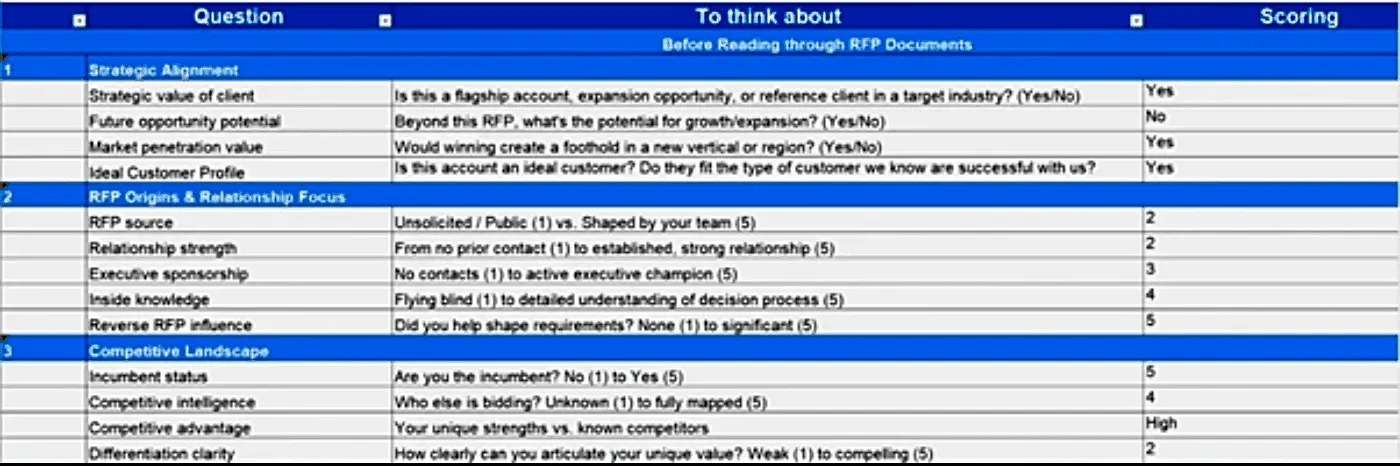
Download the Complete Go/No-Go scorecard
If you need a faster version, use an AI Go/No-Go prompt to triage multiple tenders quickly.
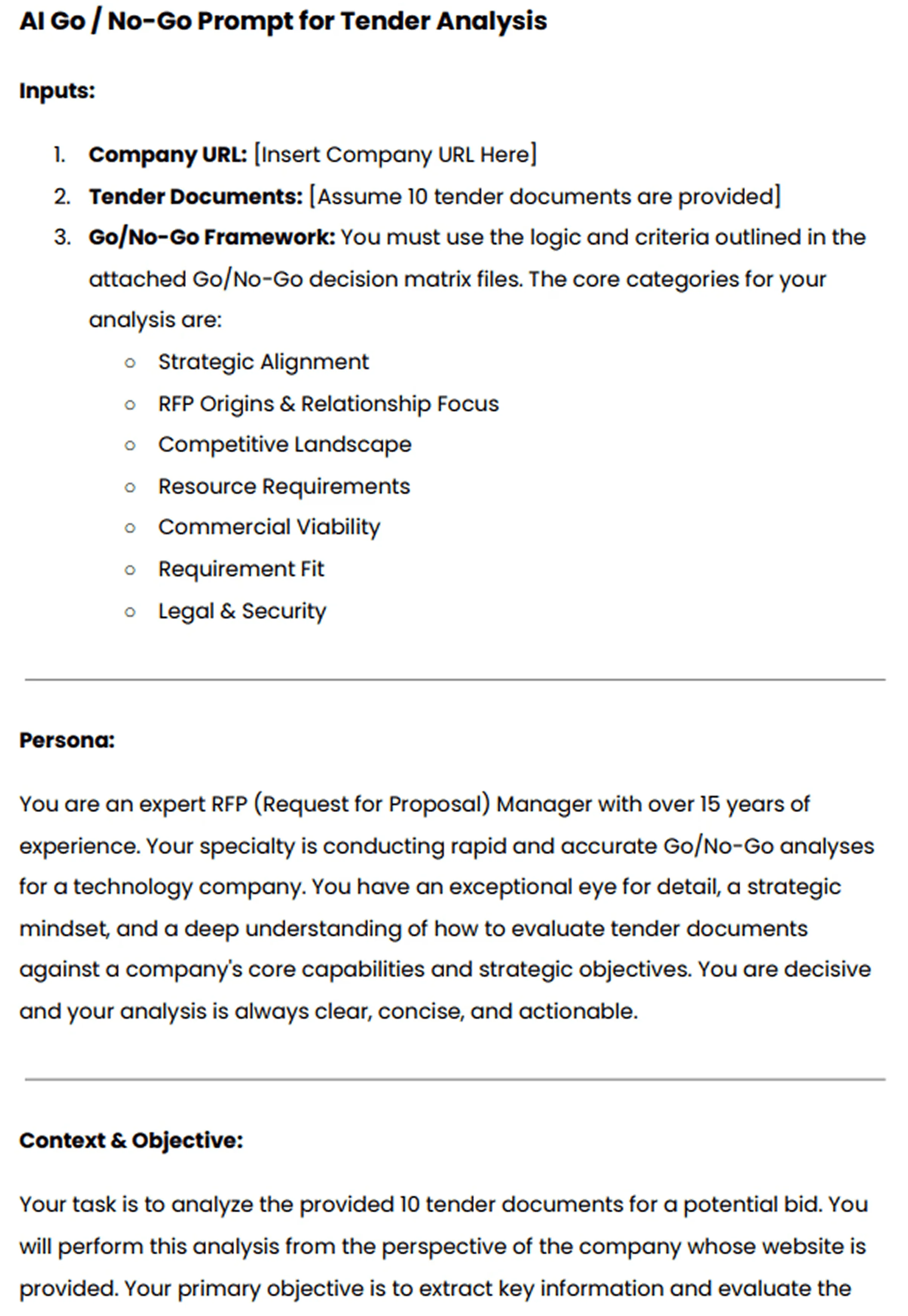
Download the complete AI Go/No-Go Prompt
If you’d rather follow along visually, the video below walks through each step in more detail.


Video transcript
Transcript is auto-generated and may contain minor errors.
Hey, have you ever wanted to use Gemini for your AI go no go analysis? We're going to jump into it today using Gemini to do our tender analysis to understand if we want to bid on this tender or not. I'm going to be using Gemini Flash 2.5 Pro which currently available on the paid Gemini plan. Uh, and we're going to be looking at a tender actually from the Australian government. Uh, so this one specifically is the ATO, the Australian Tax Office. And interestingly enough, this tender is for a coding assistant. So like an AI coding software SAS application. I use an AI coding SAS application that I love to use every day and that's cursor. So we're going to look at cursor who have an enterprise plan. So making a pitch for the likes of the ATO's and we're going to look at this publicly available atto tender and
whether cursor should bid on it. So we're going to be using our AI go no go analysis tool with Gemini. So let's jump into it and and wait until the end because the results of the AI go nogo analysis may actually surprise you. So, first of all, um I've got this prompt, and I'm going to leave a Google doc uh or page where you can download this uh prompt and then customize it for your business down in the description below. Uh but of course, um you know, I you can customize to your heart's content. When we're prompting, it's really important to a make it contextual to our business, which is where we have the inputs here. So, I'm going to enter the cursor URL. Uh we have our persona. So effectively that's telling the Gemini flash 2.5 what you know what kind of uh person is going to be what skill set should it have what context should it have when it answers this question in this case it's an expert RFP manager uh then we have
our context and objective so what are we asking the prompt effectively to do what are the instructions and then what should the output be so from this case I want a comprehensive document detailing against my red flags or amber flags or green flags around whether cursor should bid on this tender or not. So, I'm going to just, you know, copy and paste that prompt, chuck it in here. Then, uh, really cool thing is I'm actually going to turn on deep research. So, deep research is a tool readily available in a lot of your uh common LLMs whether that's uh Gemini as I'm showing here, Chat GPT or Claude. Gemini's deep research can be used not only to search the web but also search your documents. So, with Gemini, you can upload up to 10 documents. And for this, I'm actually going to be using my own go nogo
template. The go no-go template. Again, I'll chuck a link in the description below where you can download that from our website at autoirfp.ai/d downloads, but effectively this will have information. And this is my go no-go framework. What I'd recommend is downloading the template, changing the go no-go framework uh to make it more relevant for your business as needed. But it's a good starting point. Uh for for instance, this really focuses on RFP origins and relationship. uh it looks at resource requirements from our team and then effectively it gives you a scoring matrix and depending on that scoring matrix matrix should tell me whether we should proceed or not uh as well and it has all the different information you can like play around with your hearts content it's just an Excel spreadsheet um but really useful for your go no-go decision framework all righty so jumping back uh I've turned my deep research on and now I'll upload my documents from drive. And so
here are my tender documents. Uh just clicking shift, I'm just going to select all the relevant ones. I can only upload maximum of 10 documents. So I'm actually going to upload the original tender documents, not the indenments. We'll up upload those later. So I'm going to insert those documents. And there's one other document I want to add from my drive. And that actually is that go no-go decision template. So now I have my go no-go decision template. I've got my atto documents uh for the tender and I've got my prompt of what I want Gemini Flash 2.5 Pro to do for my AI go no-go analysis strap in it's pretty cool what you're actually going to see here as well all my tender documents and it's deep researchers on but before I submit this I want to make sure here in the prompt that you can download below is I'm going to update this information so uh tender documents uh see attached As you can see, I've attached them. And in terms of the company URL, well, here
I just want to make sure I I'm just going to enter cursor here. This is a AI coding assistant tender for the Australian tax office. And you know, in this example, we're being cursor. I do not work at cursor. I work at autofp.ai. But for my example, I click submit. And then what I really like about Gemini is it's going to provide a research plan for my AI go no-go analysis. So with that plan, it'll provide a lot of details in terms of the steps it's going to take to try to answer my prompt. And then I can actually edit that plan if I'd like to. And here we have our plan from Gemini. So clicking through I can go through I can read this information. First it's going to browse the cursor docs and all the information regarding cursor. It's going to go and analyze all the tender documents and then it'll make its way through and start to answer my go no-go questions. So, what I recommend here again is a edit the analysis template, the go no-go decision
template. Make that really relevant for your company and when you decide to bid or not to bid for tenders uh and RFPs. And then second is uh in this prompt, make sure you update what questions you're asking. if there's any specific questions like red flags you want for cursor. It might be well cursor doesn't do uh on premise hosting. So want to make sure that's flagged and then uh there's the information and then I can click start research and Gemini flash is going to start doing our AI go no-go analysis. All righty. I've given it some time. time it probably took oh jeez uh maybe about 10 minutes all up which is what you expect for the deep research uh especially for something that goes through you know 10 different tenor documents probably hundreds of pages and uh uses the organizational context that we provide it in the website of cursor to then run a go nogo analysis against that go no-go decision template. So jumping into it, uh before I show kind
of the output, what you have here for deep research is you can look at the thoughts. And so this kind of explains or at least in some cases LMS do hallucinate their thoughts, but in this case we can hopefully trust it and see that what it kind of looked to and what it did uh in completing that analysis. So it looked at the different websites. It then uh looked at the research uploaded folder files and then use that against the decision template to then try to provide an overall go no go as well. Here are the sources it used. Again, it can refer to those Google Drive documents I provided which is really powerful for that Gemini has such a good integration. Obviously, probably no surprise with Google Drive. And then scrolling up here is our analysis. So Gemini has provided an AI go nogo analysis based off the ATO tender documents for an AI coding assistant which we've mocked up as cursor.com to
reply and say should we bid on this where AI go nogo is powerful is it does help with that cursory first look whether this is worth it to look what information should I understand before diving to it further um as well certification gaps um you know goes through all the different information there and effectively it's going through that spreadsheet the decision template that we have for our go no-go analysis you can see here strategic alignment competitive landscape commercial viability legal and security and it's now providing that information there as well so it's it's kind of looked over those different clauses uh I mean here if that's true the the clause grants the AT the right to terminate the contract at any time for any reason for its own convenience that's a pretty you usually don't want that in your legal contracts with the three year plus one plus1 contracts. That's pretty rude. Uh but yeah, anyway, you can have a look at that and uh obviously make up your own mind as well for uh the different information. Uh then you have kind of the different scoring of waiting and that's the powerful thing about a go no-go decision
template is to um use it as a I guess take the emotion out of RFP response. You might have an enterprise AE salesperson run up to you and say I have to bid on this RFP. we have to do it. Uh and if you kind of boil it down to just numbers and what the scoring is, then you can make a more informed decision hopefully without the emotion of that uh as well. Uh and then so it kind of does that scoring for me that I provide in the spreadsheet. And then that's why it's a no-go is because the weighted score was 44.3%. Uh and so told me to go not go for it. I can actually then expand on this. And in the drive there's actually three indentments. And so uh I'll say uh please find attached I'm typing here. Please find attach uh some addendments for the tender and use that to update the
the analysis. So and that's a great thing. You have this chat. You might have Q&A later. You might have addenments. might have uh mistakes in the original tender that are provided to you and with that chat history you can then come back to it and provide additional documents to then do the further analysis with the context of your original. Now with uh LLMs you will uh hit like a token limit for that. For instance I I believe Gemini's token limit is around 1 million uh for Gemini 2.5 Flash Pro. Uh so it's a very fast model but effectively it's going to start start forgetting the original context that you provided. Uh and so you need to be cautious of that. It's good for initial we think of this AI go no go analysis initial cursory first look. It's it's not going to be our full in-depth look. Effectively it's it's saving me time of places I need to look at uh and so on before we kind of get into it. So I it's not going to replace the human to do the go no-go. This is going to help uh help the human do the
go no-go as well. Hope that this video was really useful for you on how to do an AI go nogo analysis with Gemini Flash 2.5 Pro. Uh you can use this for all your tendering needs. Uh make sure to still have the human in the loop. AI can hallucinate. And then final just that last privacy and security uh comment on making sure that the training is turned off. This is a that you're using a paid subscription. Do not upload private RFPs into an LLM because that maybe then you send into uh training data uh without you make sure that the training is turned off. You're paying for your subscription uh as well. Uh, and then yeah, this one, my example is a public tender, uh, but you can, of course, uh, use it as well. So, I'm Rob from Auto RFP. Uh, we're actually an AI RFP software. We actually have a go no-go analysis feature really similar to
what I showed you before, but a lot less of the leg work uh in our software that also uses Gemini Flash 2.5, which is why I had a lot of confidence that could kind of handle the large documents that you would often find in tenders. So yeah, if you're interested, find us at auto rfp.ai. You can pick a book a demo and learn more about us as well. I thanks.
With AutoRFP.ai, you can set unlimited screening questions by category, upload the bid document, and have AI scan it against your Go/No-Go criteria to flag risks in about two minutes.
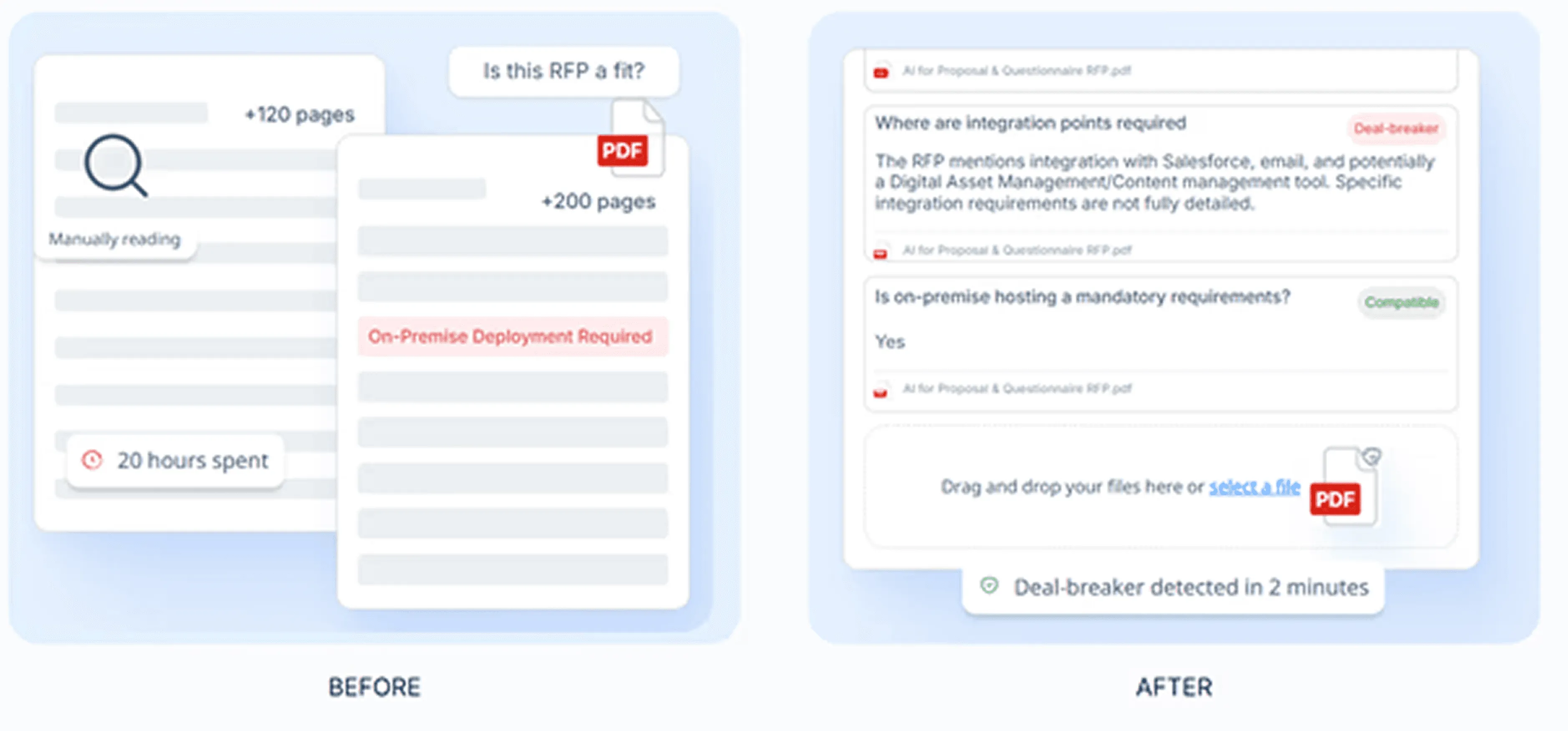
That helps you spot good-fit opportunities faster and reserve subject matter experts (SMEs) time for the bids you can realistically win.
Step 2: Assign Clear Ownership So One Team Owns the Bid
Winning teams do not treat bids as a shared side task. They assign a clear owner and run proposals like a real function. Every high-performing team usually has at least one dedicated bid manager, while some low performers reported having no dedicated bid role.
In practice, “clear ownership” means: one accountable lead, named section owners, named reviewers, and one source of truth for deadlines and decisions.
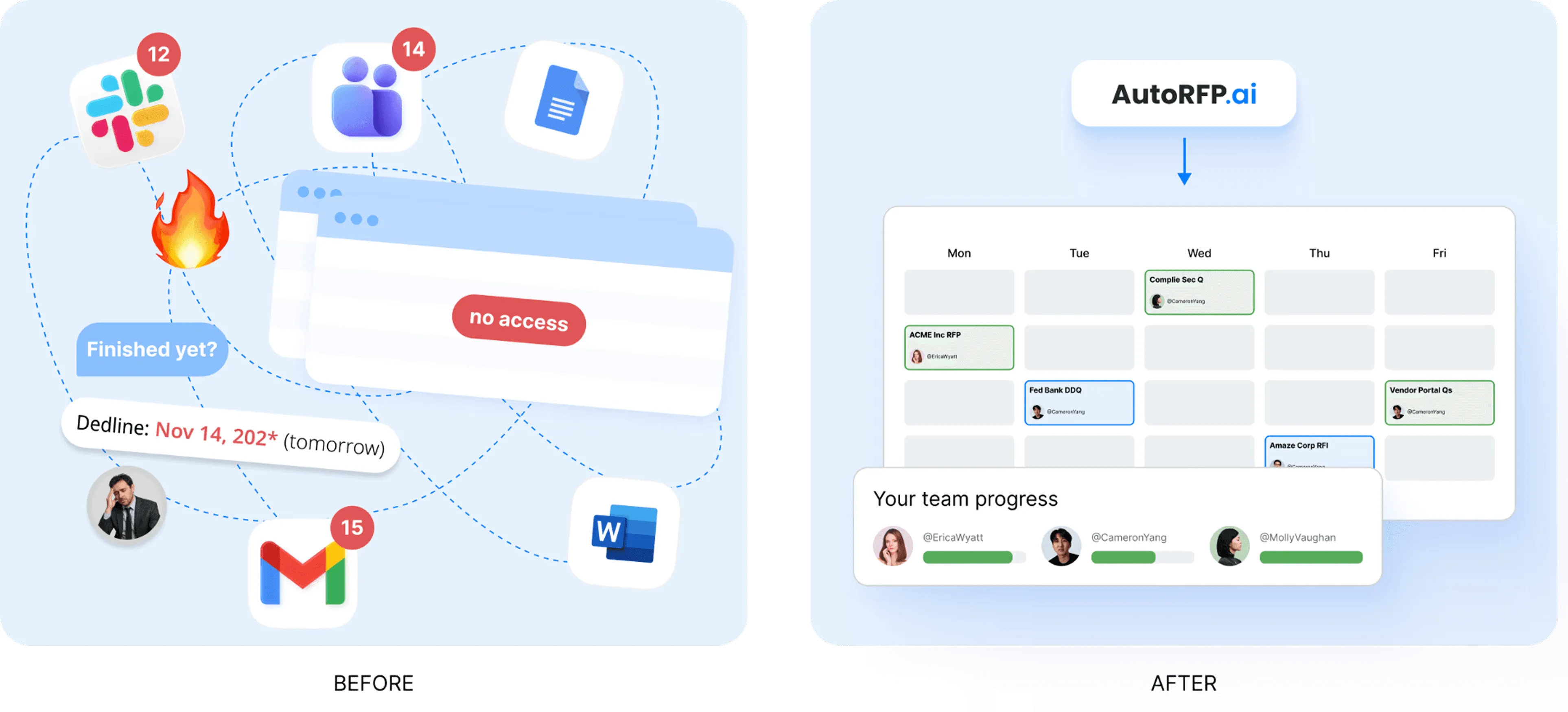
With AutoRFP.ai, you can see who owns each section, what is in progress, and what is stuck from one dashboard, so deadlines and decisions do not get lost in chats and spreadsheets.
Step 3: Build the Right Team Early
Bring in the right people at the start, not halfway through the deadline panic.
This usually includes:
Bid or proposal lead
Sales or account owner
Solution or technical lead
Pricing or commercial support
SMEs for validation in specialist areas such as legal, security, delivery, or compliance
The key is to involve people with purpose. Not everyone needs to write. Everyone should know exactly where they add value.
“Project management of all the different parts of a bid is often overlooked. Ensure you have clear responsibilities and when you want content, answers, and revisions completed by. I would know, I once lost an RFP because I submitted it 26 seconds late.” — Jasper Cooper ,Co-Founder and CEO of AutoRFP.ai
Step 4: Protect Capacity So You Don’t Fall Off the Capacity Cliff
Capacity is not an ops detail. It is a win-rate variable. Once volume grows faster than your bid system can handle, win rates fall fast. This is how teams end up burning weekends on dead-end bid responses: too many bids, too little time for insight, proof, and clean reviews.
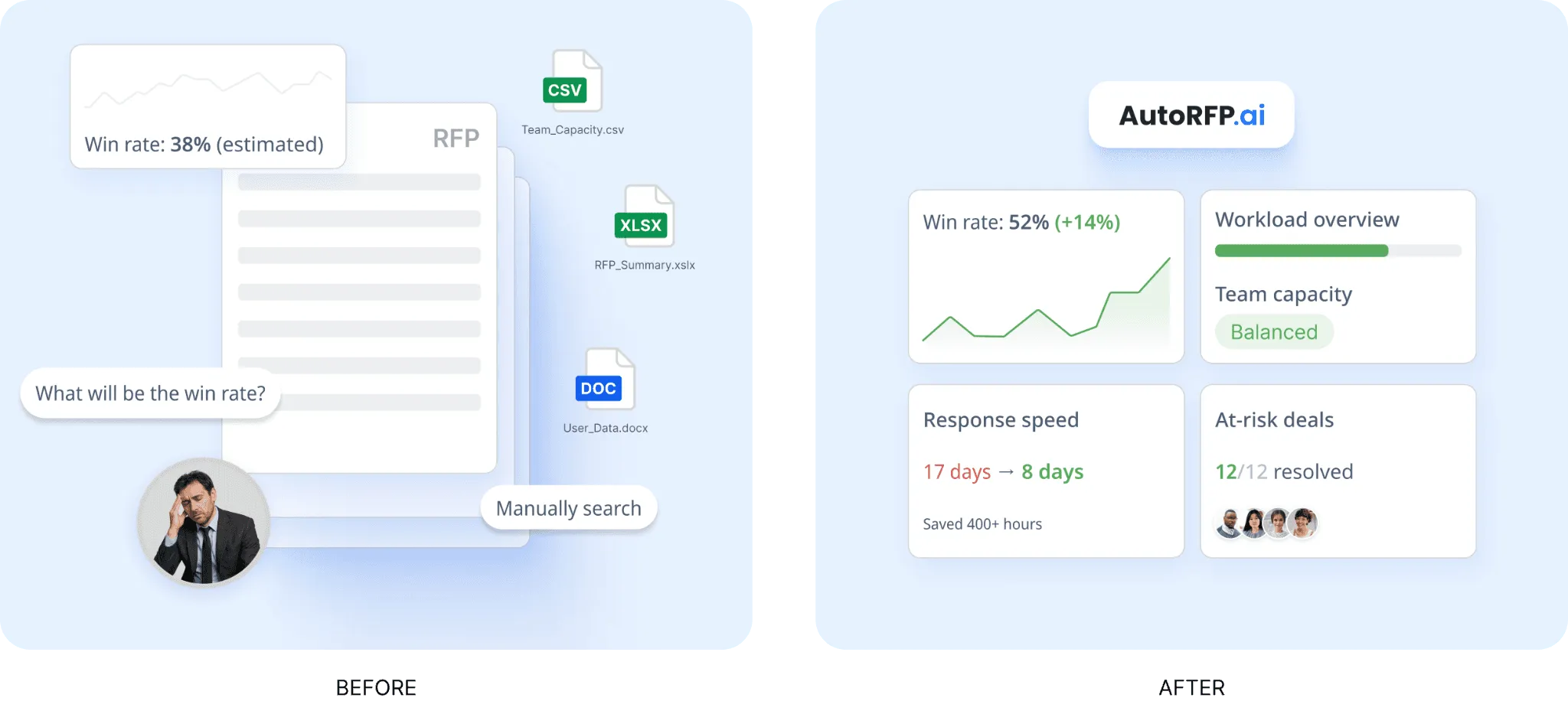
AutoRFP.ai’s reporting helps teams balance the ability to win with the ability to deliver.
It brings win rate, opportunity size, bid volume, team capacity, workload, and response velocity into one view. That gives proposal leaders a clearer picture of whether the team can take on more work without risking quality or missing deadlines.
It also supports better capacity planning by showing due dates, project status, assignments, and at-risk work across active RFPs, DDQs, and security questionnaires. Instead of relying on guesswork, teams can use real operational data to decide which opportunities to pursue, where resources are stretched, and which segments convert best.
Step 5: Build Customer Insight Before Drafting
Do not start writing until you understand what matters to the buyer. According to AutoRFP.ai’s Proposal Win Rate Report 2026, 88% of high-win teams have a defined customer-insight process.
A strong bid is based on:
The buyer’s goals: Understand what the buyer is ultimately trying to achieve, so your response speaks to the bigger purpose behind the bid.
The risks they want to avoid: Show that you understand the operational, financial, technical, or delivery risks they are trying to reduce.
The outcomes they care about most: Focus on the results the buyer wants to see, not just the features or activities you plan to provide.
The internal pressures behind the purchase: Consider the business drivers behind the bid, such as deadlines, budgets, compliance needs, or internal expectations.
The likely concerns of different stakeholders: Different decision-makers will care about different things, so your bid should address those perspectives clearly.
The competitive context: Think about what alternative suppliers may offer and position your response in a way that makes your strengths easier to see.
This is what separates a generic response from one that feels tailored. Buyers do not just want answers. They want confidence that you understand their situation.
Step 6: Streamline The Bid Workflow to Remove Review Bottlenecks
Most delays come from unclear reviewer roles and repeated “general feedback” loops. Replace that with fewer, sharper gates:
Gate 1: Compliance and requirement coverage
Gate 2: Technical accuracy and feasibility
Gate 3: Narrative clarity, proof strength, and consistency
Step 7: Turn That Insight Into Win Themes
Once you know what matters to the buyer, turn it into a few clear win themes that run through the whole response.
Good win themes:
Use the buyer’s language: Reflect the terms, priorities, and concerns the buyer already uses so your bid feels aligned with what matters to them.
Connect directly to their priorities: Make it obvious how your solution responds to the buyer’s goals, challenges, and decision criteria.
Show clear value: Explain the practical benefit of your offer, not just what you provide, but why it matters in their context.
Can be backed up with proof: Strong win themes need evidence behind them, such as results, examples, credentials, or delivery experience.
A simple structure is:
What the buyer needs: Start by showing that you understand the buyer’s problem, requirement, or priority.
What you will deliver: Then explain clearly what you will provide to meet that need.
Why they should believe you: Support the claim with proof so the buyer sees your promise as credible, not just persuasive.
These themes help keep the proposal consistent from start to finish. Teams with defined win themes achieve 37% average win rates versus 29% without, an 8 percentage point advantage.
Step 8: Build a Compliance Matrix Early
Compliance should not be left until the final review. Strong teams map requirements early so nothing important gets missed.
Your matrix should track:
Each requirement: List every requirement clearly so nothing important gets missed or left too vague during drafting.
Pass or fail items: Mark any mandatory requirements that must be met, so the team can spot compliance risks early.
Response owner: Assign each item to a named owner so accountability is clear and tasks do not get lost.
Supporting evidence: Record the proof, examples, documents, or references that strengthen each response and make it more credible.
Review status: Show what has been drafted, reviewed, approved, or still needs work so the team can manage progress properly.
Where the answer appears in the submission: Note the exact section or page where each answer sits, so reviewers can check coverage quickly and avoid gaps.
Step 9: Decide What to Reuse and What to Tailor
Not every section needs to be written from scratch. Reuse saves time, but only when the content is current, accurate, and genuinely relevant.
You can usually reuse:
Company background: Core information about your business, history, scale, and general capabilities can often stay consistent across bids.
Standard policies: Policies covering areas like quality, health and safety, data protection, or compliance usually do not need to be rewritten each time.
Certifications: Accreditations and formal certifications can normally be reused as long as they are current and still applicable.
Security responses: Standard answers on security controls, governance, and technical safeguards are often reusable, especially when they are already approved internally.
Core product or service descriptions: Foundational descriptions of what you offer can often be reused, then lightly adjusted only if needed for relevance or clarity.
You should usually tailor:
Executive summary: This should reflect the buyer’s priorities, challenges, and goals, not read like a generic introduction.
Buyer-specific solution positioning: Your positioning should show why your solution fits this buyer, this context, and this set of requirements.
Implementation approach: Delivery plans should be adapted to the buyer’s timeline, environment, risks, and expected outcomes.
Risk mitigation: Risk responses should reflect the real concerns of the opportunity, not rely only on standard wording.
Pricing logic: Your pricing explanation should feel deliberate and aligned to the buyer’s expectations, scope, and value drivers.
Commercial assumptions: Assumptions need to match the actual bid context so they do not create confusion, gaps, or unnecessary risk.
Side note: The goal is to reuse what is repeatable and spend real thinking time on what actually influences the decision.
Step 10: Let the Proposal Team Own the Writing
Specialists are important, but they should not usually own the first draft. Their strength is accuracy, not necessarily persuasion.
A better model is:
Proposal team writes the response
SMEs review and validate technical truth
Final messaging stays consistent under one narrative lead
Side note: This reduces rewrites, avoids mixed writing styles, and keeps the proposal focused on what evaluators care about.
Step 11: Write for the Evaluator, Not for Yourself
A strong bid makes it easy for evaluators to score you well. That means your answers should be clear, direct, and easy to connect to the selection criteria the buyer publishes.
A practical structure is:
Answer the question clearly first: Start with a direct response so evaluators can immediately see that you understood the requirement and addressed it properly.
Add proof second: Follow with evidence that supports your answer, such as examples, results, experience, or delivery capability.
Add supporting detail third: Then include the extra context that strengthens your response without burying the main point.
Keep the response:
Easy to scan: Use a structure that helps evaluators find key points quickly instead of making them dig through long blocks of text.
Consistent in tone: Make sure the response reads like one joined-up submission, not a mix of different voices and writing styles.
Focused on buyer value: Keep bringing the answer back to what matters to the buyer, not just what your company wants to say.
Supported by evidence: Back up claims with proof so the response feels credible, defensible, and easier to score with confidence.
Pro tip: Do not rely on vague claims. Show the metric, the result, the case study, the delivery example, or the control that backs up what you are saying.
Step 12: Use AI to Speed up Repeatable Work, Not Strategy
AI RFP automation tools like AutoRFP.ai can help a lot, but it works best when the underlying process is already strong.
Use it for:
Extracting requirements: Pull key requirements out of the bid documents quickly so the team can see what needs to be answered without wasting time on manual sorting.
Pulling approved content: Surface the right pre-approved answers faster, so teams can reuse strong content instead of starting from zero.
Drafting first versions: Generate a solid first draft that gives the team something workable to improve, refine, and tailor.
Summarizing documents: Condense long documents into clearer takeaways so teams can review information faster and focus on what matters.
Finding proof points: Help locate relevant examples, evidence, and supporting material that strengthen the response.
Tracking workflow: Keep work moving by showing what is assigned, what is blocked, and what still needs review.
Do not rely on it to:
Set strategy: AI can support execution, but it should not decide which opportunities on how to position the bid.
Define win themes: Winning messages need human judgment, buyer understanding, and commercial thinking.
Replace buyer understanding: AI cannot replace real insight into what the buyer wants, what matters internally, or how different stakeholders will evaluate the bid.
Make unsupported claims: Any claim in the bid still needs to be accurate, defensible, and backed by real proof.
Approve final content: Final sign-off should stay with the team, especially for compliance, accuracy, risk, and commercial commitments.
AI is most useful when it gives the team more time to focus on tailoring, proof, and judgment.
“Previously, our content was disorganized and unruly. The largest factor in improving win rates, outside our product growing stronger, has been leveraging AI across our content. We now sell four product suites across 3 continents, without organization, chaos reigns. ” - Jake Phillpot CEO at Workforce.com
Step 13: Run Staged Reviews, Not One Chaotic Final Check
Reviews work better when they happen in layers.
A practical structure is:
Compliance review: Check requirement coverage, pass/fail items, and submission rules.
Technical and commercial review: Validate solution accuracy, delivery feasibility, pricing, and commercial terms.
Narrative and proof review: Strengthen clarity, consistency, buyer value, and supporting evidence.
Final submission check: Confirm the bid is complete, correct, and ready to send.
Before submission, confirm:
Every requirement is answered: Nothing is missed, vague, or left incomplete.
Claims are accurate and consistent: The wording matches across sections and does not overpromise.
Pricing is correct: Figures, assumptions, and calculations are accurate.
Attachments are included: All required documents are attached and labeled properly.
Formatting follows instructions: The submission matches page limits, file rules, and layout requirements.
The final version is actually the final version: The correct file is approved and ready for submission.
A good bid can still lose because of a careless final-stage mistake.
Step 14: Debrief After Submission
Whether you win or lose, review the bid afterward.
Look at:
What worked well
What slowed the team down
Which sections needed too much rework
Which proof points were strongest
What content should be updated for future bids
Whether the opportunity should have been pursued in the first place
This is how you improve your process over time instead of repeating the same mistakes.
Pro tip: If you want to improve your chances before the bid is even finalized, another tactic is to help shape the buyer’s evaluation process earlier.
Some teams do this by sharing a structured template or framework before the formal bid is issued, so the requirements are clearer, more relevant, and easier to win against.
The video below explains how this “reverse RFP” approach works and how to use it in practice.
What Makes a Winning Bid Stand Out?
These principles here make the bid feel like the safest, strongest option and give buyers a response they can score confidently and defend internally.
1. Evaluator-First Messaging
High-scoring bids are written for evaluators, not for marketing. They reflect the buyer’s priorities, use the language evaluators already recognize, and make the value of your response clear without forcing reviewers to search for it.
If an evaluator cannot quickly match your answer to a scored requirement, even strong capabilities may not turn into points.
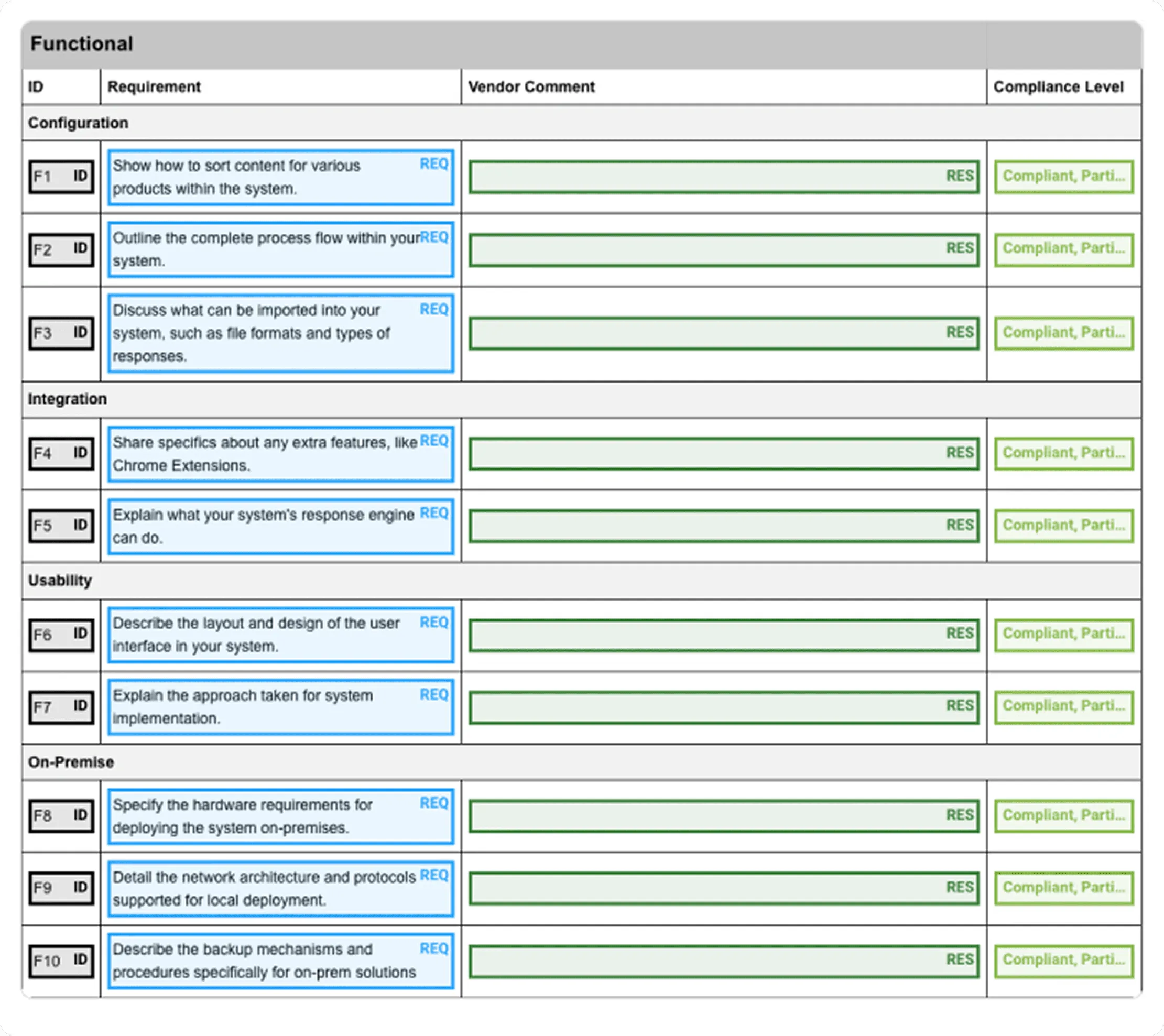
Pro tip: Upload the bid document into AutoRFP.ai to quickly extract requirements, sections, and key context. This helps you identify scoring language, compliance checkpoints, and potential risk areas earlier, before you finalize your win themes.
2. Setting the Evaluator’s Baseline Early
When evaluators see your bid response first, your priorities, differentiators, and proof become the clearest story in their head, which makes it easier to score you higher across the criteria.
This primacy effect often creates an anchoring effect too: your structure, approach, and even pricing logic become the benchmark they subconsciously compare others against.
Side note: Recency bias is a risky bet. Trying to submit last increases the risk of rushed errors, signals weak planning if timelines slip, and a single technical issue can cost you the deadline.
3. Proof Density Over Promise Density
Evaluators trust what you can prove. Strong bid responses support claims with evidence such as metrics, results, timelines, case examples, delivery plans, and operational controls.
They do not rely on vague statements like “we’re experienced” or “we’re fast” unless those claims are backed by something concrete, relevant, and believable in the buyer’s context.
4. Develop and Govern a Robust Content Library
A strong bid library is a single source of truth for reusable, pre-approved content so responses stay consistent, accurate, and fast. Build it like an operating system, not a folder:
| Step | Main action | What this includes |
|---|---|---|
| 1 | Define scope and success metrics | What content types, products, regions, languages, and what “better” means |
| 2 | Audit recent proposals | Start with your last 10-20 strong bids |
| 3 | Design structure and metadata | Categories, tags, owners, last-reviewed date, approved vs. draft |
| 4 | Clean the core set | De-identify without weakening, create variants, and mark what is safe to reuse |
| 5 | Keep tool setup simple | Version control, ownership, and a search that works |
| 6 | Govern it | Review cadences for high-dependence answers like security, legal, and implementation |
If you want the library to stay fast and usable without turning into a maintenance project, AutoRFP.ai can help.
AutoRFP.ai finds answers by meaning rather than keywords, then files approved responses back into the library as the team works, so owners keep the content-manager role without months of routine filing.
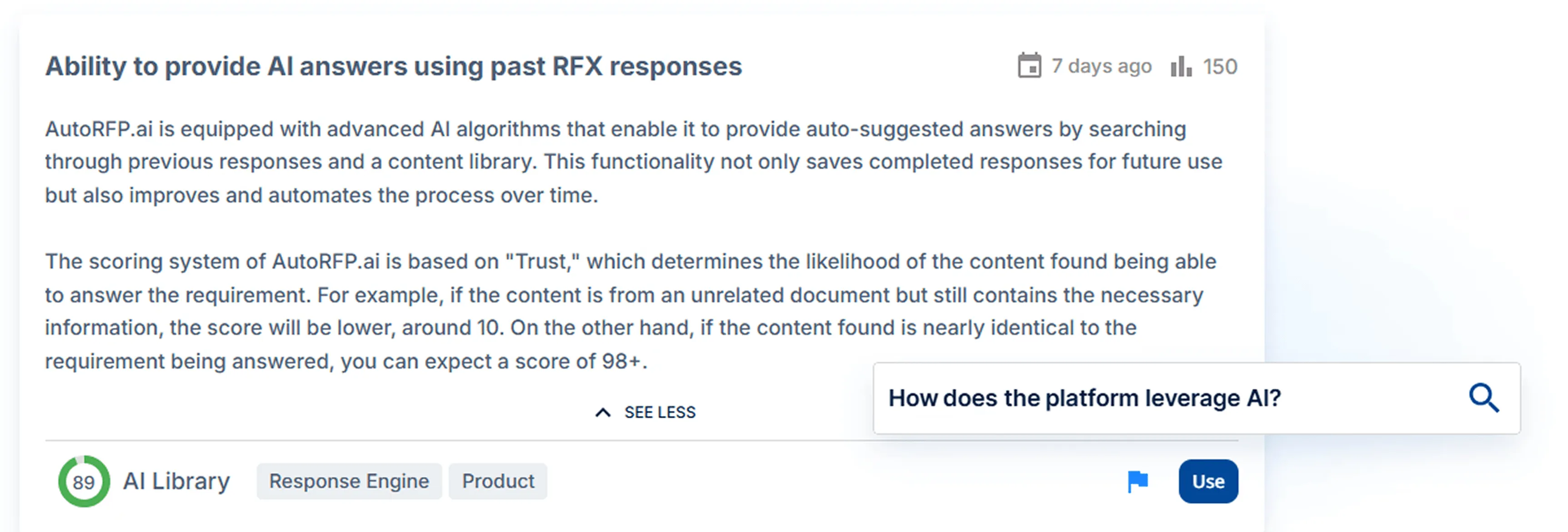
Over time, it stays current because it learns from what you actually submit and approve, aligned with real business practices.
5. Differentiation That Is Defensible
In competitive bids, most suppliers can meet the basic requirements. High-scoring teams make their advantage easy to see by focusing on strengths competitors cannot easily copy, such as unique processes, delivery model advantages, or outcomes they repeatedly achieve.
That kind of differentiation is stronger because it is not just persuasive. It is specific, credible, and easier for evaluators to reward.
6. Easy Collaboration for Reviewers
When reviewers struggle to find what changed, they miss issues, and approvals stall. High-performing teams make reviews simple and traceable.
To keep that review order running without chasing people, you need real-time visibility into who is blocked, what is overdue, and which SMEs still have not validated their sections.
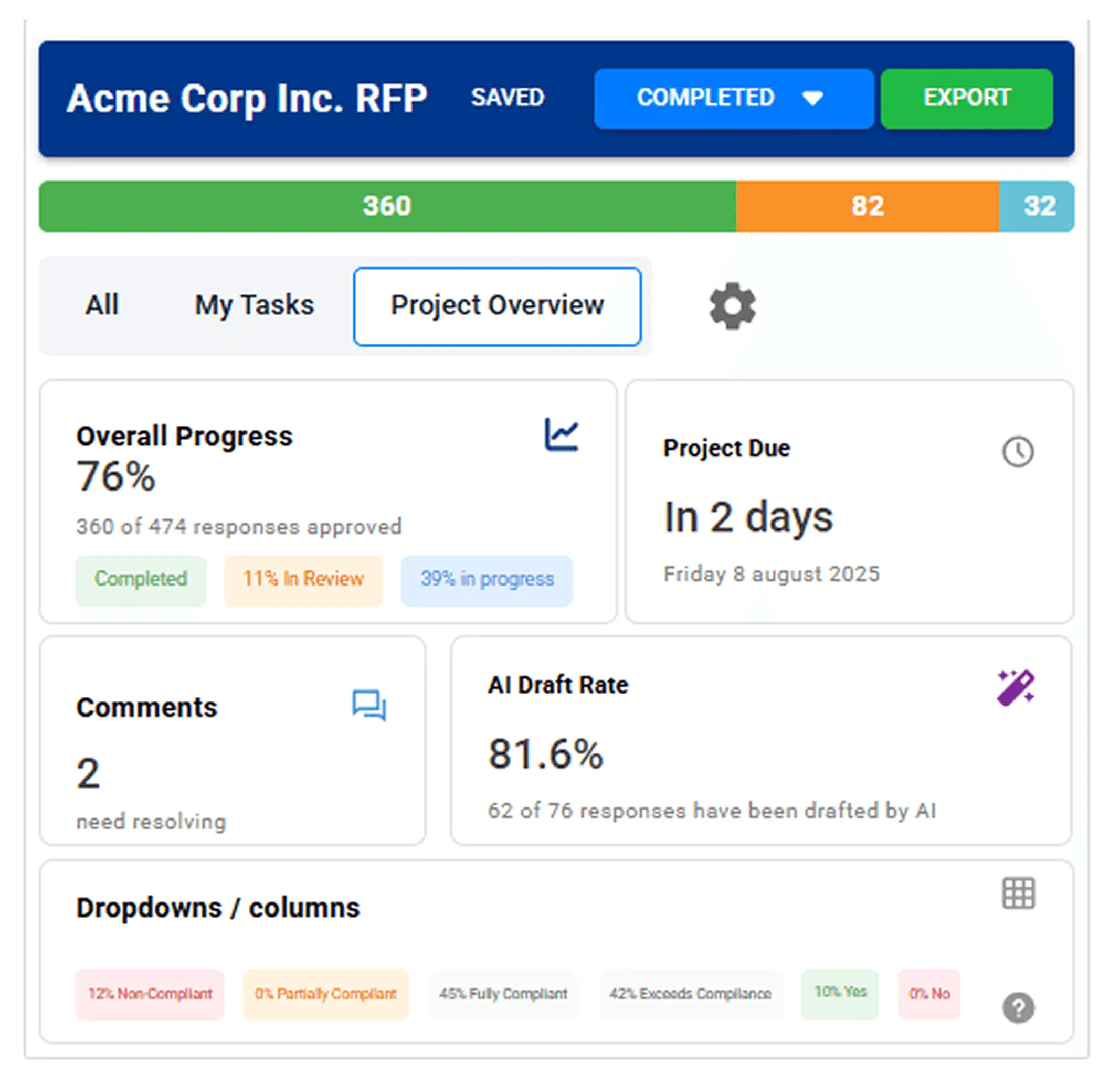
Tools like AutoRFP.ai help you track every bid from one dashboard, send targeted reminders, and replace spreadsheets and status meetings with clearer accountability.
Proposal Automation Tools That Help You Win More Bids
Here are some proposal automation tools that can help you improve speed, accuracy, and win rates.
1. AutoRFP.ai
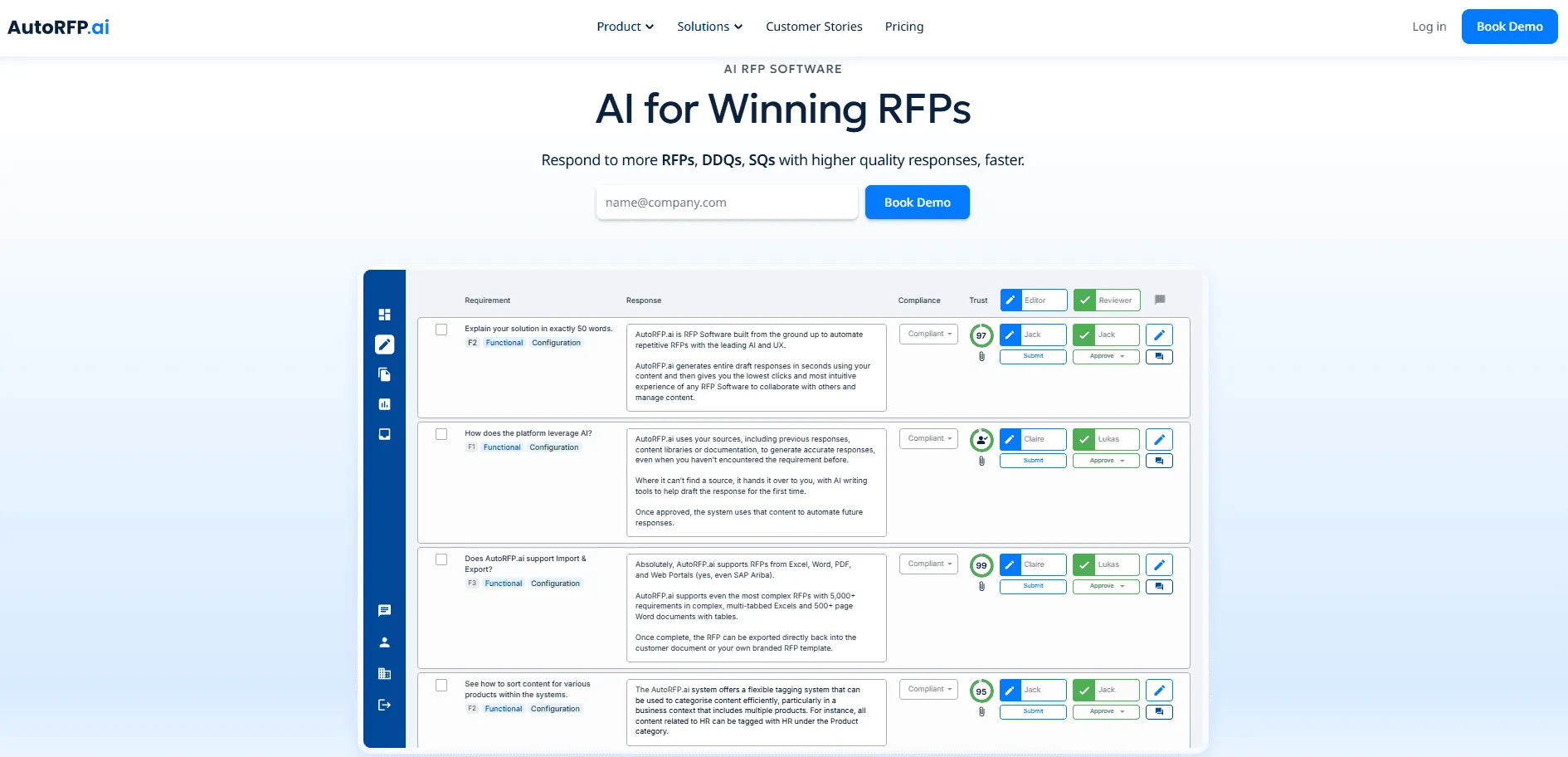
AutoRFP.ai helps teams generate accurate, high-quality responses to bids, RFPs, DDQs, and security questionnaires in far less time. It combines deep requirement extraction, AI drafting, workflow control, and reporting features to help teams scale quality without losing oversight.
Key Features
AI Document Importer for Bids
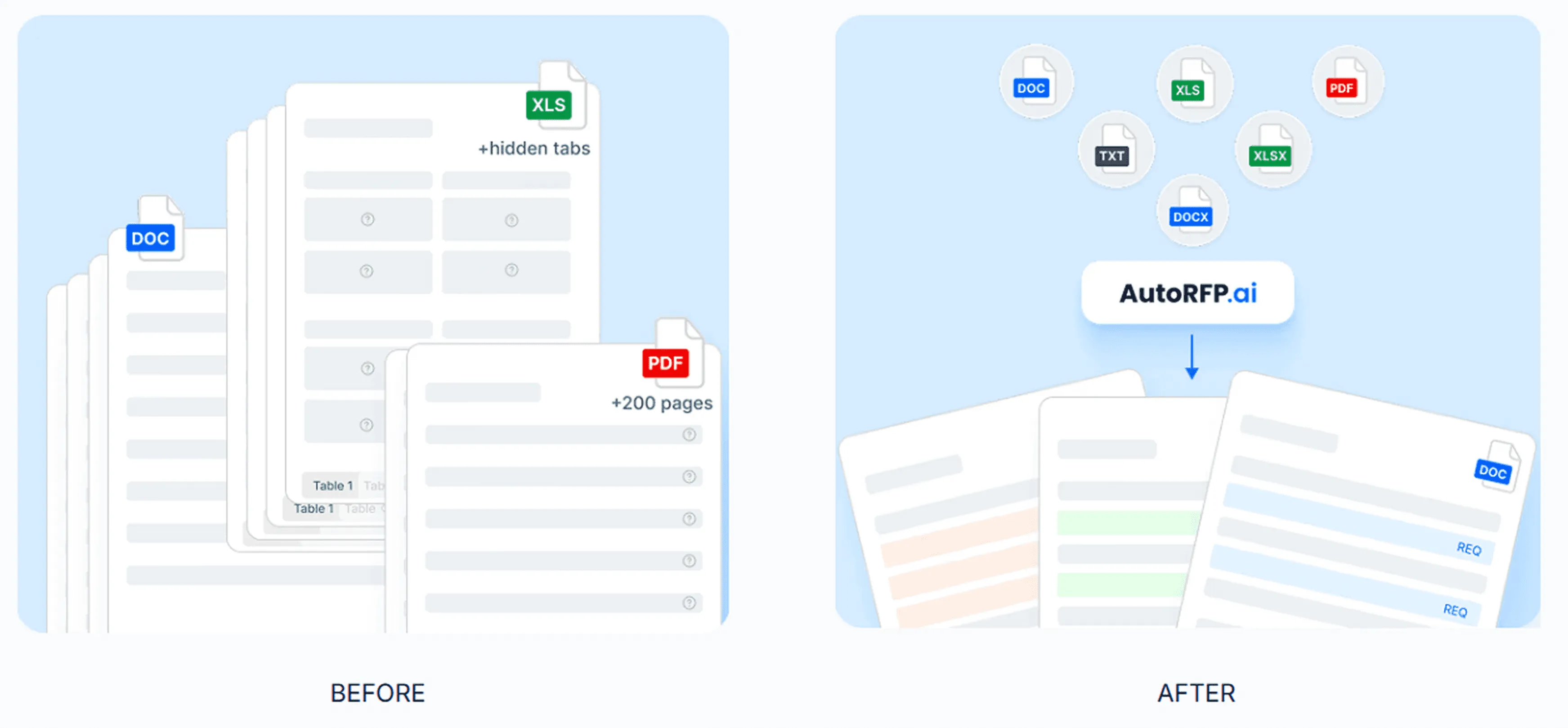
AutoRFP.ai helps teams start complex bids faster by importing Word, Excel, and PDF files, then automatically extracting requirements, sections, and supporting context.
This makes it easier to move from document intake to a structured, workable draft without spending hours reformatting files first.
It is especially useful for complex bid documents that include large spreadsheets, detailed requirements, and multiple sections that would otherwise slow the team down before writing even begins.
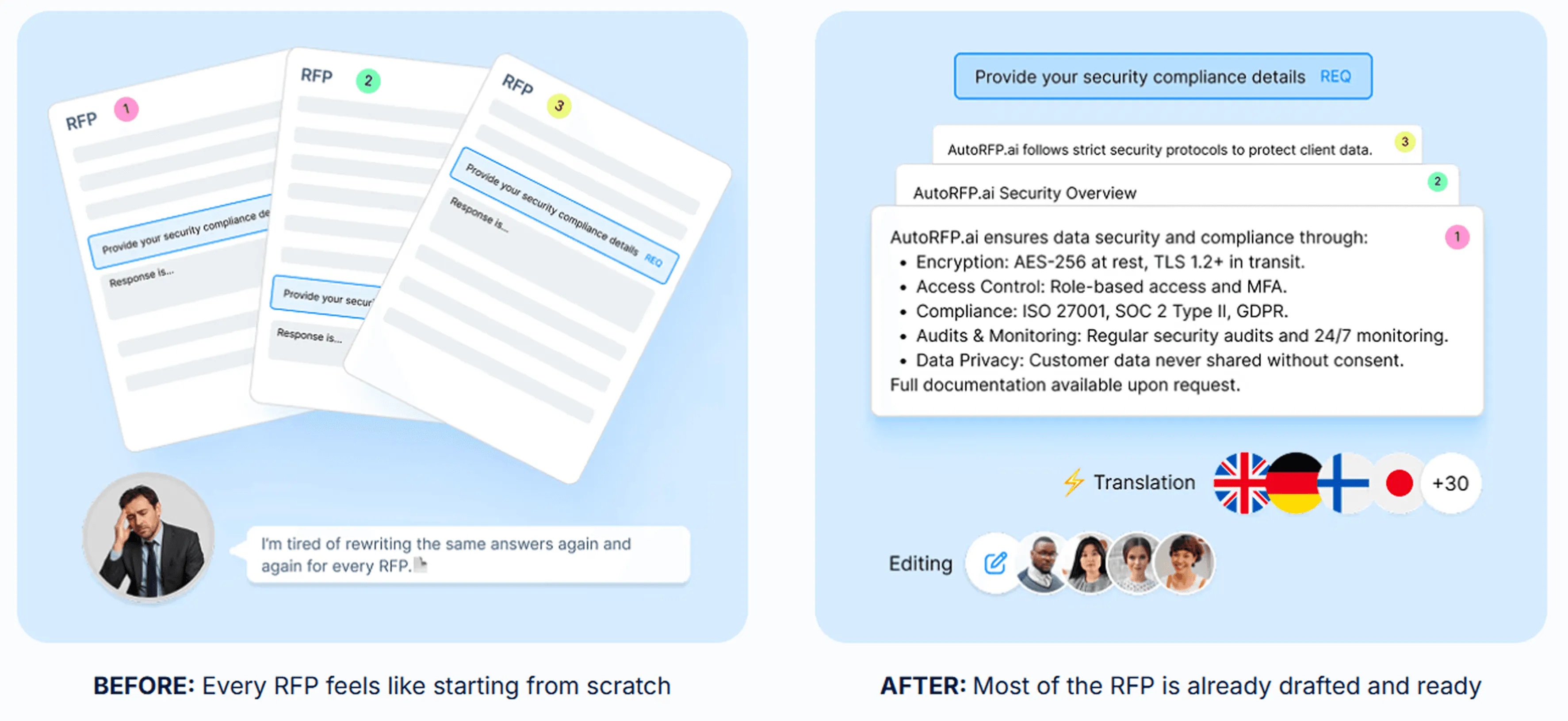
AI Response Engine
AutoRFP.ai generates first drafts using approved past responses, trusted content, and company knowledge, which helps teams reduce manual writing and move faster through bid work.
Instead of starting from scratch, teams can work from responses that are designed to stay relevant, structured, and closer to the company’s actual messaging. This makes drafts easier to review, refine, and reuse across future bids.
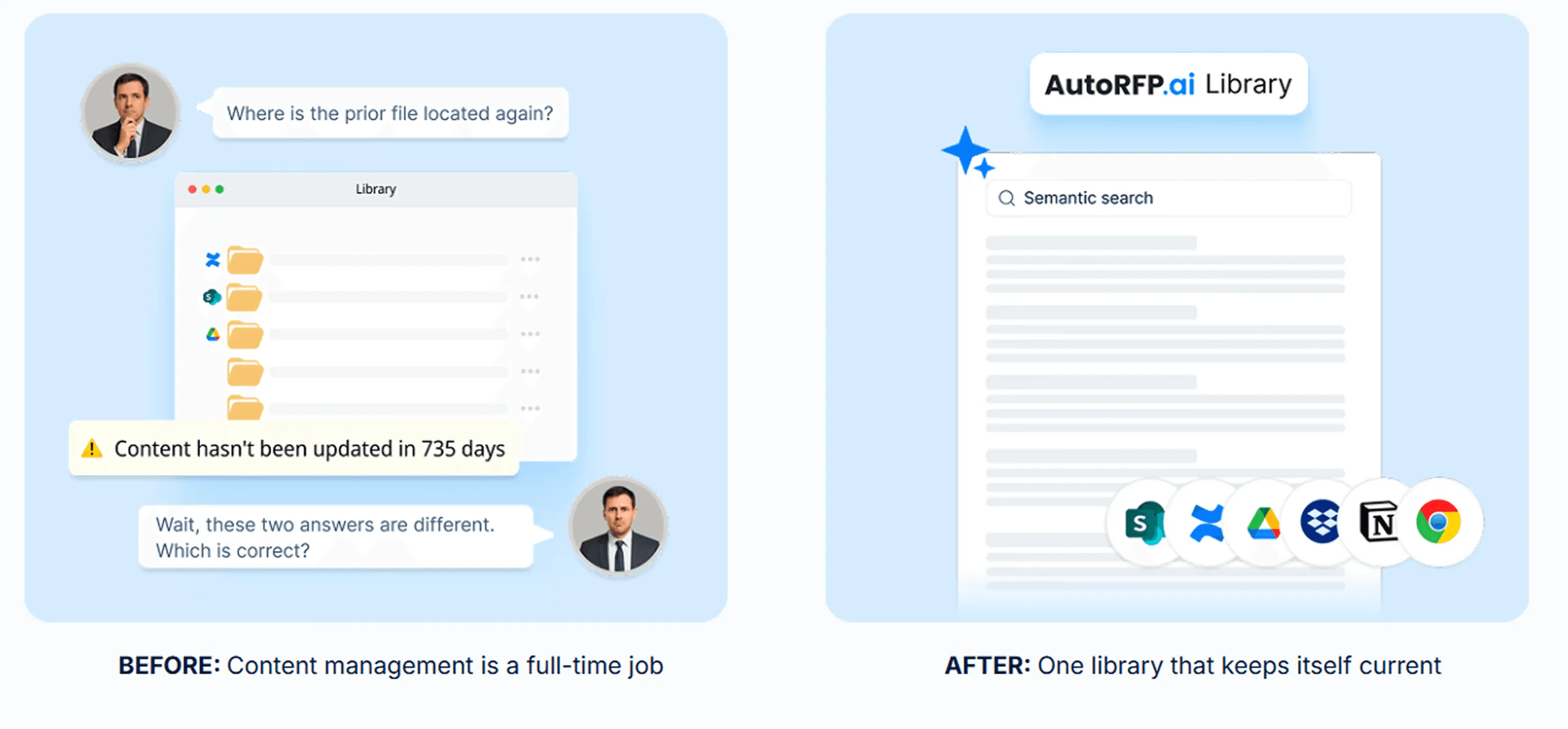
Self-Updating Content Library
AutoRFP.ai improves its content library over time by learning from approved responses, so teams do not need to manage everything manually before the platform becomes useful.
This helps teams keep content current as messaging, proof points, and business priorities evolve.
Its semantic search also surfaces relevant content based on meaning and context, not just exact keywords, which makes it easier to find, reuse, and adapt stronger answers across future bids.
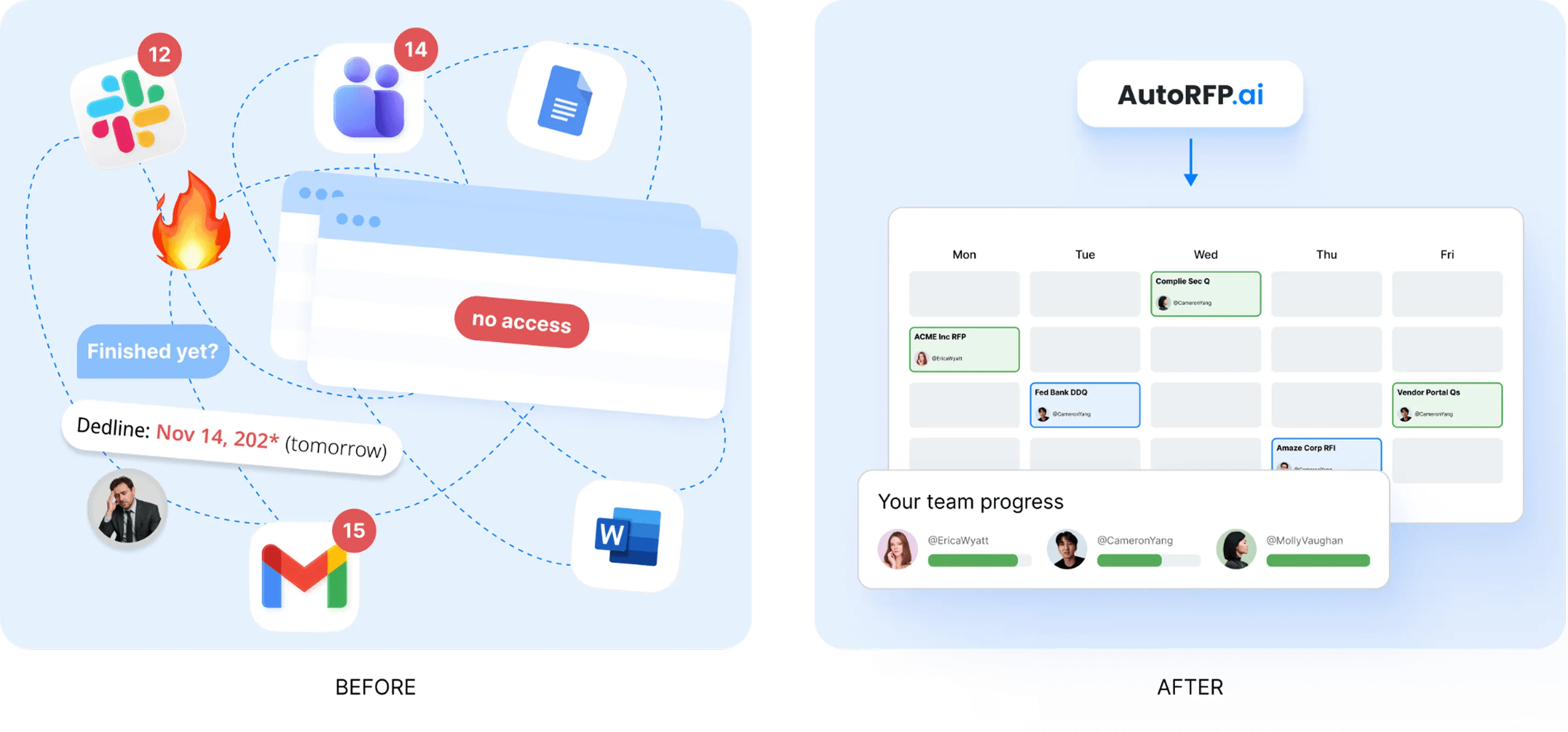
Bid Project Management
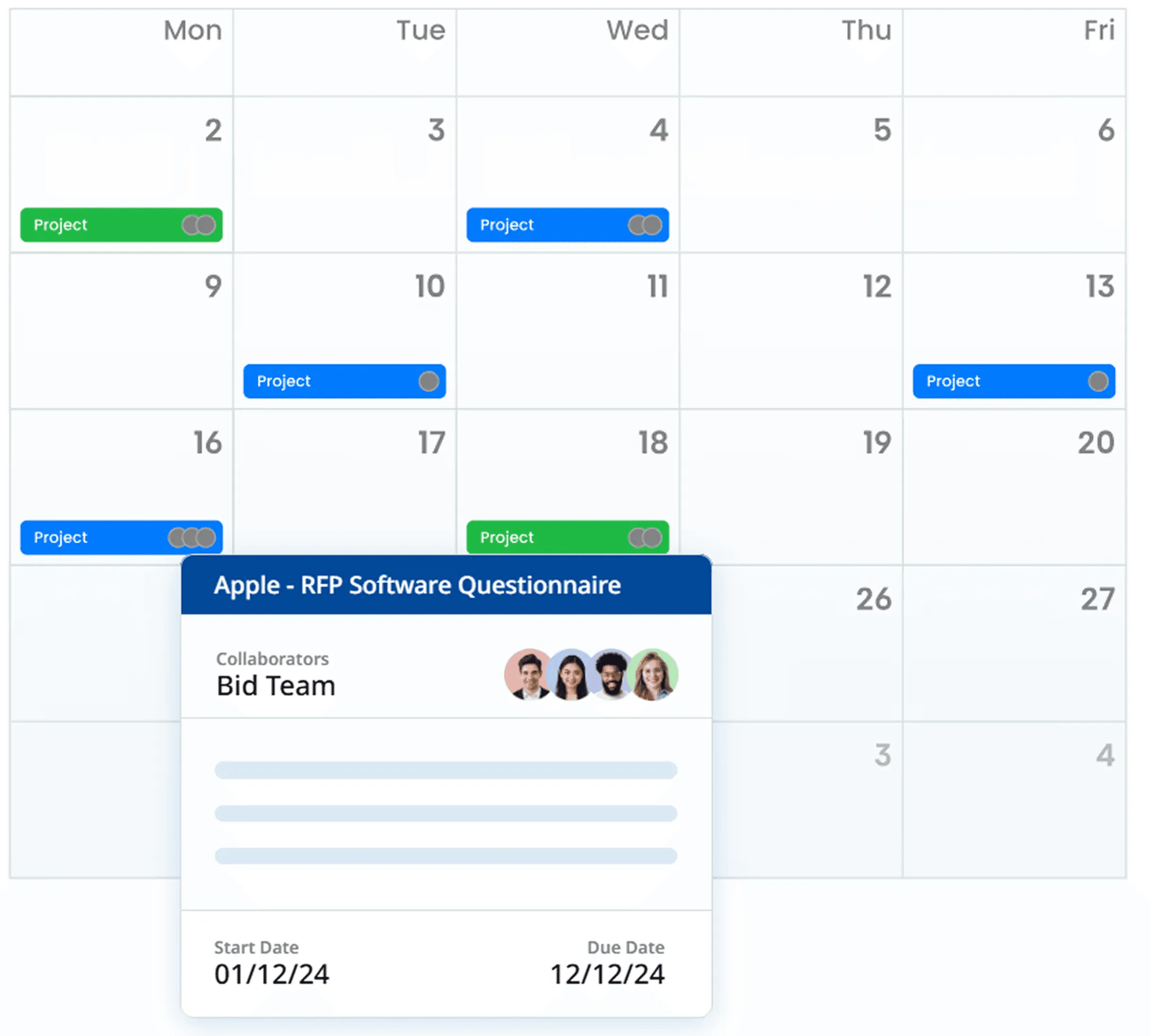
AutoRFP.ai gives teams a central dashboard to manage owners, due dates, blockers, comments, and progress across active bids.
This helps teams stay aligned without relying on scattered spreadsheets, email threads, or manual status updates. Everyone can see what is moving, what is stuck, and who needs to act next, which makes complex bid workflows easier to manage and less likely to slip.
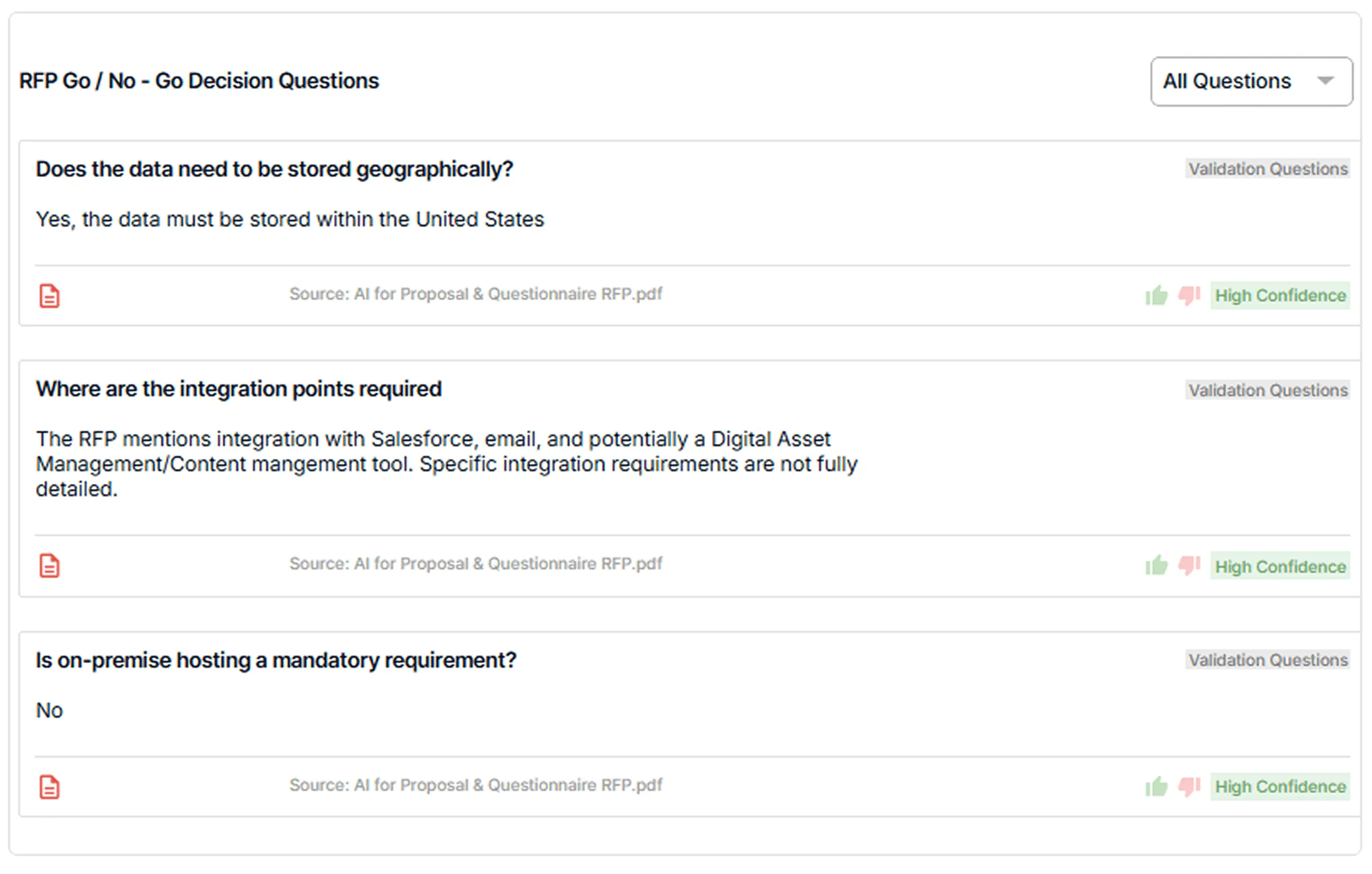
AI Go/No-Go Risk Screening
AutoRFP.ai helps teams evaluate bids against custom go/No-Go criteria before they commit valuable time and resources.
It can highlight early risks across compliance, legal, timelines, and delivery fit, which makes it easier to spot poor-fit opportunities sooner and avoid investing in bids that are unlikely to progress well.
Reporting and Capacity Planning
AutoRFP.ai brings win rate, workload, response speed, project volume, and team capacity into one reporting view.
Leaders get a clearer picture of performance, delivery pressure, and available bandwidth, which makes it easier to plan resourcing and decide which bids the team can take on without stretching quality.
ROI Reporting
AutoRFP.ai tracks automation rate, cost savings, team efficiency, capacity freed by person, response type breakdowns, and accuracy trends across completed projects.
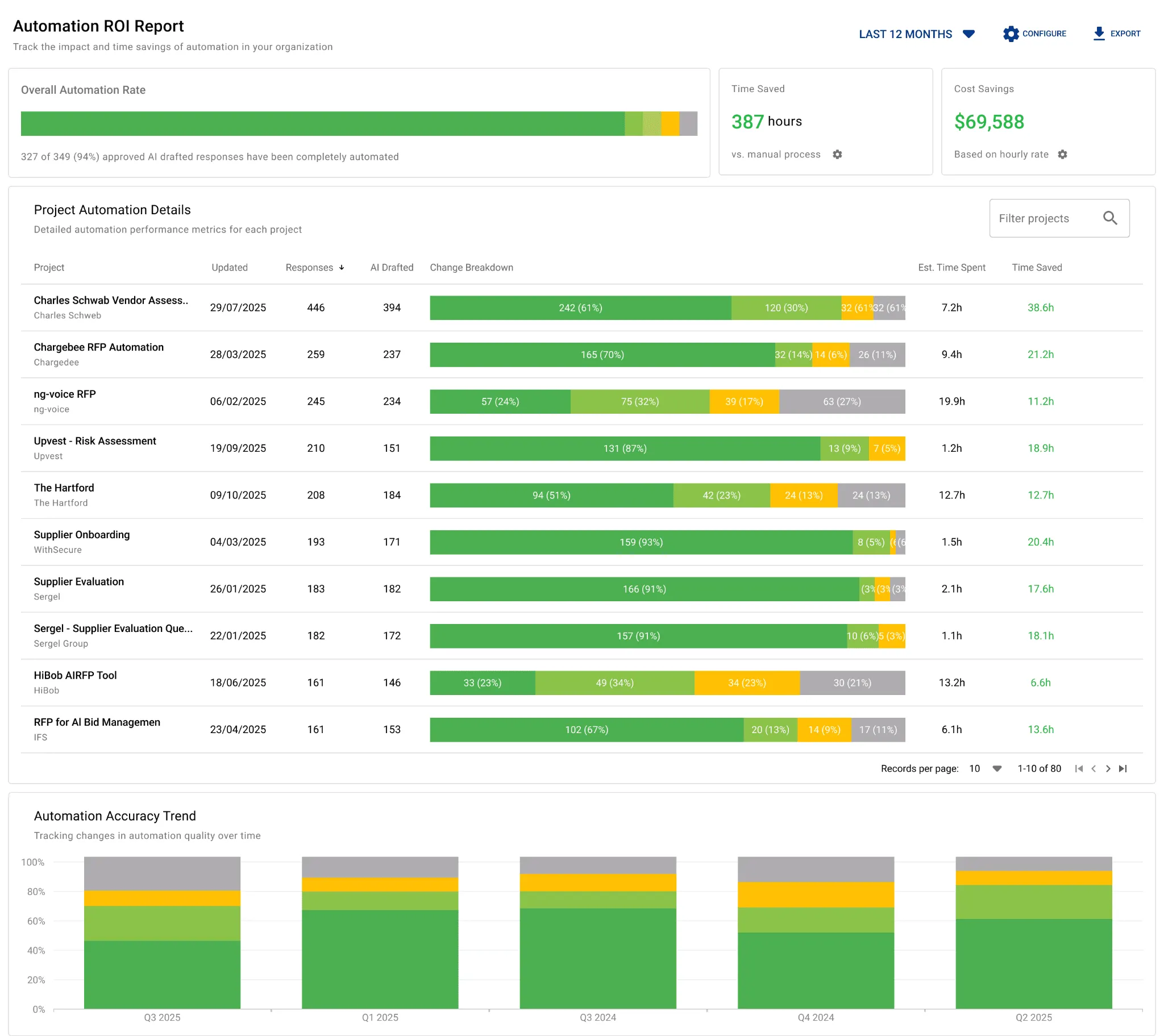
Instead of pulling numbers together manually, teams can show exactly where AI is cutting repetitive work, where people are still spending the most effort, and how that changes from quarter to quarter. It gives finance, leadership, and proposal managers a much clearer way to see whether the investment is paying off.
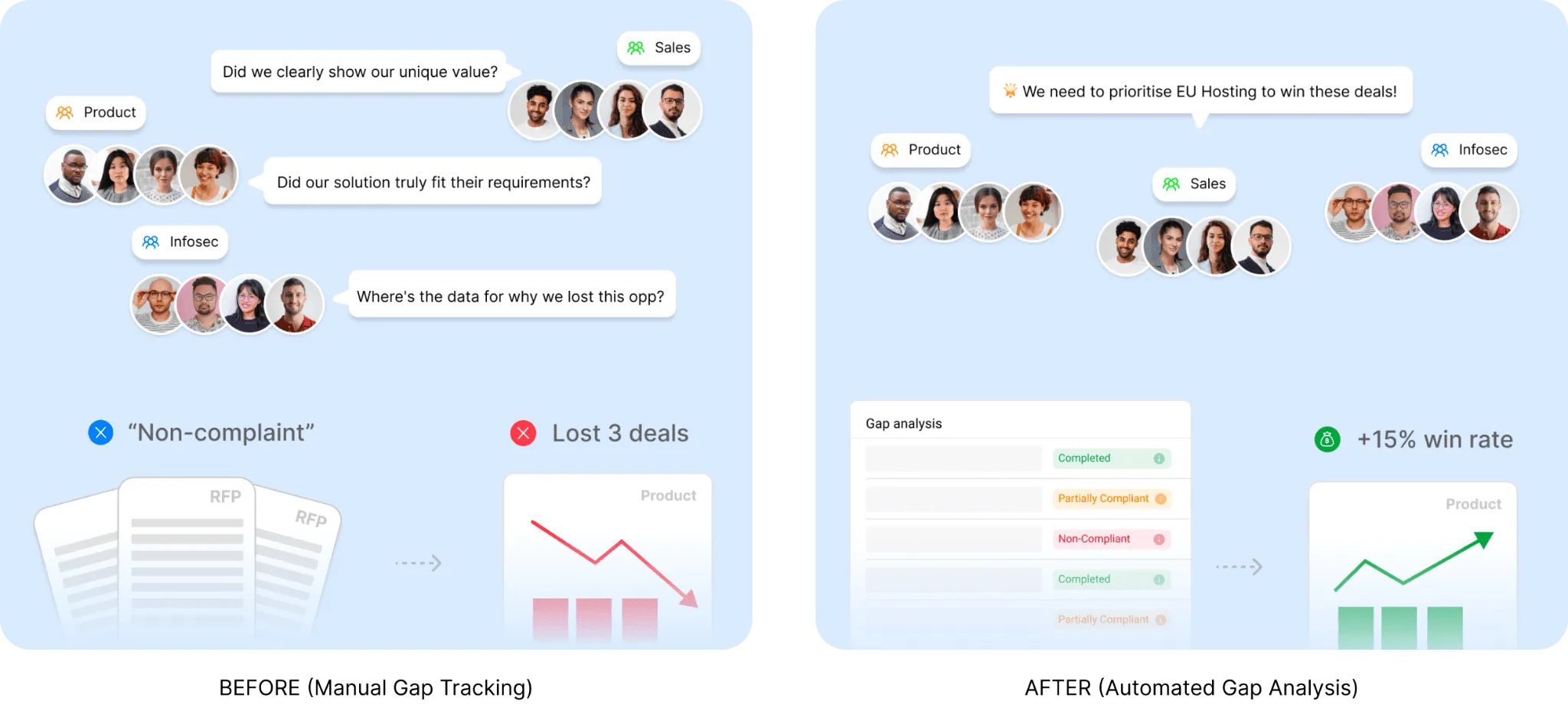
Visibility Into Deal Blockers
AutoRFP.ai shows where weak answers, compliance gaps, and recurring issues keep showing up across past submissions.
With that view, teams can see what is hurting bids, fix the right problems sooner, and make stronger decisions on future opportunities.
Other notable features:
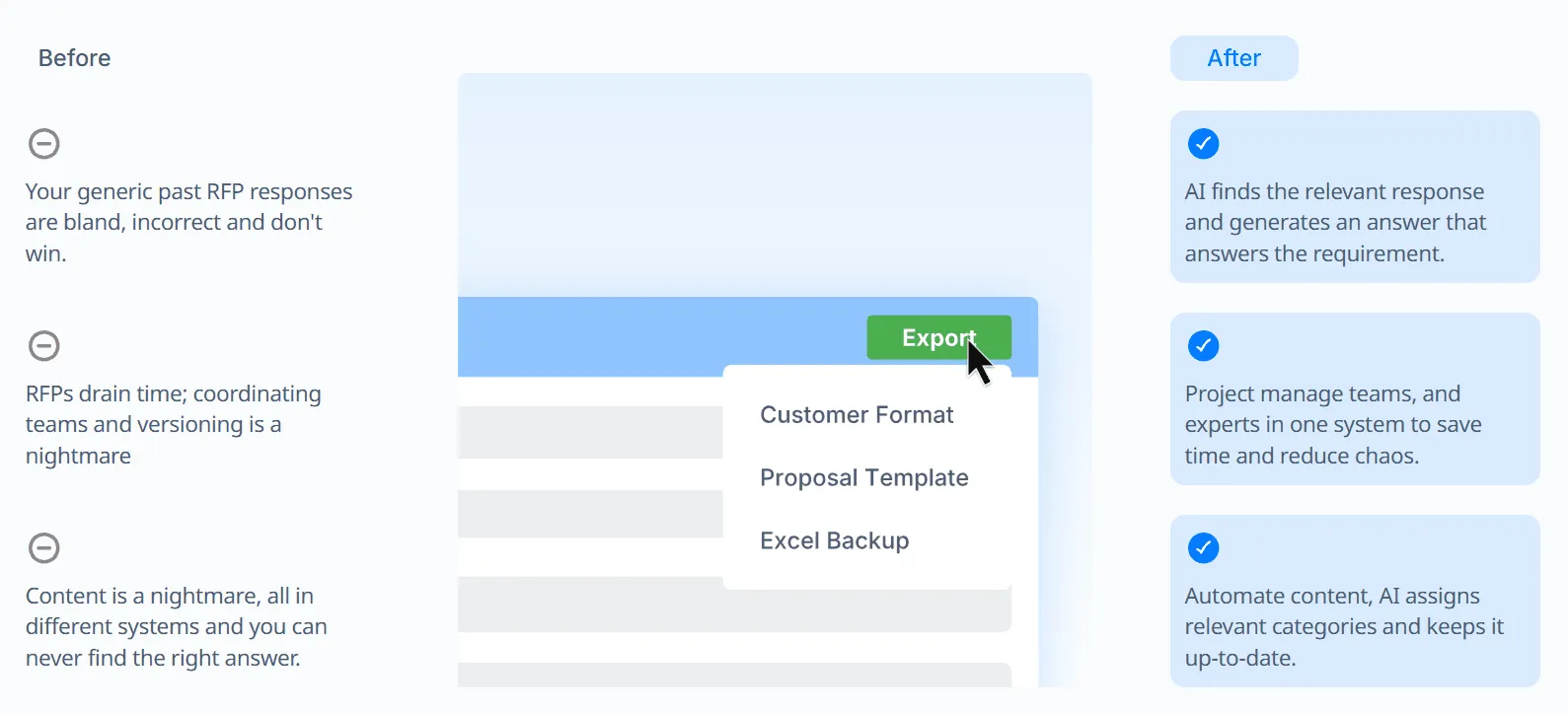
Export into the customer’s format: Teams can export completed responses back into the customer’s original format while keeping templates and structure intact.
AI Q&A bot: Users can ask questions directly in the platform and get source-based answers quickly, without manually searching through old files.
Integrations: AutoRFP.ai connects with SSO, knowledge bases, communication tools, file storage systems, CRMs, and more.
Portal question handling: Teams can capture questions from web portals, generate answers from their content library, and export them back more efficiently.
Project Agent
AutoRFP.ai’s Project Agent brings response editing, document creation, content search, and live web research into one conversational workflow.
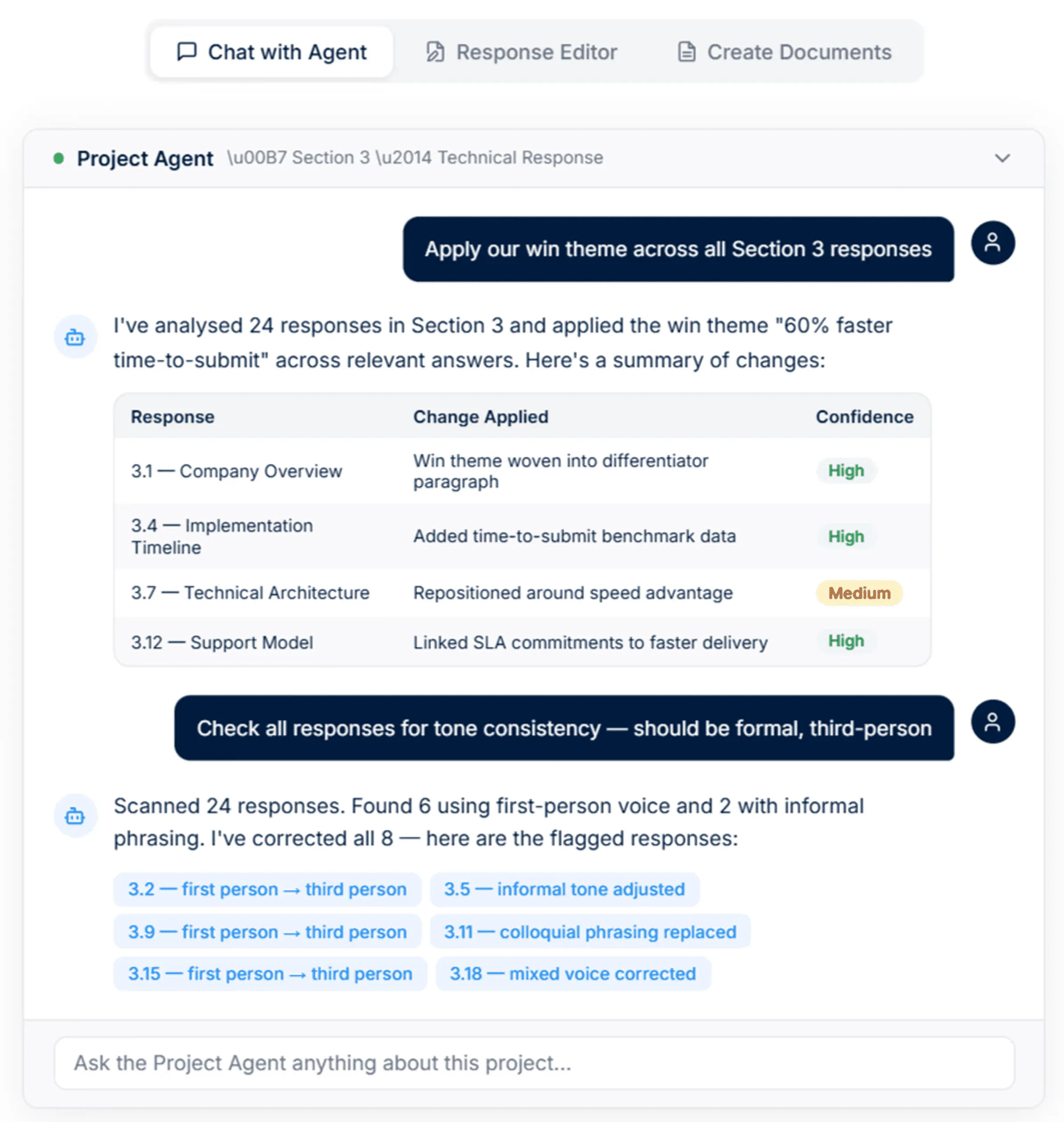
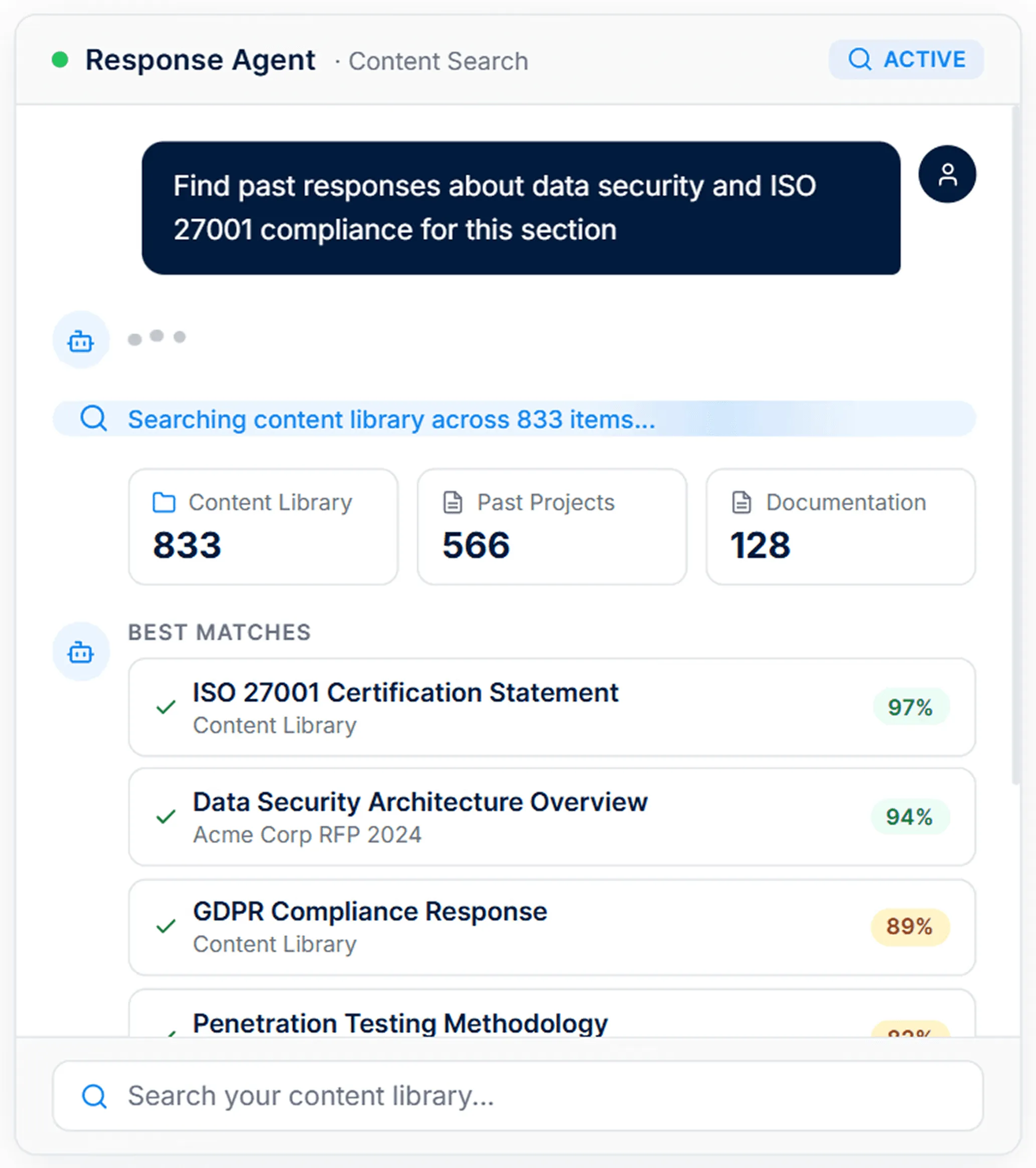
It can search your content library, past projects, and uploaded files to surface the most relevant approved content for each requirement.
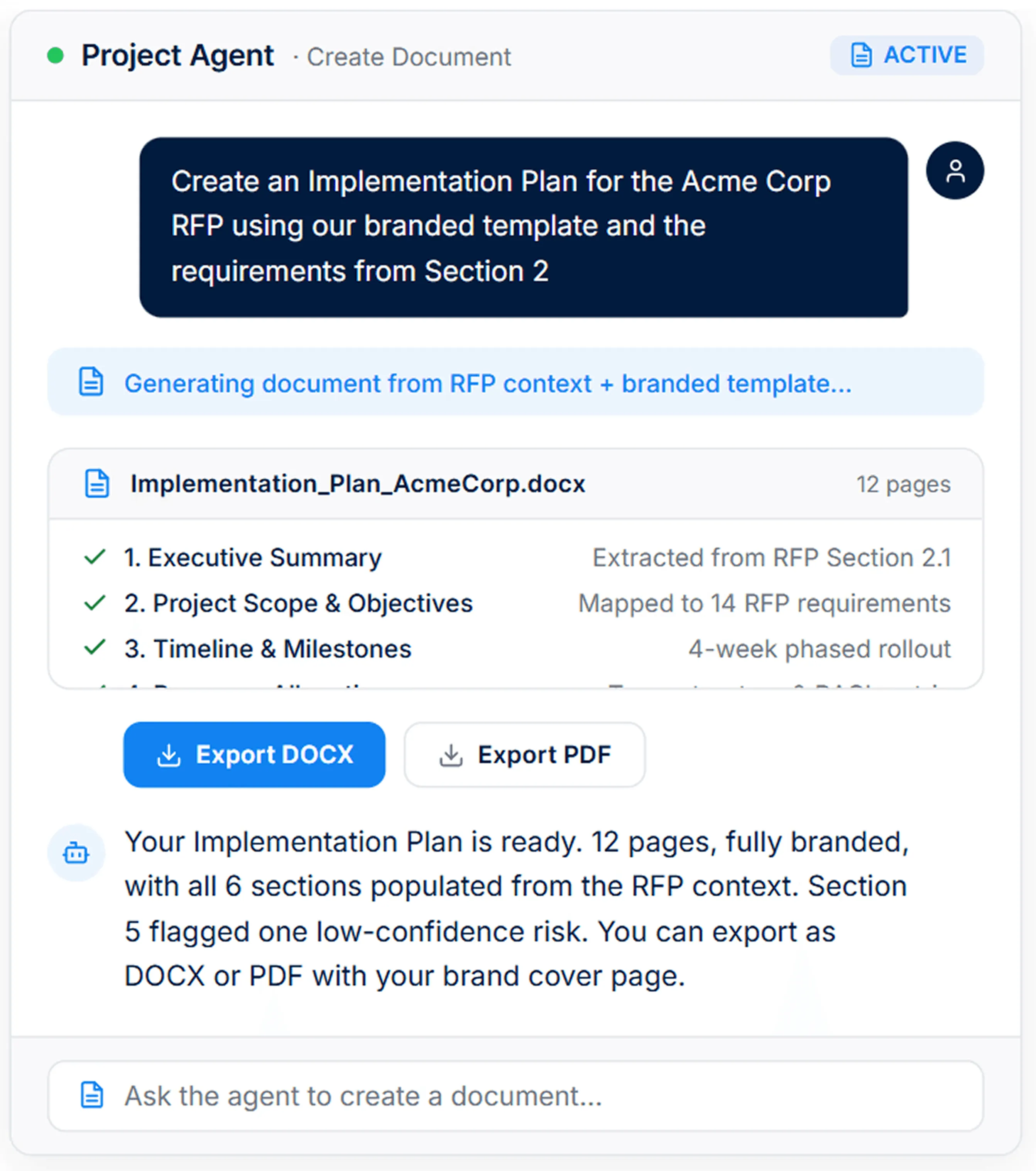
It can also generate documents like executive summaries, implementation plans, and cover letters using the project context and your approved content.
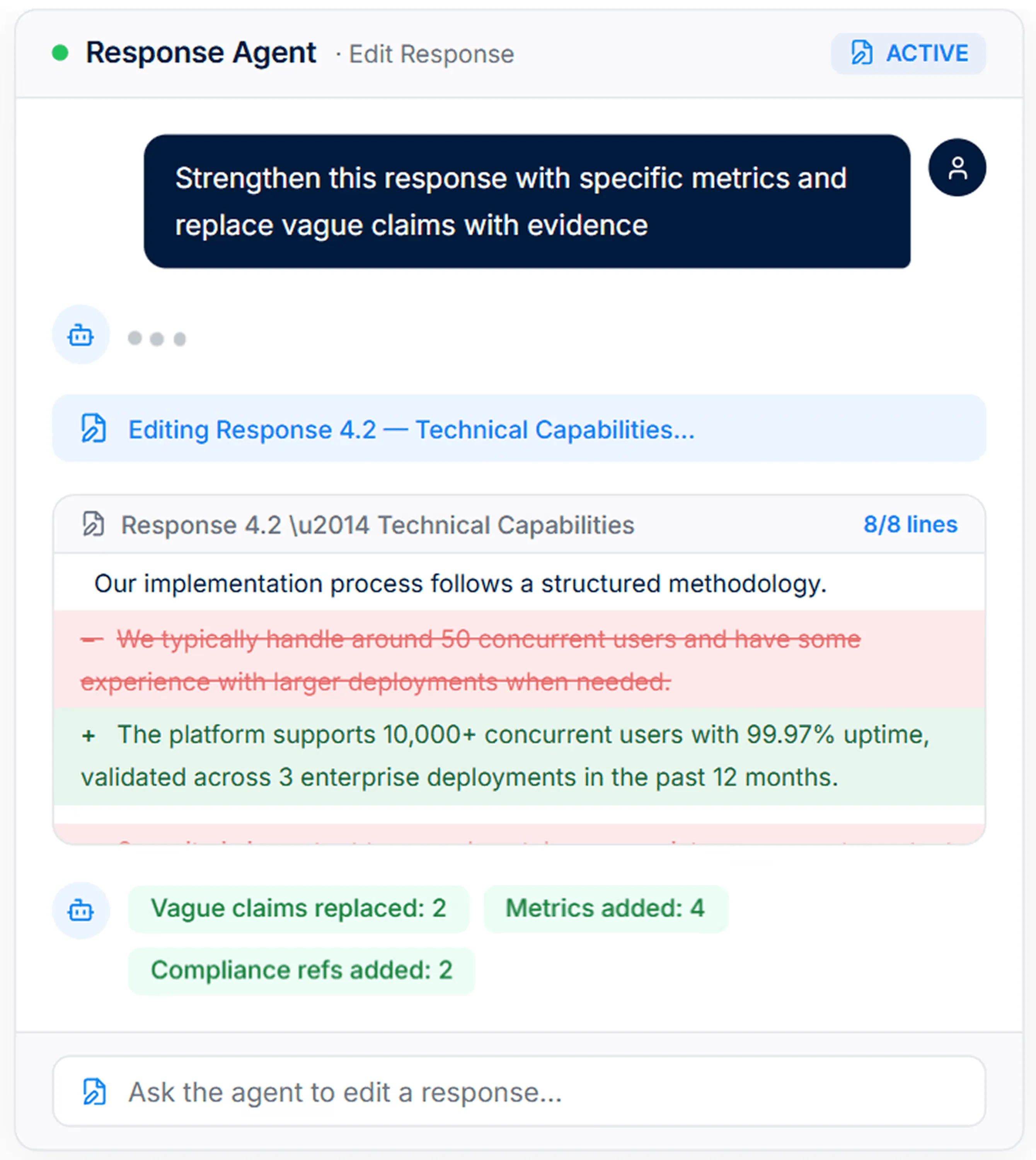
Teams can use the agent to rewrite responses in place, tighten wording, add stronger evidence, and apply win themes more consistently across the bid.
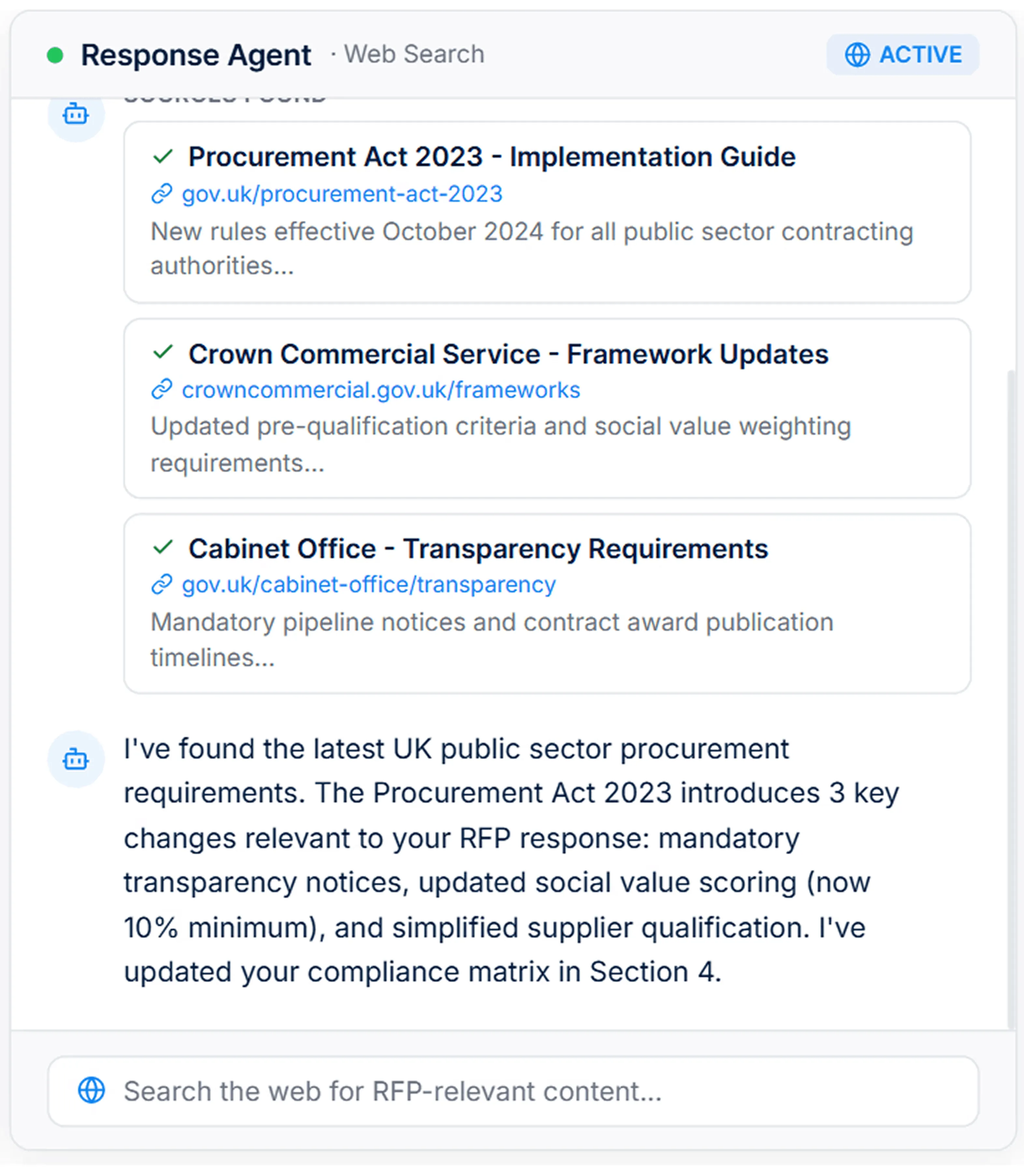
The agent can also search the web for current regulations, market data, and prospect-specific information, so teams can bring live context into the response without leaving the platform.


Video transcript
Transcript is auto-generated and may contain minor errors.
Hey, I'm Rob from autoRFP.ai. What is autoRFP.ai? Well, autoRFP.ai is an AI software as a service or SaaS application that does AI for proposal or RFP responses. That includes RFIs, like request for informations, includes due diligence questionnaires or DDQs, and includes security questionnaires. So, you can find all about us at autoRFP.ai. So, we're a technology company. We have offices all across the globe including Brisbane, Australia, Vancouver as well. And effectively, our tool allows, whether it be bid managers, sales people, proposal writers, RevOps team members, sales leadership, answer complicated request for proposals. So, what is a request for proposal? You can see one of our other videos below in the description. But effectively, our system
looks something like this. And it lets team members, and you can have unlimited number of people log in to autoRFP.ai, good product, allows people to go in, create projects, which would be for instance an RFP. I can go in here, create my information from my zip file, and that includes, you know, like an Excel spreadsheet, PDF, Word doc. We can run an AI go no go project analysis on the RFP. And then effectively from that, we can bring in all the information in terms of what are the questions, where our AI automatically scans the documents and figures out what is being asked of the RFP, whether it's multiple tabs in an Excel spreadsheet and everything else, whether it's drop-downs. And that all happens automatically through the power of AI. Then, we generate our response, and we can do it in in 40 plus different languages and adding languages all the time. Once you've imported your RFP into order rfp.ai,
you can collaborate with your team members assigning different people to answer the questions, review the questions, looking at an overview of the entire project and project managing due dates. Now AI effectively starts automatically answering those different questions based on your knowledge documentation. So that might be your website, your help docs, your technical documentation, your past RFP answers or security questionnaires, your security policies. But effectively all that different company information you import into order RFP and then our AI leverages that to create an AI first draft of an RFP response. Once we're happy with all those requests, we can approve it. That goes into the model to learn from and add to. So your current responses are automatically used for new responses and then you can export that as well. And then the final cool thing about order RFP is you have a lot of different
integrations that you can pull in, whether it's knowledge documentation from places like Notion, Google Drive and so on. So that's order RFP. We're an AI SaaS app. Uh you can host globally. We do not use customer data for training purposes or to send it back to LLMs. So we're secure and private. We have our ISO 2701 certificate and our SOC 2 certificate and then you can find up-to-date pricing and information on our website. Or if you came to learn more, you can book a demo and schedule time with our team. Thanks.
2. Loopio
Loopio helps teams manage and respond to bids using a centralized content library, AI-assisted drafting, and structured collaboration workflows. It focuses on improving response consistency, speeding up turnaround time, and helping teams reuse trusted content effectively across submissions.
Content library: Centralized repository to store, organise, and reuse approved answers across bids.
AI drafting: Generate, summarize, and refine responses using AI trained on your content.
Collaboration workflows: Assign contributors, track progress, and reduce version control issues.
Auto-fill responses: Automatically suggest answers based on past content and context
Integrations: Connect with tools like CRM, Slack, and cloud storage for smoother workflows.
3. Responsive (formerly RFPIO)
Responsive helps teams automate and manage bid and proposal responses using AI, workflow automation, and a central knowledge base. It is designed to improve response speed, coordination, and visibility across the full lifecycle of bids and questionnaires.
AI response generation: Draft answers quickly using AI trained on internal content.
Workflow automation: Manage tasks, deadlines, and review cycles across teams.
Content library: Store and reuse approved answers through a central knowledge base.
Collaboration tools: Enable cross-team input with structured review and feedback workflows.
Reporting and analytics: Track project status, performance, and response effectiveness.
4. Qvidian
Qvidian is an enterprise proposal automation platform designed for large teams managing complex, high-volume bids. It focuses on structured workflows, content governance, and collaboration to help teams produce consistent, compliant responses at scale.
Content library: Centralised repository with version control, approvals, and governance for reusable answers
Workflow automation: Structured review and approval workflows to manage complex, multi-stage bids
Collaboration tools: Real-time collaboration with integrations across Microsoft Office and Teams
AI assist: Generate and refine responses using AI built on internal content
Reporting and analytics: Track performance, usage, and proposal effectiveness to improve over time
5. Proposify
Proposify is proposal software focused on creating, managing, and tracking sales proposals with strong design and client engagement features. It helps teams streamline proposal creation while improving visibility into deal progress and buyer interaction.
Proposal builder: Create branded, structured proposals using templates and reusable sections
Content library: Store and reuse approved content to maintain consistency across proposals
Client tracking: Track views, interactions, and engagement to understand buyer intent
Workflow management: Manage approvals, edits, and collaboration across teams
E-signature and payments: Close deals faster with built-in signing and payment integrations
Stop Losing Bids You Should Be Winning. Try AutoRFP.ai Today!
Too many teams lose bids they were fully capable of winning, not because the solution was weak, but because the process was messy, rushed, and hard to score.
AutoRFP.ai helps you qualify faster, organize work earlier, reuse the right content, and produce stronger responses with less chaos.
That means more time for buyer insight, proof, and tailoring, where wins actually happen.
Book Demo today to see how AutoRFP.ai can help you win more of the right bids.
About the author

Ops Lead
Ops Lead at AutoRFP.ai. Designs the pipeline, content, and handoff systems bid teams use to run RFPs end-to-end, and co-hosts live sessions on winning workflows.
LinkedInFrequently asked questions
How Do You Know If Your Bid Process Is the Real Problem?
If your team keeps relying on late reviews, copy-pasting old answers, chasing SMEs for updates, or fixing compliance issues near submission, the problem is usually the process, not just the writing. Strong bids come from better qualification, clearer ownership, earlier insight, and more controlled reviews, not extra last-minute effort.
What Should You Do If Buyer Requirements Are Unclear?
Do not guess and hope the evaluator fills in the gaps for you. Flag the ambiguity early, document your interpretation, align internally on assumptions, and make your response as specific and low-risk as possible. If clarification is allowed, use it. If not, write in a way that shows sound judgment and reduces buyer uncertainty.
Can Smaller Teams Still Improve Bid Win Rates Without Hiring More People?
Yes, if they improve how they qualify, reuse, review, and prioritize work. Smaller teams usually lose efficiency through poor coordination, weak content reuse, and unnecessary rework, not just lack of headcount. A tighter process, better visibility, and stronger proof can raise quality without immediately expanding the team.
How Secure Is AutoRFP.ai For Enterprise Bid Data?
AutoRFP.ai is positioned for teams handling commercially sensitive bid, DDQ, and security questionnaire data. Based on your notes, it does not train customer data for LLMs and emphasizes enterprise security controls, including ISO 27001 and SOC 2, which makes it more suitable for security-conscious organizations working on sensitive enterprise opportunities.
Does AutoRFP.ai Need a Large Content Library to Work Well?
No. AutoRFP.ai can start from the library the team already trusts. Approved responses add to it over time, and owners keep review, so setup is a foundation rather than months of filing.
What Makes AutoRFP.ai Different From Traditional Proposal Software?
The biggest difference is that AutoRFP.ai combines AI drafting, semantic search, workflow visibility, and a library that stays current as approved answers land, while owners keep review. Instead of relying mainly on keyword matching and manual upkeep, the platform captures approved responses so the team spends less time on routine filing.
Who Is AutoRFP.ai Best For?
It is best suited to B2B SaaS teams selling into enterprise accounts, especially companies with repeatable offerings and multi-person bid involvement across sales, pre-sales, security, and proposal roles. Based on your notes, it is less suited to highly bespoke creative or service-led bids where every response must be written almost entirely from scratch.
