Pink Team Review: Process, Tips & Solutions for Proposal Teams
A pink team review is an early proposal review of the first draft, checking structure, compliance, and win strategy before the team polishes the writing.
Co-founder & CEO, AutoRFP.ai··18 min read
You do not want to reach the final proposal review only to realize the strategy was weak from the start. By then, every change takes longer, reviewers are frustrated, and the team has to fix problems that should have been caught earlier.
This guide breaks down the pink team review process, practical tips to improve it, and solutions proposal teams can use to optimize reviews before small issues become major rework.
What Is a Pink Team Review?
A Pink Team review is an early internal proposal review that happens before the full response is drafted.
It is run by the vendor or proposal team responding to the RFP, not by the buyer issuing it. The goal is to check whether the team has the right strategy, structure, requirements understanding and win themes before writers and SMEs spend days building the full response.
Where the Pink Team Fits in the Colour Team Review Process
Here’s where the Pink Team review fits in the wider colour team review process: it happens early, after the opportunity has been qualified and the response strategy is taking shape, but before the full proposal is written.
The colours are Shipley naming labels, not a literal quality scale. Pink is not “less serious” than Red, and Red is not automatically “better” than Pink. Each colour marks a different review point in the proposal lifecycle.
| Review stage | When it happens | What it checks | Main outcome |
|---|---|---|---|
| Blue Team Review | Before the RFP is released or early in capture | Customer needs, competitive position, solution fit, win themes and pursuit strategy | A stronger capture plan and clearer bid strategy |
| Black Hat Review | Before or during proposal planning | Competitor strengths, likely positioning and how they may attack the opportunity | A sharper competitive strategy |
| Pink Team Review | After initial planning, before full drafting | Storyline, compliance plan, section outlines, win themes, response strategy and evidence gaps | Approval to start drafting with a clear direction |
| Red Team Review | After the full draft is written | Whether the proposal is persuasive, compliant, clear and aligned with the buyer’s evaluation criteria | Major revisions before final polishing |
| Gold Team Review | Near final submission | Executive-level messaging, pricing, risk, final positioning and business approval | Leadership sign-off |
| White Glove Review | Right before submission | Formatting, page numbers, attachments, forms, signatures, file names and portal requirements | A clean, submission-ready proposal |
The Pink Team review is the point where the team asks: “Are we building the right proposal before we spend serious time writing it?”
That makes it different from a Red Team review. The Red Team reviews the draft. Pink Team reviews the plan behind the draft. It catches weak win themes, unclear section direction, missing proof, compliance gaps and SME confusion before those problems become expensive rewrites later.
What a Pink Team Review Evaluates
A Pink Team review usually checks:
RFP requirements: Whether the team understands what the buyer is asking for, including mandatory criteria, submission rules, attachments and evaluation priorities.
Go/No-Go decision: Whether the opportunity is worth pursuing based on fit, risk, capacity, timeline and win probability.
Buyer priorities: What the customer actually cares about, not just what the RFP says on the surface.
Win themes: The main reasons the buyer should choose your solution over competitors.
Response strategy: How the proposal should be positioned, structured and supported with proof.
Section plans: What each section should cover before full drafting starts.
SME responsibilities: Which subject matter experts need to contribute, validate or approve specific answers.
Risks and gaps: Missing evidence, weak differentiators, unclear requirements or areas that could hurt the submission later.
The practical point is simple: a Pink Team review catches strategy problems early.
The Pink Team Review Process (Checklist)
Before the Pink Team review happens, the proposal team has already done the early pursuit work.
Here is where the process sits:
Receive the RFP: The sales, bid or proposal team receives the RFP from the buyer.
Review the requirements: The team checks the scope, deadlines, submission format, pricing needs, compliance requirements, evaluation criteria and risks.
Run Go/No-Go qualification: The team decides whether the opportunity is worth pursuing based on fit, win probability, requirements, timing and available resources.
Build the proposal strategy: If the RFP is a “go,” the team defines win themes, buyer pain points, customer insights, differentiators, competitor positioning, solution approach and pricing direction.
Create the proposal outline: The team maps out what each section should cover before full drafting starts.
Run the Pink Team review: The Pink Team checks whether the early strategy, structure and response direction are strong enough to move into full writing.
For a closer look at the full RFP workflow, this video breaks down the RFP management process high-win bid teams use to manage competitive proposals from kickoff to submission.
Video transcript
So you've just received an RFP. Maybe it's the first time you're doing it. Potentially you're an experienced bid manager, and you wanna understand what is the RFP management process, like process, challenges, and how do you win these highly competitive and challenging bids? In this video I'm gonna show you through the exact RFP management process, challenges, share with you some data in relation to winning bid teams and how they win these complex bids that can really elevate your business. Let's jump into it So why does RFP management matter? An RFP or request for proposal is when a large organization, let's say an enterprise with 10,000 staff, or federal government body wants to procure products or services. Where RFP management matters is we surveyed with between AutoRFP.ai and Stargazy over ninety-seven bid professionals in our twenty
twenty-six proposal win rate report. You can find the link below if you wanna have a look yourself of the proposal win rate report. In this report, we found that fifty-one percent of teams without content automation sit in the low win cohort. So in our RFP management video today, we're gonna go into content automation. We're gonna talk about how ninety-four percent of high win teams use joint collaboration with their subject matter experts, not having the subject matter expert drafting. And where this all matters is the median shortlist rate. So the rate of which your RFP makes it to the next stage and isn't disqualified is sixty-three percent for high win teams versus thirty-eight percent for low win teams. So the teams that have very strong RFP management processes and structure, not only are they winning more, but they're making it through the RFP process to the next step almost double or triple the rate of other teams with content automation, joint collaboration with SMEs, and a lot of other things.
So let's jump into it. But before that, I wanted to leave you with this quote: " Most teams lose RFPs because their system is perfectly designed to produce the results they currently achieve." That was in the Proposal Win Rate report from Christina, the founder of the Stargazy community, a bid manager community, and that really stuck with me, is that if you have a poor system for your RFP management and response, you are setting yourself up to fail, which is why RFP management and systems and processes matter a lot more than heroic efforts one-off bid that you spent, hours and hours fine-tuning. But actual process and repeatable ways to win will get you and your business more revenue than just the one-off effort of trying to win a random bid. And finally, sixty-five percent of the bid teams that win the most
use AI proposal tech, which is what Audirfp.ai is and where I'm from. So what is RFP management? RFP management is how you organize everything that happens between receiving an RFP and submitting your response. Think about it could be everything from when you first discover an RFP on a public tender notice board. Let's say it was for a public tender notice board. Receiving an RFP and submitting your response. It involves people, content, and process. So what is the RFP management process? It starts off with a kickoff meeting. When you see it or you receive that private or public RFP, think about who needs to be involved. Get executive stakeholders on board quickly, especially if it's a very highly competitive and commercial bid. What is the response strategy? How are we going to make our response best fit for the evaluation criteria to win the RFP? Draft and assign. Who is doing what section?
How are we going to complete those sections? And overall, what does a great first draft look like? That is where AI can help the most. Review and submit. Who gets final say on the pricing and commercial? Who gets final say on legal? Who gets final say privacy, security, and compliance measures? Make sure that's clear from the start, and be ready when you have your first draft and everything is ready to be reviewed, that it can be submit cleanly to the right people at the right time. Audit and analyze. Something we don't do often enough in bid management is think about how could we do better with this bid? What feedback can we do, and how can we improve for next time? Which leads into that next one, continuous improvement, and that is the difference between a one-off effort and a systematic approach to RFP management and bid response that will get you to win bid after bid versus just that random one bid that you were lucky to get. An effective kickoff meeting does not just rehash to everyone
exactly what the RFP is saying. It is about establishing clear deadlines, where we talked about who is going to submit each answer each section, who's gonna draft each section, who's going to review each section. That's where you wanna have all those people there to establish clear deadlines for each of those contributors. Then you should already have somewhat of an understanding here, but this is where you can kinda lean on the people in this meeting to develop win themes. A win theme is what is your clear competitive advantage or way that you are going to structure your response with persuasive writing, with clear customer stories, that will get you the win in this RFP. For instance it could be an enterprise that cares a lot about security and privacy, and it could be based in the EU, is looking for a vendor who meets certain requirements. And you could be the only vendor, and you may know that you're the only vendor who meets the high-level requirements in relation to security and privacy, and you believe that's a competitive advantage for your company and for this bid.
Overall make sure that you plan all your supporting documents, so everything that the final submission should include. And you can use like an RFP checklist. We've got a pre-submission checklist in the links below. But you can use a pre-submission checklist to make sure, again, all of that is taken care of when you go to submit. And then assign a single project owner who drives accountability. This would often be a bid manager or at least, or a project manager, someone who is keeping an eye on all the deadlines. Clarification questions is an often overlooked part of the RFP process that can really help you understand that buyer and should be used every time. What you don't wanna be doing is submitting a question for the sake of submitting a question. Don't ask something that is very clear in the RFP. That could reflect negatively. But do think of some useful questions, that you can submit back to the buyer that will, help understand their current solution better and what they're currently doing. Map requirements to identify capabilities.
You could look at, for instance, there could be Moscow ratings, there could be mandatory nice to have, must-have, and so on. But each of those requirements you can compare to, evaluation criteria, and you can look at where do you stack up. But every single one of those requirements, where do you stack up just at a first glance? Even better is that step is in your AI go, no go or your go, no-go process before you even start to bid on, start contributing resources. You've already seen if you're actually a good fit for this bid before jumping headfirst. Build a response plan with section owners, deadlines, and review cycles. We discussed that just before. And decide your competitive angle before writing a single word Now, drafting response and assigning owners.
So this is where we actually start to write. So each of the reviewers and writers they begin to work. Use real-time collaboration so multiple people can work simultaneously. You never wanna have a bid that only one person can access at a time. That's not very conducive to strong teamwork. Pull from your your content library for common questions instead of writing from scratch. So at the start of the video, I mentioned how a strong content library often underpins a winning bid team, and here is the time that you can use that. So if you have pre-filled answers or approved answers in regulatory environments that you can pull from readily to answer common requirements, then this is where you use that. Make sure, though, you're not just mindlessly copy and pasting. Make sure that where appropriate, you're weaving in that win theme throughout the RFP and bid response. AI tools, and this is where a company like and product like ours, AutoRFP.ai, really shines, is generating that first draft.
AutoRFP will demonstrate a first draft in a matter of seconds from a blank RFP document and it'll leverage your content library for that, really speeding up the RFP response time, increasing participation rate, and giving you more time to write even stronger and better responses. So it goes into kind of like an AI feedback loop to continuously improve your responses. That can be one part tooling, and tooling can be one part of your RFP management process and response process that can really underpin a winning strategy. Some larger bids and structured processing involve a different colored reviews, where it goes through multiple and sequential reviews of different sections for relevant people. One trap around reviewing is making sure that the value of the bid and that win theme isn't lost through people's opinion. If you have ten different people review a section, you're gonna have ten lots
of different feedback and potentially some of them are contradictory or some of them are the same. But you wanna make sure that, of course, you're applying feedback if they're experts in that space. But you as the editor or project owner of that section should ensure that the win theme and what makes that a winning bid isn't lost. That's the review trap And finally, just before you go to that final review, run your pre-submission checklist, spelling, grammar, compliance, consistency and so on. And again, in the description below, we've got our pre-submission checklist that you can download for free, and that can be part of your winning process. Finally, we've now submitted that RFP. So some kinda top-level metrics that you should track is your stages the bid goes through. How many do you not bid for because it wasn't a good fit? That's a good thing to measure. Make sure there's endless opportunities, but you wanna bid what actually makes sense. The ones that you bid for, what were the outcomes of those b-
The ones that you bid for, what are the outcomes for those bids? Was it won? Was it lost? Did you withdraw? Did you stop the bid because of resourcing issues and never submitted it? Next level, once you have that data in terms of the status of your bids , is what were the size of the bids and what was the cost of the bid? That's a really tricky thing to measure. There's some great resources out there around cost of bid, but effectively you wanna make sure that these bids are profitable. So if there's a ten percent chance on a ten million dollar bid, but it costs two hundred grand to bid, that's a really tough one to make. And then also make sure that, you wanna make sure, in a good system or a good AI RFP software like AutoRFP or other software out there in the RFP software market, should automatically be using your responses that you're working on and add them into your library and intelligently store that and categorize that content so it can be used for next time. That's where it's really important to consistently write better and
better, and your content library kind of builds over time, and your systems are set up to produce better results as your company gets, makes bid management and RFP response and the management, RFP management process a competitive advantage of the company And finally, continuous improvement. So it's really not out there to ask for feedback, whether that's a private enterprise bid or if it's government bid. Often this may even be posted publicly. But you wanna make sure you get feedback on the bid, and not just on the bids that you win, but the bids that you lose are sometimes more important. You may unearth that you shouldn't have bid on that in the first place, that it wasn't a good fit from the start. You may realize a flaw in your RFP management process and where something needs to be sharpened up for next time. And continuous improvement in your RFP management process implementing that will just kinda make it better and better every time, and that's what really helps companies go from winning the occasional RFP worth a million dollars
to consistently winning million-dollar RFPs and substantially growing the business's footprint in the enterprise so what are some of the common RFP management challenges? Outdated systems and bottlenecks. Thinking about that process is where is the most amount of friction? That could be following up people to review. So you're always having to message them and be like, "Hey, can you review a section? This was due yesterday." It could be that your content lives in ten different systems. You can never find the right answer. It could be technical docs. It could be SharePoint. It could be Google Drive or whatever. And then and then content library paralysis. So if forty percent of saved references may reference outdated information, no one has the full data to update them. Now, here's some best practices to help you win RFPs consistently and land those million-dollar contracts. Automate the repetitive work. AI has come so far and can help out in particular places of the RFP management process.
Whether it be automating the repetitive work of a first draft and finding the relevant information out of your content library, AI is incredibly strong in that. AutoRFP.ai customers consistently get eighty percent plus AI first draft rate off their existing content, and you wanna make sure that standardized templates. Centralize everything, so it's easy to find the right and source the right information. Cross-functional collaboration, multiple people can edit at once. Reviewers it's easy for someone to review. It's an easy-to-use system. You don't want some clunky software that they have to log in, and an SME can never use it, and therefore, they hate having to help you on an RFP. And track performance metrics automatically. Every time you are moving through your CRM or your relevant software, these opportunities that the bid software is also updating, or at least your bid process data is there. Automating routing questions to the right SMEs, so you don't have to think about who should this go to. Real-time progress tracking so nothing falls through the cracks, and automatic importing of different documents to get a really high level of AI first
draft, and trust scores telling you which answers need human review. So the AI is doing a lot of heavy lifting. That's kinda what AI RFP management looks like is the AI is taking care of that manual work, and the human is coming in to ensure that the win themes are strong, that the pricing is competitive, and that evaluation criteria are met, and they're going to win that bid. All right. What I wanted to leave you with today was a live demo of just the project management capabilities with an AutoRFP.ai and how that can help your RFP management process. So looking in here, we have an RFP project. You can see here that already forty-five of my responses have been submitted and reviewed, nine have been, nine have been submitted but not reviewed, and there's still fourteen left drafted. So I can quickly click into my Drafted, see what ones are left left need to be edited, and then I can look after those as needed. So I can click into my fourteen draft and see, okay, we're still waiting for someone here to to submit those, and I can go in, submit, and make changes. So it's a very easy kinda multiplayer capability, seeing where everything's at.
Can go to my Project Overview and see that the project is due in five days. This is everyone who worked on that project, when it's due. My first draft was highly AI automated, ninety-seven point one percent draft. And overall we have sixty-two percent exceed compliance, thirty-five percent fully compliant, and I can quickly see what response is partially compliant and understand why that's partially compliant and kinda review that. By just having one look and a couple of clicks, I can see, against the evaluation criteria, what responses need to be improved or where we're potentially weak on this competitive bid before having to really do a lot of work. I can see project attachments and everything else going into this bid. And so that's what a project overview dashboard for a competitive bid looks like. If you wanted to have a look at AutoRFP and give it a try, you can go to our website autorfp.ai. Here, you can have a look and learn more about our product and everything else that kind of goes into it and what kind of automation rates our customers are achieving with autorfp.ai. And you can also book a demo to spend time with our team, and in this demo, they'll
provide a really guided walkthrough of the platform, help understand your business, and see really if it's a good fit or not. Thanks. I'm Rob from autorfp.ai. Hopefully, that was helpful in relation to your RFP management process. See ya.
Step 1: Confirm the RFP Requirements
The Pink Team review starts by checking whether the team actually understands what the buyer is asking for.
This is where teams look past the headline scope and break the RFP into real work: requirements, instructions, attachments, pricing rules, compliance needs, page limits, submission steps and evaluation criteria.
Check:
Mandatory requirements: What the response must include to stay compliant.
Evaluation criteria: What the buyer will likely score most heavily.
Submission rules: Deadlines, portals, file formats, forms, signatures and attachment rules.
Technical requirements: Product, security, implementation, service, integration or support needs.
Pricing requirements: Required pricing format, assumptions, commercial model and exceptions.
Hidden work: Requirements buried in appendices, spreadsheets, portals or attachment lists.
AutoRFP.ai can help here because missed requirements are not a small admin issue. They become rework, compliance risk and lost scoring points.
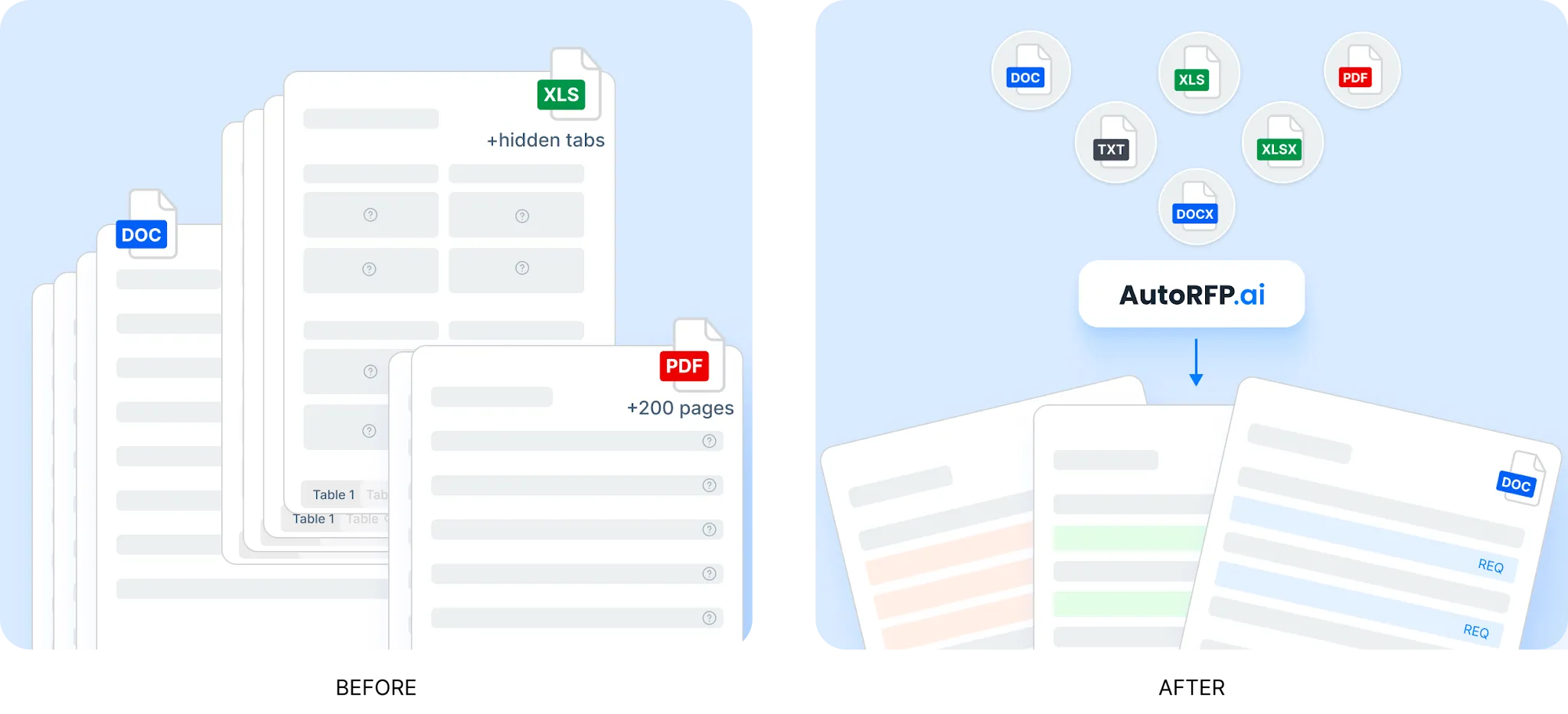
Teams can drop in an RFP in Word, Excel or PDF, and AutoRFP.ai extracts the requirements, sections and context automatically, so the team starts from a complete requirement set instead of manually hunting through the document.
Step 2: Identify Compliance Gaps Early
The Pink Team review should catch compliance gaps before writers start drafting.
Manual reviews can miss these gaps because requirements are often spread across the main RFP, Excel sheets, attachments, portals and buyer instructions. By the time someone spots the issue later, the team may already have built the wrong response.
Check:
Unmet requirements: Requirements the company cannot fully satisfy.
Partial compliance: Areas where the answer needs qualification or careful positioning.
Missing evidence: Claims that need proof, documentation or SME confirmation.
Recurring weaknesses: Requirements the team keeps marking as non-compliant across multiple RFPs.
Product gaps: Buyer needs that point to roadmap, hosting, security, integration or service limitations.
Submission risks: Forms, attachments or certifications that may be missing.
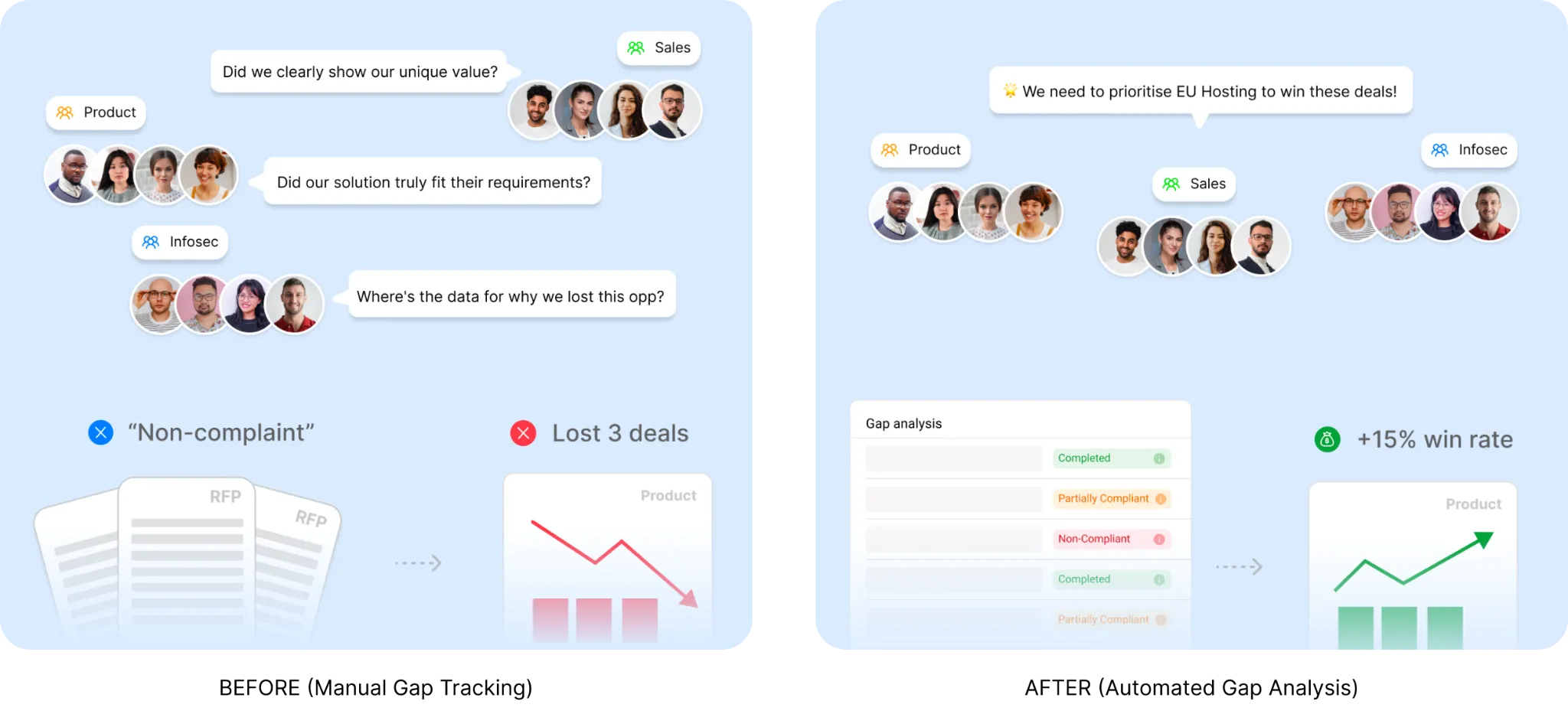
This is where gap analysis becomes more than a review task. If the team keeps marking “non-compliant” on the same requirement, that is not random. It may be a product, security, hosting or process gap that is costing deals.
AutoRFP.ai’s RFP gap analysis helps teams aggregate compliance data across RFPs and spot those patterns without digging through old responses or building spreadsheets manually. The value is not just finding one gap. It is seeing which gaps keep showing up and deciding what to fix.
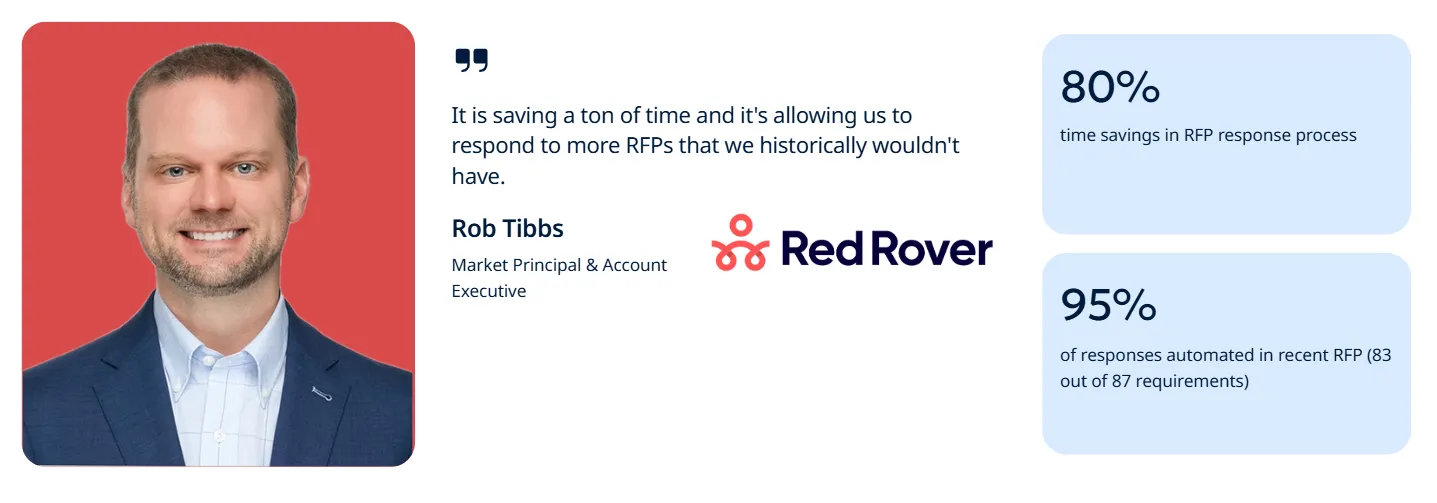
For example, one AutoRFP.ai customer, Red Rover, was able to reduce RFP response time by 80% by automating answers from existing documentation.
In one recent RFP, the team automated 95% of responses, accurately answering 83 out of 87 requirements. For Pink Team reviews, this shows how centralized requirements and approved content make it easier to catch gaps, reduce SME back-and-forth and move faster.
Step 3: Validate Customer Insights
A Pink Team review should test whether the proposal strategy is built around the buyer, not just the RFP document.
The team needs to understand what the customer is trying to solve, what risk they are trying to reduce and what outcome they need to defend internally. AutoRFP.ai’s 2026 Proposal Win Rate Report found that 71% of high-win teams conduct formal customer research, which makes this a practical performance habit, not a nice-to-have.
Check:
Buyer pain points: What problem is driving the RFP?
Decision criteria: What will likely matter most to evaluators?
Internal stakeholders: Who needs to approve, use or defend the decision?
Business outcomes: What measurable result does the buyer need?
Risk concerns: What could make the buyer hesitate?
Existing relationship: What does the sales team already know from discovery, account history or prior conversations?
A weak Pink Team review only checks whether the outline matches the RFP. A strong one checks whether the response direction matches the customer’s real buying situation.
Step 4: Lock the Win Themes
The Pink Team review should pressure-test the win themes before the team starts writing.
Win themes are the core reasons the buyer should choose your company. They should not be generic claims like “great service” or “innovative solution.” They need to connect your strengths to the buyer’s pain, scoring criteria and risk concerns and 71% of high-win teams use defined win themes.
Check:
Customer alignment: Does each win theme speak to a real buyer priority?
Proof: Can the team support each theme with evidence, examples or outcomes?
Differentiation: Does the theme separate you from likely competitors?
Repeatability: Can the theme show up across the proposal without sounding forced?
Evaluator value: Would the buyer care, score it and remember it?
A Pink Team review is the right time to kill weak themes. If the theme cannot be proven, tied to the buyer or carried across the response, it should not survive into the full draft.
For a deeper look at how win themes, customer insights and strategic narrative shape a stronger RFP response, watch this walkthrough on writing a great RFP response with AI. It explains how proposal teams can use AI for repetitive response work, then spend more time on the strategy, buyer insight and messaging that actually influence the win.
Video transcript
You've just received that monster RFP. It's a lot of work, and you're excited to dive in and potentially win this massive contract. You've started using AI, but how do I actually win? What is the RFP response that I need to write to win this deal? That's what takes from basic level of proposal writing to what wins. I'm Rob from AutoRFP.ai. We're an AI RFP software. I personally complete and win RFPs on the daily, and I'm keen to dive in today about using AI for an RFP response that actually helps you win RFPs. I'm gonna be covering win themes. I'm gonna be covering leveraging customer insights to write strategic narrative that helps you actually win RFPs. Yes, we're gonna be talking about AI automation and saving time,
but it's not just about that. It's not about doing an RFP as fast as possible with as little effort as possible and just putting out slop into the world. It's about writing and winning RFPs. But first, as I did say, it's about RFP automation with AI for our RFP response process. It's about automating the mundane. Before you dive into how you can use AI to help you win RFPs for RFP response, take a step back and think about, what are the activities I do related to RFPs that don't actively help me win RFPs? So automate the mundane. AI's real job in an RFP, isn't to do what you do well and what humans do well, and that is writing strategic narrative. It is to do what it does well, and that is hunting and pecking throughout
your past responses, automating kind of the basic responses and really making sure that those are compliant as Jasper Cooper, our CEO and co-founder at AutoRFP.ai, put in our proposal win rate report for 2026, the real advantage isn't automating content, it's what teams do with the time they get back. So automate as much as you can on the mundane So firstly, these are some clear things you can hand to AI from the start. The clear yes or no. Does your product or service do this? And it has a yes box or a tick box or a radio button or a drop-down selection. Yes, . AI should be completing those 99% of the times. Of course, having a human to review if appropriate, but that is where AI is good, the black and white. Company information all the content forms you get about company legal name, company entity, where the office is based, and so on.
If there isn't a place to kinda put your flair there, of course, just basic information, AI is good for that. Boilerplate. Then you've got boilerplate and your security and compliance questions. Across our customer base, 63% of every AI-generated answer is approved with zero to one-word changes. That is 63% of AI-generated answers are perfect. A human still reviews them, but it doesn't require any manual editing. That's freeing up enormous time for teams using our software and the other software out in the market to then, take that time back to do what wins. So what are those activities you can do to help win? First Automate the answer everyone gives and write the answer only you can give. But first, let's cover off what a great answer looks like, and I'll give you both a good and a bad example. So what does a great answer look like?
And this is subjective, of course, to your industry, to your country your buyer. It's all dependent on so many factors. My background is in technology RFPs. That's where I've spent ten years working and selling and writing RFP responses across local government, national government, state government, as well as private enterprise RFPs in Australia, in the UK, in Europe and it is very subjective what a great answer looks like. But I'm gonna take on a couple of core principles that are gonna help you think about what a great answer looks like for your use case. So leads with the verdict. I'm a big believer in front-running the value of the response in the first sentence or two. What that means is effectively, if we're thinking about how humans read, and especially if your job is to read a handful of RFP responses, it's pretty
hard work to continually stay focused and read an entire response and remember everything that you read in there. You wanna make sure that it's easy for the reader to understand the value in your response, and tick off and give you the points that you need in that evaluation criteria. Second, mirror the buyer's words. This is where your understanding of that industry, of that country, of that buyer goes into how you talk about the response. Three, specific enough, no competitor could paste it. Again, imagine you have an evaluation criteria and you are marking this RFP, and you have two responses that look exactly the same. How are you gonna differentiate? That's where being specific enough no competitor could could paste it is so important to make your response stand out, short and scannable. Now, short is dependent on the type of RFP or RFI that it may be and what they're expecting for responses. Make it scannable. Make it a pleasure to read. Don't make it giant block paragraphs that are incredibly hard, again,
for that evaluator to give you the marks for that response. Make it have bullet points. Make it have flowing paragraphs. Make it have a summary or conclusion at the end if reasonable. Make it short and concise and scannable this is probably the biggest sin I see in executive summaries. Someone writes an executive summary, maybe it's the CEO has the standard template one that they use, and it's all about them. It's all about your company, it's all about your experience, and it's boring to read. Make it about the buyer. Easy way to do this is scan the left margin. How often do the sentences start with we, our, your company's name, and so on? How often is this talking about you? Leverage your customer insights and incorporate it into your win themes to make it about them. Tie your solution into the pain and the problems that they are living, and write about them, not about you. But you're tying everything back into their world because it's just more contextual, and it's easier for them to map your response to the evaluation
criteria and how it meets their stated objectives and goals for the RFP. So this is what a great answer can look like. This answer was actually is using social proof. It's one of our answers that we would write, and effectively it's talking about a migration. So SugarCRM migrated from Qvidian to AutoRFP.ai in 2024 and deployed in two weeks. The first sentence has the value. Social proof time. Because we're thinking about migrations. The buyer might be thinking about how long does that take? What's the risk here? How long does it take is answered in the first sentence, and social proof helps alleviate the risk. Then the next three dot points, again, incredibly skimable and readable and has numbers to draw attention. So this requirement was regarding do you have any customers who have migrated? A forgettable answer. AutoRFP.ai.ai, so leads with me, leads with us. Maintains version control automatically through the History tab. First of all, a lot of flowing commas, a pretty long sentence. We've kinda cut off the response, but it keeps going.
No hook, no numbers no so what for the buyer. And effectively it's correct, and for a functional question in a response, it could be a great response if it was looking for a black-and-white response. So it's a forgettable response. So how would we improve this response? We might say Audibility and traceability is core to the platform. This extends to the history tab in which… and then you might use then dot points to list out all the relevant comma points there. So I'm gonna give you some concrete examples of how you can use AI to incorporate win themes and customer insights to help you write winning RFP responses. First of all, the data. We did a survey of over a hundred winning bid teams and asked them what do they do to win. These are teams that win more than 50% of the RFPs they bid on. 71% of high win teams use win themes, 42% of low win teams use win themes.
So a clear distinction, the difference there. This is a strategic part of your RFP response use your intuition and your knowledge of the buyer, your knowledge of your company and your products and services to really fine-tune it. But it can definitely be helpful in thinking of ideas and going back and forth and helping you once you've generated those win themes, actually deploying the win theme across an RFP response. So the RFP, what you receive from the buyer, often will have a bunch of context about their current situation That is gold to help you understand exactly what to incorporate. Once you have the win themes, then you go into applying win themes everywhere. Try to win th-thread these win themes consistently throughout every section. Flag answers that drift, especially on the answers where it matters. I'm using my project agent here so it's talking about differentiation, and then it has access to the web, it has access to my content library, it has access to my CRM, and it's gone
through and looked at all that in different information and found a bunch of different information relevant to this RFP that I'm currently working on and helped create some win themes. So win themes are, it's a scalable platform. Win theme number two, reduces security and compliance risk. It's easy to use and it's integration flexibility integrates with their entire tech stack. Maybe that is also a point of competitive differentiation. If I understand the market and the competitors really well, potentially my solution might be the only one that has a particular integration with a particular system in the buyer. So I wanna highlight that fact consistently that we have the experience of integrating their entire technology stack to our solution, and that is important because of X, Y, Z, because of what's stated in the RFP, because the buyer has told us or we've spoken to the buyer about it. Okay, so we've got all these different win themes that was created via AI, and now I'm gonna ask it, can you now incorporate these win themes across functions?
The AI is now going to start incorporating the win themes by editing these responses for me, by searching my past content, and effectively giving me a stronger narrative of why this buyer should choose our solution Now, it's generating those responses. I can go through, I can see the changes it made, and I can accept this or not. Okay, cool. That looks good. And then I can go through, and I can look at these responses and accept and change them as well, and make sure it incorporates what I want in the responses as well. Let's try and find one here You can see it keeps using the word configurable. So it's reasserting though that vocabulary that ties to integration strengths of our platform, But that's just an example of how we, how I used AI and the AutoRFP.ai project agent to generate win themes based off the RFP project, based off my knowledge of the buyer. And then from that we work to incorporate four win themes, and
then I've used AI to help apply that. I would then go through and edit and make changes here if necessary. And then we've got a strategic narrative throughout that section on the functional requirements. So what are customer insights? It's not just that we know who the buyer is and we've spoken to them a couple of times, but it's actually understanding their current state. It's about understanding their pain, their problems, why they're looking to go out to market, what has been their history of solutions, and everything we understand about that customer, about industry, about the geography and other relevant customers in the space to, understand their world and help pitch a solution that would generally provide value to them. So where can customer insights live? First of all, in your CRM. There's a goldmine of information in your CRM Then you've got your recorded discovery calls. This could be from systems like Gong or Clari and effectively any calls or demonstrations or workshops that you've had with the prospect before the RFP
strategy and workshop sessions. This is really important, in the world of capture, is helping shape that RFP in a subtle way. And a big way is strategy and workshop sessions or giving updates on the state of the market and other information that helps you position the buyer to understand the world and the category that they're looking to procure their products or services in. Team interviews. So again, you might have a sales team, pre-sales team or legal compliance, they all know incredibly well what the buyer is looking for, especially if they've spoken to buyer and, or they understand the industry well. And speak to them, talk to your team, bring out internal meetings that add value and help you understand the customer and provide their knowledge into things like the strategic narrative, like the win theme for that RFP. So content is what you say and your past content, but insight is why it matters.
You can say a bunch of stuff in an RFP, and it can come out looking like gobbledygook and be of no value to the buyer, and you can get a really low mark and not tick off any evaluation criteria or compliance matrices, and you're gonna lose. Anyone can generate an RFP with AI, but insight is why it matters. And why does that matter? Again, tying back to the proposal win rate report where we interviewed and asked winning bid teams what do they rate most highly as to why they win, customer insights was the number one reason, and 88% of high win teams were doing customer insights, whereas only 67% of low win teams had a defined customer insights process. But again, of all the reasons why they win, the number one reason for high win teams was customer insights. So all that information we just spoke about, they're leveraging
that to win competitive RFPs in my same response, we're gonna jump back into our section, and we're going to ask my agent, my project agent, to look at my CRM notes, I have a couple of call transcripts in there that have been made up, and help them edit these responses based off the knowledge of that CRM. So there's my prompt. It's gonna look inside HubSpot. This is the made-up company, and it's going to go through and look at these notes without me having to effectively point it to it. It's gonna hunt and peck. And it's all fake, and it's going to use that to help respond to my fake RFP. So here you can see it's used a bunch of tool calls via the MCP. So effectively, my AI in AutoRFP.ai is speaking to HubSpot's server and grabbing all that information and then parsing that and contextualizing that for the RFP because my AI understands the RFP because it's right there in front of it. And it's going through, and it can look at all the information, and then
it's pulled out a stakeholder map. All the stakeholders and role in the decision, what they care about, and where it sourced that information. So that's really important, especially with thinking about it's actually a person behind the marking criteria. Could be procurement, could be a decision-maker and then it's talking about the actual drivers and pain points. And you can see here it's actually pulled out a lot of different information from those calls about what's important for this RFP. And it's then going to effectively take all that information, take my library content, so it's still sourced in reality of what my product and company can actually achieve, and it's going to take those win themes and must-win sections, and it's going to effectively craft that into a response. And now I'll ask it, "Cool. Can you now update section B?" Based off the context information there Again, here's two responses where it's worked in that context to that response. And you can see that I can accept that, easily make those
changes, and pretty happy with it. Those responses. That's how it would incorporate the customer insights and so on into it. I And one big thing I wanna call out is SME-led drafting, so the subject matter expert writing the response from a blank page, is a low-win habit. Ninety-four percent of high-win teams from our survey and our interviews, the proposal team writes, the SMEs review. So SMEs write for precision, whereas proposal teams write for persuasion. And we're talking back through the entire thing about customer insights, about win themes, about what makes a great response. We're talking about persuasive narrative and writing, and SMEs will write for the technical correct answer, which can be a good answer, but proposal teams write for a great answer that will actually win you that RFP. So don't fall into that trap. Make sure that when you have SMEs, they're just reviewing and approving information.
Or even better, you're sourcing that from an approved library of content that SMEs already approved, so they don't even need to approve it, but they're just reading over and approving things. But someone else is actually incorporating everything we've spoken about today into that response, and they're just approving the technicalities. One model actually that can really help speed up SME time and reduce the time as well is that AI can draft the repeatable responses, again, sourcing from approved content and then sourcing from the context of your company and the SMEs just going in and validating low-confidence bespoke responses So that's how you can use AI to help raise the floor and incorporate insight, themes, and narrative into your RFP response and really use AI to automate the mundane. Now, if you wanna get a hold of the 2026 Proposal Win Rate report that I covered throughout some of the great stats throughout today's video you can see the link in the description below. All right, thanks. I'm Rob from AutoRFP.ai.ai. Cheers.
Step 5: Review the Proposal Outline and Section Plans
The Pink Team should check whether the proposal structure is strong enough before drafting starts.
This is where the team looks at the planned response section by section. The question is not “Do we have headings?” The question is “Does every section have a job?”
Check:
Section purpose: What each section needs to prove.
Evaluator logic: How the structure helps the buyer follow the answer.
Requirement mapping: Which RFP requirements each section addresses.
Content owners: Who owns each section and who needs to review it.
Evidence needs: What proof, attachments, examples or data each section requires.
Gaps: Sections that are thin, unclear, duplicated or missing buyer context.
AutoRFP.ai’s Project Agent can help teams generate implementation plans, executive summaries, cover letters and compliance matrices from the project context.
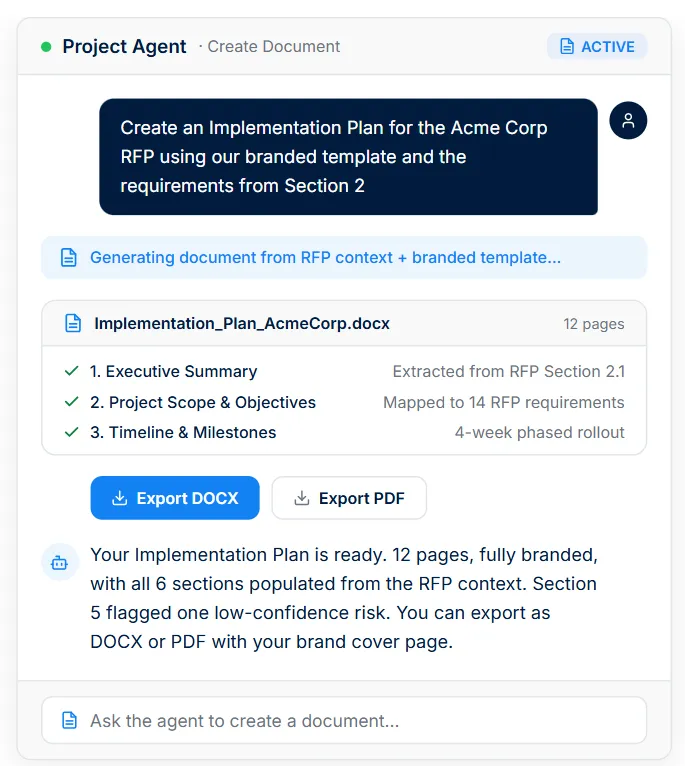
That means the proposal outline can be informed by the RFP requirements, attachments and approved content, instead of starting from generic boilerplate.
To see how this works in practice, this demo walks through AutoRFP.ai’s AI proposal agent for RFPs, DDQs and bids. It shows how the agent researches prospects, pulls context from approved content libraries, edits responses inside the document, generates branded attachments and connects to tools like Salesforce, HubSpot, Slack, Gong, Jira and Google Calendar through MCP connectors.
Video transcript
Transcript is auto-generated and may contain minor errors.
Really exciting session today demonstration of the brand new auto RFP agent jump into the new beta releasing later this month which will cover MCP connection. So that doesn't mean anything to you that's totally fine. That's what we'll cover today. And then we could talk a little bit about what's next, like what agents look like in the proposal, in the DDQ, in the bid space over time, and what this might look like all the way up to 2027 as things rapidly change. But I feel like the vision of what's possible with large language models and other types of AI is becoming more and more clear, how serious the effect is going to be, and how different responding to RFPs, DDQs, RFIs, and all of the above is going to be in the coming years. So at Auto RFP, we've spent a long time invested in this. We were founded straight after chat GPT, not even ChatGpt, just slightly before ChatGpt became available via the first API endpoint for the first usable OpenAI
model. And today we've taken that all the way through the product, worked with all the different model families and stayed across the evolution of the chatbot, the assistant, and now the agent. And really today is the time to I think release the agents like to the world and they've got to a level of capability now where they can be useful and not waste a lot of your time. So let's talk about the rise of the chatbot. We started with chat GPT being the very first and claude has become more and more important over time as well and widely adopted particularly in the proposal community as well and they are really quite simple still. So we started with the basic building blocks sometimes called primitance. The first one being prompts right everyone might remember prompt engineering being a big thing. I don't I don't know where that went. I do but it turned out to not be such an important part. So there was the prompt part where we just type stuff in the box. Maybe we even copy pasted from documents back then to get it inside of our prompt box and ask a question. Help
me write this. Help respond to this question given this context and then paste it in below. And that's where it started. And then we started to go, oh no, I don't want to copy paste things from all of these different files, right? I do want to be able to add entire documents. And we started with being able to upload 20 pages and then 100 pages. And Gemini has far exceeded that. Some of them are still, hey, this document's too big. You're not allowed to upload it into the context window. So there was the context part. And that's still even a constraint today for certain models. Then we have the tools. So they started to come out. Probably the first one was web search, right? When they started to release that, we saw that with Chach and Bing back in the day, there was like an integration there and more and more we saw Claude release web search and then of course Gemini being backed by Google has amazing web search and eventually releasing deep research as well. So let's not just call one tool once. let's use deep research where we can call web search a 100 times a 100 different ways
and over time look at 400 different websites. So that deep research was it was a huge expansion into what's possible with tools. Some of them will also have things like create image where it asks a different model to create an image or it maybe does research or yeah different aspects. And then finally more recently there's been all the buzz around MCPS the model context protocol and that is just a standardized format of connectors similar in a way I guess to APIs but but quite different so that just allows the agents and chat bots etc to easily connect with systems and that's a really wellsupported ecosystem now with over 17,000 public connectors available. So those are the four core primitives that we see in our chat bots and in really any agent today. Even things like uh artifacts, right, where it's generating documents are really just using a prompt and then calling a tool to create a document. Projects are
really just having preset prompts with some preset context and some tools all in one place, easily accessible and ready to go. So not necessarily like a feature or a new building block, but just bringing these together in different ways. And even more recently something like skills, which is just bringing prompts, context, tools, some files, different things like that, and bringing it into one big block so you can easily install things like skills. So there's some great skills for web design, for example, that pull in prompts and context of how you should best go about designing the landing page, for example. And that's all out of the box. So we started in this very generic place and now catch GPT and claude can do so many amazing things. You can rely on them for all sorts of tasks. But what we have seen more and more is the move over to specialized agents. And one of the largest markets for this is the software development market. The models are extremely powerful at software development. It's also easy to tell if a AI model has failed or not
when it comes to software development. Sometimes the test either passes or it fails. It generates a result or it doesn't which is not at all really similar to what we have to deal with proposal. What is actually going to cause me to win here? What is truth? And much much harder questions. So the software development focus made a lot of sense for all of the big providers. And what they eventually figured out was we probably want a specialized set of prompts of tools of context. We want special systems here that are going to be way more performant when it comes to that particular use case. So if we look broadly at Claude and Claude Code, recently Claude Code did a bit of an oopsie and released all of their source code by accident. Not advisable, but it really gave the industry a lot of insight into how those bleeding edge tools work under the hood. And if we compare them of what we might know about the Claude client and similar clients
like it to something more specialized, a more specialized agent like Claude code, we have a whole different level of complexity to this. So where Claude might just take you through three steps like you ask a question, it thinks about it, it generates an answer, Claude code has upwards of 10 different steps and that's built off software best practices, right? It's built by engineers who are thinking what is the best process. Oh, it's not just to ask and then think and then generate code, right? It's to plan. It's to search all of the current code that exists and identify how we've done things in the past. Let's not reproduce code that already exists. Let's try and leverage it again. There's a lot of different best practices just like any particular segment of the economy or white collar work that needs to be thought about there to turn it from an average developer or maybe someone who hasn't developed really anything at all to someone more senior with the skills frameworks mental models in order to produce good code. So that's the same with tools, right? Where a basic tool
like web search or research or a few other things, Claude code has a lot of very specialized tools that allow it to search tens of thousands of files very quickly at the same time which is needed in that particular use case. It has a lot more opinions. Quarter is often regarded as the model or at least the client that has like the best prompts. So you get really nice writing from it. You still get m dashes and things like that, but you might not get as many robust this, robust that. It's not X, it's Y type responses from it. In clawed code, you have very specific opinions. It will even get to the point of don't say this or don't use this tool, do this or don't use this coding approach, use this exact coding approach. So, it tries to overcome many of the challenges even with the state-of-the-art models, but they still fail on these tasks. So they've basically put it inside of the tool as part of clawed code to work around that. It's also got special loops in it that go okay if I fail how do I try again? And also it's able to work
with users and files. So, it's got a much more clean interface of being able to actually work with the user in their workspace because it assumes a semi-professional person that is aware of some software development practices is able to install a certain install claude code but also work within a development environment. So, it's specifically built for that use case, making it a lot faster to work with than if you were trying to copy paste all of the code in and out of claude. With Clawude code, it's actually doing that instantly for you. can edit hundreds of files at the same time if it needs to. And then on the skills side, Claude comes out of the box with very few skills where if you use Claude code even out of the box, it's going to have 11 plus preset skills ready to go. So basically, if I log into Claude, it can technically build software. It can do it reasonably well, but Claude code is just on an entirely different level in terms of the quality, in terms of the level of automation and kind of hands off the wheel. So you can think of this as like maybe Claude can give you some driver
assist on the road where Claude code is much more moving towards fully autonomous driving, right? And there's a huge delta between those two. And these specialized agents are having far superior results. So we're seeing things like if I was to go into to claude itself and go make me a new landing page for auto RFP, it comes up with this which is yes technically a landing page. Whereas if I go with a tool, a specialized agent in this case, Lovable, which really focuses on user interface design and shipping code, when I put that same prompt in, it's navigated to our website, it's taken our brand assets, and it's produced a better result. So, if I'm to jump in, they technically both completed and created landing pages. It might be impressive if I've never seen a landing page before. I've never created one before myself, but as someone who knows a little bit about code and what marketing websites should look like, Lord has given me raw code that's not ready to publish. There's no
built-in security check. It's made up those brand colors, hasn't really got those from anywhere, and even the buttons on the website that it provided don't work in the first instance. But interestingly enough, it does have better copywriting when compared. Whereas Lovable on the other hand had really high quality code compared to Claude. It was instantly ready to publish on the web. So I could just click a button and that would go straight out to a website. It automated a security audit off the back of it. It was actually matching the existing brand colors and the buttons actually work. Right? So when it comes to these two things like if I'm in a hackathon or I need to make marketing sites for a living like Claude is going to be useful if I'm playing around with the concept. But if this is my profession, then lovable is definitely going to be the way that I go there. And this has been true. So across across the chat, like we've got a lot of generic chat bots for the Geminis, the Chachts, the Claudes, and more recently, Open Claw has been a huge kind of hype cycle around that.
Really interesting ways that it incorporated new tools, more skills, more memory into the client, but still kept a fairly general use case where it can really do anything. And then more and more not just across coding but also other areas I think thin AI is a good example within the customer success space but we're seeing a lot of different kind of coding agents that are working very well and then to tie it back to our space here proposals like what really is there there's really not much and it's because it takes so much time to develop this kind of skill set and these massive companies have been very focused on doing it for the generic the coding they may ever produce a specialized proposal agent. So that is exactly what we intend to do is put massive amount of resources across our client base into building truly the best agent in the space. A hypers specialized one that sits on the cutting edge with the clawed codes the lovables of the
world but for our specific use case by incorporating these building blocks and entirely new but also very focused on our use case way to provide the best results. So that's something that we've been doing and putting a lot of work into really since we started the foundations have started have been built but more recently being able to put them all together in one place so that we can really show what's possible now that the model layer is ready. So if we just think about the agents and how they interact specifically in our space is with a generic agent you're probably experiencing a generic tone and style. It's very hard to collaborate with 20 plus subject matter experts inside of a chat GPT thread. Virtually impossible. It doesn't really respect formatting. Sometimes I'll ask Claude to like edit this existing document and it will just make me like a new HTML document or like some random markdown file that I need to copy paste. It's very limited in the context that it can search. So even with
a lot of new connectors, they're using keyword search. So, it's really struggling to find different content that it needs to respond. Even though I've technically connected it to Google Drive and I've technically connected it to Confluence, it's just unable to find that because like me, it's just typing keywords in, hoping for a match, not finding anything, and then taking it back to me to deal with. And it's quite slow, right? So, you've got these models now that are impressive but very slow with their thinking modes and such. And then there rather than having easy tools that are built for specific use cases, they've got very generic tools. So even something like Claude, it doesn't necessarily have like native document editing. It actually edits the documents through writing code. So it takes a long time because you're writing an entire script in the background just for you to edit two words in a word document. So very slow and it can also be very manual. And I said those are like some of the main drawbacks is there's many more of just the generic agents at the moment. So what we wanted when we were building the proposal agent was
something that learns the tone style win themes and and captures that over time that's super easy to use with multiple users at the same time. Can 20 people use 20 different agents at the same time on the same document? How can we get it to respect your templates, respect your formatting? How do we have it just be able to search across thousands or tens of thousands of files, documents, integrations that actually find what you need? And then how do we just have it instant so it's just natively editing documents? There's no waiting for code and how do we connect this with all of your different systems in a safe way as well. So what we built with in the foundations of our approach much like any other client and the open claws and the chachi pts of the world first we started with the models love the openclaw approach where you can bring in any model that you want what we have done in our infrastructure is we have partnered with each of the major providers in the most secure way possible so we're talking
about open AI we were able to work through Microsoft Azure's open AI service with zero training on data and then provide the latest and greatest model there GPT 4.5 and then with AWS we're able to provide secure version of Opus 4.6 six and then with Gemini the Google we've got Gemini 2.5 flash so basically a foundation of how do we get enterprise ready models with zero training and also hosted in Europe if you need it there in the US or Australia where you need it there and build that into the foundation and we don't want to be stuck with one model family we want to be able to easily switch between for different use cases because the use cases within our space are so varied sometimes you just need to do a quick search. Sometimes you really need deep reasoning. Sometimes you need taste and style more than anything else. And unfortunately, there's no real model to rule at all at the moment from our benchmarking. So bringing these different things together really gets people to the cutting edge, gets to the
best available models for different use cases. We're able to stitch them together in very interesting ways. The next thing is the context. So integrating the model with our existing integration layer. So that's where we connect into 15 plus systems like Confluence, Google Drive, SharePoint, things like that and then actually recreate a lot of that content in system so they can be easily searched. So rather than Claude that has to go out and search by keyword, we're able to use a very powerful and faster AI search inside of our platform to find content across all of those different systems. Meaning that we're not having to upload files. We're not having to rely on the keyword search, but we're getting way faster results and we're getting way more specific context in that context window to make sure we're getting the best results. Finally, as well, the tool piece from the base layer. So, we wanted the best-in-class web search and scraping.
So, we wanted to be able to go into websites, documents, particularly for driving customer insights. We wanted to be able to access as many websites as possible. go as deep into those websites as possible so that our customers can research their prospective clients and take that insight into their response. Because as we know, it's one thing to have a fast draft these days of all of the basic answers. That's great. But where we want the agent to go is take it a step further, research this particular customer, pull in more context, and help me win this thing by providing a more bespoke, a more insightful response. And then finally, the connector layer. So we did a lot of work actually on the like enterprise security side because MCP is still a very early standard. So there's huge risks in some of the connectors. For example, you might connect GitHub to the system so that you can search so that the system can search through GitHub and maybe there's interesting context there that you need for your particular use case. But at the same time, a lot of MCPs will allow you
to delete things in GitHub using their MCP or create things that they maybe shouldn't create. an agent still can't fully be trusted. So, we wanted to build a secure approach to deploying MCP that allows our customers one to define which MCPs their users are actually allowed to select and then having a readonly first approach where we really heavily recommend that you only use it for context. So from searching from these different systems, although also allowing our customers to do rights, which means things like Google calendar. I'll get into a few more use cases later, but basically not only do we want to bring you the models in that fashion, we want to be able to give you these cutting edge or sometimes even bleeding edge technologies in a way that's safe. So that is some of our engineering time as well. Cool. And then finally, the prompting as well, right? Like that is a basic part of it. But this is going to be huge as it evolves is much like claude code. How
do we start to develop more and more specialized prompts in the back end? How do we start to identify as a customer base where the gaps are in these different models and then can we give it explicit instructions to not do that and build that up over time. So much like legacy SAS players where it was just like we we write a feature for one person and everyone gets it. I think this is going to be amazing for agents as well where we write one prompt, we write one skill and then everyone gets the unlock from that. So there's going to be a huge amount of resources deployed there as well to basically build out the many necessary prompts and skills and etc on the back end that inform the agent and how it approaches response. Great. That's enough of my ramble and we will jump in to some real examples of the agent. Cool. I'll just jump straight into the platform here for those not familiar
with auto RFP. Just quickly, what we're looking at is a live project. So, we're inside of the project view. The project has already been drafted. So, there's already been an AI agent worked through all the content, find what it could generate the best response as it possibly could out of the box. Great. That's what we're looking at is this draft. And here I've got some questions that are form part of this particular RFP. In this case, we're doing a little something a little meta. We're doing a RFP for proposal software. So they've got some questions around the security of the platform, around the implementation of the platform, our service level agreement, all of those questions you might have for a vendor like us stepping through that. So first thing here is we've got some questions on data residency and it searched our content library and then provided these basic responses which is all we had in the content library at the moment. It's as specific as it got. So our objective here is I know that this is an important aspect for this particular prospective
customer. they are in this case we can say they are enthropic and we want to be able to customize this further to focus on their demands right we don't want to be talking about Sydney Australia or Frankfurt Germany if their only focus is United States-based hosting and we want to make sure that our certifications and everything mirror exactly what they need and that we're highlighting that as part of our response so we're not just putting all those context in a box we're actually being responsive or even better we're being insightful when providing our response So this is where one of the many surfaces the agent is available in but probably the primary one dayto-day is within the actual tool itself I can simply open the agent on the right side. So, it's here with me in the application. And then below I can see much like a chat GPT type interface, I've got the ability to type in a prompt. I've got the ability to attach any files that I
would like and send this message. And then I also have our specialized tools that we've developed like our web search that integrates very specifically to yeah search multiple different pages, scrape their context, even access sometimes things like PDFs and etc. We've got content here which allows us to search our content library. So all of the context in the system and the systems that we're integrated with very quickly. We also have the edit tool. So again, rather than having to basically just talk with this bot and then copy paste it into the interface, how can we start to give the agent the exact same tools that I have access to? So I've got access to edit this document. Why can't the agent just do it for me? So I'll switch that on. And then finally, the ability to document. So, not only can it edit the response that I'm going to give to the customer and insert it back into their file, but it has the ability to build out documents or artifacts or
addendums, attachments, whatever you want to call them. It's able to generate new documents like a service level agreement, like a security overview, whatever we might need, it's able to do that. And it's only able to do that in a generic way that it thinks is best. It's able to do that in different proposal formats and different branded templates and we'll step through all of that. So let's start with this example here. So I've got a number of different questions. I can select the questions that are in scope and this is defining the context. So I could work with the entire project and all questions throughout it or I could work with just specifically these security related questions. So I might start there and work on some data residency stuff to try and take this to the next level. So first thing I'll do is type in do some research on anthropics data residency requirements on the web. So I'm just going to see if it can find anything about where they host their different options. Maybe they've got different
APIs. And great, it's already been able to jump in very quickly there, find data residency on the claude API docs. And it's also found their internal trust center and being able to pull from there. So in this case, just to be clear, Enthropic, we're saying that this is an example prospective customer. So we're researching them and then we've got some context here. Great. So now that I know that, I'm going to say, yeah, we should probably update these responses to be more responsive to their needs. And based on this, it does look like they will want maybe US hosting. So we should align with that and their security requirements. So let's do that and let that run. The agent will think about that and then of course it has access to that edit tool. But we don't want the agent just randomly making edits without us seeing them first of course. So here is another part of the interface where much like what they have accessible in the coding type agent, we've got this in our workspace so that we can actually see what it's recommending. So I can see
here it's refactored quite a bit of this and it has gone and actually what we previously had is this little list here of all of the different places weighted pretty equally. It's gone through and said great our primary hosting region is in Oregon, United States. Great. So our other available regions also include and then just highlighting four clients requiring EU only hosting. Great. So it has tailored that a little further much more serious about US-based hosting now. So I can accept that change. And here it's even put in some stuff about bolding the different requirements that they that aligns with them and then yeah talking about how we align with their industryleading standards including those held by anthropic. Awesome. Great. So now I've just taken that from basic generic response there to something a little bit more high level. But maybe I remember on the call with the customer before they sent over this questionnaire actually the chief information security officer might have wanted a little bit more detail than that. Then I could even take this to the next level and ask
create a brief and highle overview document of our security approach and US hosting option for their CISO. So now past just researching it, providing me that context, and then applying that edit within the response, it's going to go even a step further and generate a document here based on all of that research and putting it all together. So again, it could do further research into our content. We could ask it to research the web more or whatever we really need and then put those building blocks together. And here you can see a very simple preview of the document on the right. with different headings, subheadings, formatting options, images, tables, and I can actually edit this document. So unlike some generic clients where I actually can't edit the underlying document, I just need to reprompt the AI, I can actually just jump in here and screenshot things and add them straight in even to the point of maybe I want to insert a table or something like that and start to work that way. And what's nice about this is although this is very
simple and high level here I was to build this whole thing out might be more interesting but ultimately what I will do is I will export this into a template. So it's not going to come out in a generic kind of AI slot based template but in anything that I've uploaded. So here for example only I've added three different types of branded documents we might do. So, I've added one called branded attachment just for no real fancy headings, just straight into the context. I've got one that is a branded one with a cover, right? So, like an auto RFP cover and then a more structured type document. And then even an RFP cover letter, right? Might include CEO's signature or something with an overview and populate with the client's name and then have aspects of the artifact or the document we're building here. So in this case I can go for a branded cover. Click export and then that will simply get the document ready and download it. It's straight for me to preview. So
cool. It's downloaded right there. And then I've got that already open in here in Google Docs just so we can quickly jump through. So here this is the branded template. It supports anything that's in in Google Docs or Word document formatting. So it can be quite complex. And then here you can see great it's got the it's got the cover table. It's got all of our fonts, colors, headings, etc. And then it's gone ahead and actually exported all of that different response material into a document ready to go further edits if I want to work in my Google Docs workspace if I want further or I could just use that and attach it directly to the proposal, send it to them, whatever I want to do there. So that's a really quick example of just one of the different use cases. Another use case could be something like an implementation plan is like a constant struggle for a lot of people where you need to make a more bespoke document for that particular customer. Be it an implementation plan, be it an approach, be it your assumptions,
whatever that might look like. So here they say provide a realistic implementation timeline and playbook for an organization of 500 employees. And then what RFPs come through? It's just being not like the base model has just found the stuff that we've provided for this in the past and put that there. But we know we want to work on this and develop something a little bit more detailed. So let's say in this case that we're going to be really hands-on with Enthropic and that's what we've put forward to them. So let's say rewrite the full roll out based on research of Enthropic's office locations and one week deployment per office. So here rather than just using one tool at a time, it's actually able to go through search the web. So it searched entropic office locations, it's found all their office locations across a few sources there and then automatically suggested an edit updating our roll out from the really short one to hey here's all of your offices and here's all the rollouts. So doesn't require me going to
a bunch of pages, copy pasting all of the different office locations and then going back to the RFP document and working that in or prompting an AI and then having to do that, right? It's just simply done. And then on top of that, I can just to show off add create a full implementation document 600 words or more with a table of rollout dates based on an assumed May 30th, 2026 kickoff date. Right? So now model's able to reason and go great. So if it's May 30 30th kickoff date 2026 then we can roll all of this through the different dates and then I'm going to make a document for that in our format maybe even an implementation specific branded format and here we can see great the implementation plan for anic got all the team training etc. And then we've got our different dates for the actual deployment post those first few steps. Here's what the actual office kickoffs and end dates will look like as well as
the required resources, some of the key risks, etc. So I could go look, yep, that looks great or maybe I want to do some further research whether it's entropic or in our internal content. Right? So if I had more content, I could go search the implementation we did for open AI, right? And then that will actually go through and be able to search the content, etc. So yeah, then apply that. So that's another kind of quick example of what's possible there. To round this out, we can also have something as simple as the service level agreement. So again, can pop that open and say create a document for the SLA, nice table and 200 300 words.
So it just allows me to get away from yeah having to manually create new document, copy paste all of that workflow and just makes you move so much faster and honestly like gives me at least the willpower to go that extra step that step that you might not otherwise take with tight deadlines and provide that extra document that they ask to attach optionally to give a more detailed implementation plan rather than just paste the generic thing in there and expect to win. We know that from our win rate report earlier this year, the number one difference between the people with that win over 50% and those that win under 50% is the amount of customer insight, is the amount of responsiveness to their particular requirements. So this is basically how you achieve that without having to hire more people, double down or start spending all of your Sundays adding that. So here the next big step is integrating
that with a far broader range of tools. So we've got all the core stuff in there now which is great but the next immediate step what we have in beta now and will release this month is the MCP connectors. So again MCP allows us to connect to yes 17,000 now different servers. Most applications these days support an MCP server where we can connect. So that could be simple organizational context. So there's an MCP for Slack for example that allows us to search through maybe different threads where you keep some information or some context. Maybe you've even got different Slack threads for certain customers that are going through the RFP process. You could keep the agent in line with that and it can get its updates from the chat. Confluence and notion are also supported which takes us past the native integrations that we have out of the box already in auto RFP and gives us a few extra tools to be able to search further and do more interesting things as well as Jura and
many more. Then you've got the customer context parts. This is really exciting because it allows us to do things like search the opportunities context in Salesforce, in HubSpot, in Microsoft Dynamics, in any system that supports the MCP protocol, which is most will be able to have the agent go, hey, actually look up this customer, what were their pain points, what are potential wind themes that could work here, and actually work that into the response, which will be an absolute game changer. And that's the same with call transcriptions as well. So can connect Gong is a common one and there's so many others that are supported by MCP really all of the major ones at this point. So not only can we get the customer context from the CRM we can also go hey look at every meeting we've ever had with them highlight all of the critical requirements that they mentioned find them in this document and tell me which ones they are so I can jump in there further or whatever creative prompt you can come up with to work that context in. really interesting stuff as well is
going past just reading and using as a context layer and starting to use it as a project manager. So things like realizing during the bid that I actually need to create some time to do the implementation plan. What I could do very easily as we step through is go hey I need some time with implementation manager X. Could you schedule that in my Google calendar and provide them a quick overview of what we're going to be talking about? And of course, it's looking at the RFP. So, it can take all of the required context that they talk about implementation, take that into a Google calendar invite, and actually write that invite and send it to the person and give you that feedback directly within the tool. So, that's just like incredible things that we can do. And I think we'll develop more and more of that natively into the tool, but that gives you a starting point. You can prompt it and do that. I think some of our vision around this that I'll talk about more is that we want it to be able to automatically do these types of tasks and take more actions for you where it makes sense. There's also so many industry or
customer specific connectors that might exist. There's great registries online where you can search. So if you search MCP server list, you'll have a bunch of different websites that index them all. There is in a financial services regulatory context. There's FINRA where I can search things like broker check and so many other information sources and pull anything from a form ADV all the way through to other things in a software context. You can do amazing things as well. You can integrate with yeah jurors of the world about your product road map or linear if you use that tool even things like GitHub where if you are someone who has access or could be authorized to access the actual application code it's really interesting because you can answer really technical questions without the need for one of your subject matter experts to search through all of the code themselves and find a particular answer to your question. you might be able to get a great first draft there and then assign them in as a reviewer after doing kind
of the hard work for them. And then there's different research contexts whether you're in healthcare and something like PubMed articles might help you sell or maybe there's look at any academic research to do with this particular painoint that they're accessing and pulling in that context. So, I think we'll see a lot of companies get huge amounts of competitive advantage by connecting interesting information sources and then building that into their workflow to be more accurate, but also much more informed than their competitors. It's impossible for a bid manager, for a pre-sales engineer, for whoever to know everything about everyone and to have the 20 hours to do all of the customer research and understand their space, etc. But the agent can give you just so much leverage to come more informed to a deal than virtually anyone else on earth at the moment. And I think really now is the time to to make use of that in your win rates while this isn't a commodity but actually something new. And yeah, again 15 17,000 plus public
servers. And let's touch on this a little more. So here we have our organization settings integrations. We have all of our different content integrations and everything that we've done to date. And what we'll have here is our agent MCP servers. So this is where the admin of an account can log in and then actually add an MCP server. So we're basically whitelisting the sources in which they can have access to. So here we've got some native ones just so you can click on them and get started. But again, we support over 15,000 of these on the MCP standard. So you can just click add a custom server and that will have your Salesforces and everything else of the world right there. You put in the URL and it will start the login process. Really nice benefit of MCP is that we don't have to go and integrate with a thousand different APIs, 15,000 different APIs.
We can simply do that one connection and you can connect to anything. And just to show you that flow here, I'll go ahead and delete. Actually, I'll keep this. I'll keep this. So, let's say I add the connection. I would go through maybe click Slack here and then sign into Slack and connect it. What that will show me is a list of all of the tools that makes available. So here we've got grain which is similar to gong for those not familiar. It's a meeting recorder at its most basic. So here right we've given the agent the name of the tool a description of what it is the meeting recordings and transcripts right and we can give it access to different tools. So is the AI allowed to list my meetings or not? Is it allowed to fetch meetings that I've attended? Is it allowed to search companies that I've met with? Is it allowed to so many different things like list the open deals that I'm working on? And by default here, we've only given it read access. So, it's actually safe. You can go in there and make sure that if someone logs into auto RFP and they authorize something like a
gong or a grain. It's not just going to come in and start to fetch deals or create collections or do anything crazy. It's just going to be able to read and do things that are useful and that make sense in this context. So that's something we spent some time on there. And then what that means is that every user when they actually log into auto RFP will have the different tools available. So here not only the document tool and the edit and everything we've been through, but actually we've got the linear tool turned on here and then grain not connected where I could click on grain and then connect that for myself. So really cool thing about MCP as well is it will respect my permissions. So within GitHub, within linear, within Confluence, that user and their agent will only be able to use whatever they're actually authorized to use. So that's a huge benefit of our type of approach versus just one MCP connector that connects all of your information as an admin and then anyone
can go willy-nilly and search all of the meetings in the company. This will just search that individual's users meetings, what they've been shared. So now that we've got that an interesting one and just one example of many here is that I can now go to a question let's say about the road map. I can open my agent and with the linear tool already active here, I can go through and have it search our linear. And knowing that this prospect is maybe super interested in our reporting road map and all the different things we're working on there, it can search our linear search all the different road map items and then actually put that together for me and then provide that in the response. So we'll give that a second. Interesting thing about the linear agent as well in particular is it can actually talk to a linear agent. So, we're already having agentto agent
discussions in some of these integrations. Cool. So we can see here it's actually gone through and then it's got all of our reporting enhancements and it's got great here's our insights redesign we're going to be doing this and that and I go look rather than get into that level of detail maybe yeah let's just make a summarized road map document with a table for the reporting elements Cool. Now I've got that and we can go. Okay, cool. So rather than maybe responding in line here, let's go update the response to refer to that. attachment. Cool. So now rather than having that respond in line, we're going look that's
maybe a little bit big. Maybe it exceeds the word count. It should be an attachment or something like that. Great. So a detailed road map of our reporting initiatives plan items is available in the attached summarized reporting road map which is exactly what it will be downloaded as and then eventually attached. And I've done that across a number of different prompts here. But there's nothing stopping a user as well from doing something like this. where I can go firstly search linear for this then do this and you might even have workflows where you want those compound elements first search Salesforce for this then consider this then do web research then update the relevant responses with requirements that that interact with that context so cool it's able to go through there and do that all in one foul swoop that is the foundation and really the first release of our AI agent. So, we're just getting started here. This is the absolute V1 and we see the future of
this as working with the top winners on Earth, our customers and others to build skills directly into the platform based off our research findings. So things like customer insights, how can we really understand how to do those best, how to respond in different types of RFPs and respond the best way and have that data backed and work on that with domain experts so that our platform builds from all of that collective knowledge automations as well. So not just triggering the agent for these different use cases by talking to it and working backwards and forwards there, but actually building it throughout more and more of the process. So using it to automatically triage RFPs to the right people to flag conflicts as they appear or even near the due date. Can you please have a final check and then suggest changes 3 days out from the due date. So you not even having to prompt anything but it actually coming to you, maybe even sending you an email, a Slack message going, "Hey, it's due in 3 days. So I did a final check. Looks like this
is missing. Could you jump in and help me respond and finish that off?" And then a lot more tools. We want to get to the point where the agent has access to all of the same tools as a human. So that means assigning users, maybe as editors and reviewers, maybe exporting the files and checking the export, doing all of those types of actions that you can within auto RFP like flagging content, updating it, etc. And really getting all of that to the agent over time so that you can act through your agent rather than just being able to act through the user interface. And then there'll be the concepts of ambience and really interesting and we've got some really interesting thoughts around how this applies that we might not share at this stage because they are that interesting. But things like being able to forecast what users are working on. So, if you're working on a bid and you're making a certain type of change, maybe you're updating something from first person to third person, we see you do that a few times. Can we automatically trigger the
agent to suggest how that should happen across the rest of the document for you automatically without it being annoying? So how can it just be sitting in the background always thinking always working with you like a colleague but you not having to jump in there and think about how it could be useful but it itself taking the responsibility for that and jumping in where it makes sense. So that's some of the stuff that we're actively exploring and working on today. And then I think broader than that when we think all the way out to 2027 I think by then the need for a proposal agent and this is more broadly as well is it should have onetoone context and the ability to commit actions just like a human user inside of the platform. It should have every feature, every tool. It should be super heavily customizable. You should be in a way to create like a basic version of some of your subject matter experts. Here's the kind of tools that they would have or rely on. And here's their approach and really here's how they think. And I would like you, the agent, to come in and think like
them and work as hard as you can before bringing them in. And I'd like you to learn about your colleagues in your team, maybe in that subject matter expert unit. And maybe assign them when you don't know the answer or follow up with them if they're going to be late to a request. Like, how can we start to hand off ownership or not not ultimate ownership, but really a lot of responsibility to the agent to follow up things and help us keep on track. And we'll also do things like every good agent has really specialized memory and memory will be I think very hard to do in the proposal space in a good way. So I think we're going to want a very specialized type of memory that we will develop as part of the agent as well. So similar to open claw had a lot of innovations there. We'll need to look into similar innovations but I think they'll be in a completely different direction. We will also need completely new user interface paradigms. So we're already starting to explore what happens when certain processes or certain types of questionnaires can be entirely
automated. What does that even look like for a user? Because then I don't necessarily need to log in and look at it like I need to do this or that. How do we prioritize humans time to the highest leverage things? Like we're learning that just copy pasting stuff and doing basic admin work isn't going to help the win rate. And there's so much more that you need to be doing as the bar raises and raises. So we need you to be able to allocate your time differently and think about how you do that to actually stay ahead of your competition. And that will require a lot of work to be automated and that will require a lot of different user interfaces where you still trust the ultimate automation. So I think we started and we've got a we've got the trust score type UX um which we yeah which we started and built that is now becoming more widely available across the industry which I think is great but I think we're going to need even more transparency even more specialized types of interfaces to display that and for you to understand how the agents are working and where you're most needed. So
yeah, it's going to be a really exciting time, but I definitely see this space much like software engineers and if you've seen the graph recently where they have the software engineering hiring is actually going up when everyone said it would completely collapse and go down. I think we'll see something similar here is huge amounts of leverage come to the fold for us in the proposal management space or in knowledge management in general because we're going to be doing amazing things within our tools that previously weren't really part of our role will be huge return on investment and an important part of a more important part even I would say of our organizations going forward. Thank you for coming through that. I hope that was useful that there's some takeaways there and at least giving you a glimpse into the future of what this looks like what you might be thinking about whether you're an auto RFP customer and you'll actually be able to use a lot of this tomorrow whether you're using Claude or generic chat bots but you can still think and integrate some of this into your approach or even other platforms I I gen genuinely hope you you got something out of this today and yeah you can log join
like more topics about MCPS where agents going and etc. I'd be really happy to answer any questions on anything. Yeah. Related to agents, of course, the product, where we see this going, MCPS or otherwise. >> We did get a question through the chat, which I believe that you responded to just now, but do you foresee a connector to Confluence? >> Yeah. Yeah. So, auto RFP already has a connector to Confluence like natively in the content. >> Oh, sorry. I got some feedback vendor. >> And then on top of that, yes, the Confluence MCP is also supported. So yeah, not only one but two Confluence integrations will be available and yeah, you'll be able to see the different use cases. One will be in the agent and one will just be in the nature of how auto RFP responds. When is this available? And Angela asks, so the agent will be live tomorrow. you will have a notification about it and how to enable
it because we're still allowing you to self opt into this process if you're not quite ready for the for the agent power or want to try it out first. So, it will be in your organization settings, feature flags, agents, you'll be able to turn it on tomorrow. That will give you everything including the documentation and then MCPs will be out later this month after we test it a little more with customers. But also, please feel free to reach out to me. If you've got a burning desire to join the MCP beta, then yeah, please reach out. We can turn that on for you and you can be at the cutting edge of it and help us work through that as well. Yeah. Yeah. There's like longer form proposal specific questions. Yeah. So, it's interesting with the longer form stuff. I guess it depends on the nature of those documents. I think what we saw some of today is like being able to work with larger documents as artifacts and then attach those in. And then yeah, a lot of the examples inside of our demo account today were very short sharp answers. We can do slightly larger than that, but we're certainly not doing the types of RFPs that you
would see in like the construction industry, facilities management, architecture, that kind of thing where it's very long form. That's not our specialty at Auto RFP, but yeah, we're going to be working with partners and actually sharing some of our IP with people in the space so that they can build that out in other industries as well. Um, cool. And then, yeah, it's interesting, Maurice, on the visuals side of things, charts, elements, and others. So, what RFP does allow for the upload of images into the actual responses themselves. And a really interesting aspect of MCPs is there's MCPs that allow you to actually generate images whether that's an image model or whether that's something that builds diagrams and etc. So that's just something that we're starting to see is like you can ask an MCP to generate a diagram and then on depending on the MCP you could access that diagram and bring it into auto RFP. So I think we'll be exploring ways to automatically bring it back into auto RFP but for now I think
you will be able to do interesting things around at least creating the diagram and maybe getting it from its source and plugging it in. So yeah I think visuals charts and elements uh directly in our sites and PowerPoint's also interesting. I think PowerPoint also has an MCP. So I'd be interested to see yeah can like what a prompt would do. Please create a a PowerPoint with 15 slides about this RFP response and see how it does. But yeah, these are all all things that we need to test out and more and more as the different use cases become common, we will build them out more natively. So turn a prompt into a single button and build skills around something to ensure you get the best results. Any other questions? Yeah, feel free to pop them in the chat. But know our session has ended for today. So really appreciate everyone's time. Have a great rest of day and yeah, look forward to seeing you on the next one. If you're not currently a customer and you want to
dive more into this, you can sign up, step through a demo. Otherwise, yeah, invite you to try this out. Looking forward to customer feedback. And again, just the beginning of what's going to be an exciting era of agents. No, thank you. Have a good day all. Bye.
Step 6: Check Rough Content Direction
The Pink Team review does not need polished writing.
It needs enough rough content direction to confirm that the response is heading the right way. That may include storyboards, bullets, early answer notes, section summaries, key messages or draft response angles.
Check:
Opening direction: How each major section will lead.
Key messages: The main points each section needs to land.
Evidence placement: Where proof should appear.
SME input: Which sections need expert validation before drafting.
Tone: Whether the response sounds like a confident vendor, not a generic template.
Risks: Any claims that feel unsupported, too vague or too aggressive.
This step keeps the team from writing 30 pages before realizing the story is wrong. The Pink Team should be tough here because vague content direction becomes expensive rewriting later.
Step 7: Review Draft Messaging Before Full Writing
Draft messaging should be reviewed before the team commits to full response writing.
At this stage, the team is checking the message, not polishing the prose. The goal is to make sure the response is direct, compliant, differentiated and supported by approved evidence.
Check:
Answer direction: Does the draft answer the buyer’s question directly?
Compliance: Does it satisfy the requirement without overpromising?
Proof: Is the claim backed by approved content or evidence?
Consistency: Does the message align with the win themes and customer insights?
Confidence: Would the sales, proposal and SME teams stand behind this answer?
Review needs: Which answers need technical, legal, pricing or executive approval?
AutoRFP.ai’s AI RFP Response Enginecan create first drafts from approved organizational content, but the important part is control. Every generated answer includes a visible Trust Score and links back to the approved source behind it. If AutoRFP.ai cannot find approved evidence to support an answer, it leaves the gap blank rather than making something up.
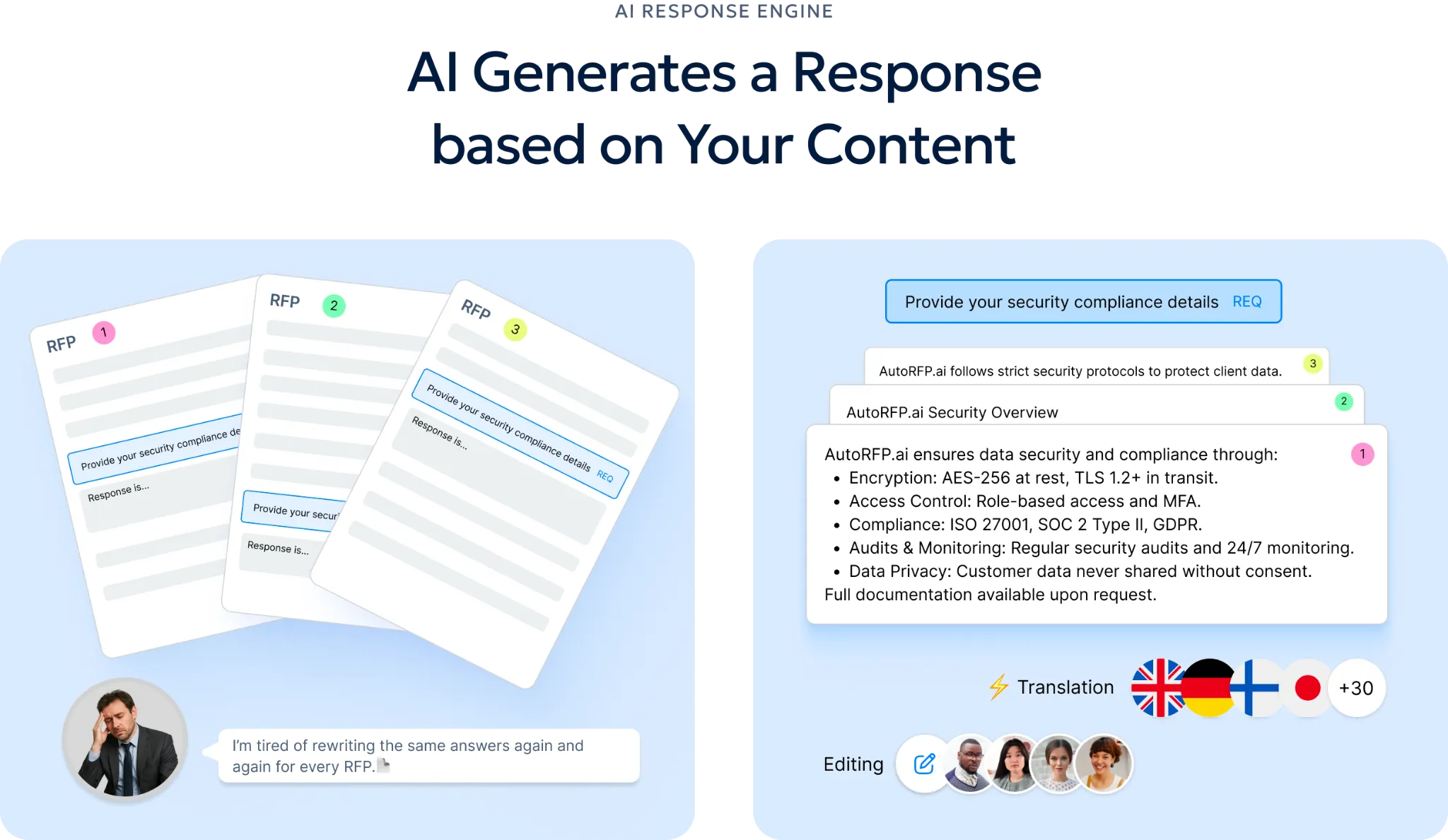
That changes the review job. Instead of checking every answer from scratch, reviewers can focus on low-trust answers, missing evidence and sections that need expert judgment.
Step 8: Decide Whether the Response Is Ready for Full Writing
The Pink Team review ends with a decision.
The team should not leave the meeting with vague feedback like “looks good” or “needs work.” It should decide whether the proposal plan is ready for full drafting, or whether the strategy needs another pass.
Check:
Requirements: Are all major requirements captured?
Compliance: Are known gaps identified and owned?
Strategy: Are win themes clear and defensible?
Customer insight: Does the response reflect what the buyer cares about?
Structure: Does the proposal outline make sense?
Section plans: Does each section have a clear purpose, owner and evidence plan?
Messaging: Are early messages strong enough to guide drafting?
Next steps: Does every action have an owner and deadline?
The practical standard is simple: do not move into full writing until the proposal team knows what they are building, why it should win and what evidence will support it. A good Pink Team review saves time because it stops the team from drafting the wrong proposal faster.
Related resource: The Ultimate Pre-submission RFP Checklist
In high-stakes RFPs, one missed requirement, attachment or formatting issue can put the entire deal at risk. A final pre-submission checklist helps proposal teams confirm the response is compliant, complete and ready to submit before the deadline.
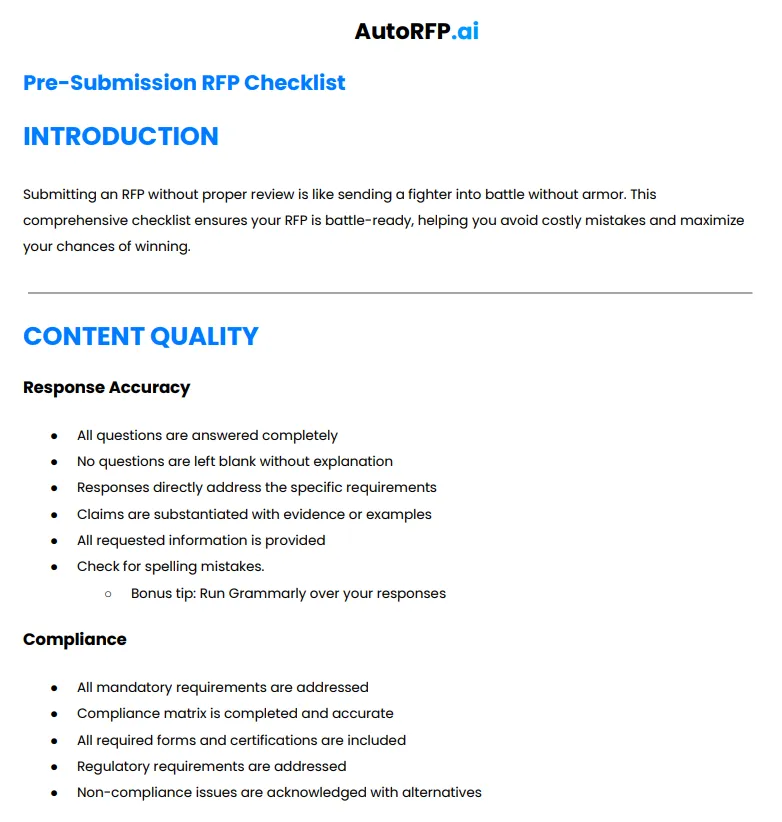
Download the complete checklist
Pink Team vs Red Team Review
A Pink Team review checks whether the proposal strategy is strong enough before full drafting starts. A Red Team review checks whether the full draft is strong enough before final submission.
Both matter, but they solve different problems. Pink Team prevents the team from building the wrong proposal. The Red Team improves the proposal once the full draft exists.
| Area | Pink team review | Red team review |
|---|---|---|
| Main purpose | Check the proposal strategy, structure, and response direction before full writing begins. | Checks the completed draft for clarity, compliance, persuasiveness, and buyer alignment. |
| When it happens | Early in the process, after Go/No-Go, strategy, and section planning. | Later in the process, after the first full proposal draft is ready. |
| Main question | Are we building the right proposal? | Is this proposal strong enough to submit? |
| What it reviews | RFP requirements, compliance gaps, customer insights, win themes, proposal outline, section plans, and rough messaging. | Full draft, executive summary, section responses, proof points, compliance, scoring alignment, and overall persuasiveness. |
| Level of detail | Strategic and structural. It focuses on direction before the team spends serious time writing. | Detailed and evaluative. It focuses on improving the actual draft before final polish. |
| Best use | Preventing weak strategy, unclear win themes, missing requirements, and poor section planning. | Catching weak arguments, unclear answers, compliance misses, unsupported claims, and buyer-facing issues. |
| Who is usually involved | Proposal lead, sales lead, solution lead, SMEs, capture team, and key reviewers. | Senior reviewers, proposal leaders, sales leadership, SMEs, legal, pricing, and executive stakeholders. |
| Output | A clearer proposal plan, stronger win themes, fixed gaps, and approval to move into full drafting. | A marked-up draft with revisions, risks, gaps, and final improvement actions. |
| Risk if skipped | The team may write a complete proposal around the wrong strategy. | The team may submit a proposal that is compliant on paper but weak in front of the buyer. |
Tips & Solutions for Optimizing The Review Process
Follow these tips to make the review process faster, cleaner, and more useful for the people who actually need to improve the proposal:
| Tip | What to do |
|---|---|
| Start with a clear review goal | Define whether the review is checking strategy, compliance, messaging, pricing, technical accuracy, or final submission quality. |
| Separate Pink Team and Red Team feedback | Use Pink Team reviews for strategy, outline, win themes, and section direction. Use Red Team reviews for full draft quality, scoring alignment, and buyer-facing strength. |
| Use AI to create the first proposal outline | Use AI RFP tools to instantly generate a compliant, structured proposal outline based on the exact government or buyer instructions. |
| Map every section to the RFP requirements | Build a compliance matrix that links each response section to the buyer’s requirements, attachments, forms, and evaluation criteria. |
| Assign review owners by section | Give each section a clear owner, reviewer, and final approver before the review starts. |
| Give reviewers specific questions | Ask focused questions like “Does this answer the requirement?” or “Is this proof strong enough?” instead of asking for general feedback. |
| Review source-backed answers first | Check whether every answer links back to the source document it came from, including source context such as the date it was last updated when available. |
| Flag low-confidence or missing answers early | Separate strong answers, weak answers, missing evidence, and SME-dependent responses before the main review meeting. |
| Keep comments tied to action | Every review comment should say what needs to change, who owns it, and when it must be fixed. |
| Use one live review workspace | Keep requirements, comments, assignments, source documents, and status updates in one place. |
| Check buyer alignment before polish | Confirm that the response matches the buyer’s pain points, evaluation criteria, win themes, and risk concerns before editing language. |
| End with a final submission checklist | Check attachments, file names, signatures, pricing forms, page limits, portal fields, formatting, and deadlines before submission. |
Automate First Drafts and Save Your Team Time!
Pink Team reviews are supposed to stop bad strategy before it becomes a full draft, but manual requirement checks, scattered evidence and SME back-and-forth slow the team down.
AutoRFP.ai helps teams extract requirements, identify gaps, generate source-backed first drafts and focus reviewers on low-trust or missing answers instead of checking every line from scratch.
That means cleaner reviews, fewer late rewrites and more time for win themes, buyer insight and solution fit.
About the author
Co-founder & CEO
Co-founder and CEO of AutoRFP.ai. Spent 7 years in enterprise sales and personally completed 500+ RFPs before founding the company.
LinkedInFrequently asked questions

What Does Pink Team Stand For in a Proposal Review?
Pink Team is not an acronym. It is a proposal review label used in the colour team review process, often associated with Shipley-style proposal management. A Pink Team review happens early, before the full proposal is drafted. The team checks whether the proposal strategy, win themes, outline, compliance plan and response direction are strong enough before writers and SMEs spend serious time building the full draft.
How Long Does a Pink Team Review Take?
A Pink Team review can take a few hours for a smaller proposal or one to two days for a complex RFP. The timing depends on the size of the opportunity, the number of sections, the number of reviewers and how complete the early strategy is. If the team already has a clear outline, compliance matrix and win themes, the review moves faster. If requirements are unclear, it takes longer.
Can You Skip the Pink Team Review?
You can skip a Pink Team review, but it usually creates risk later. Without it, teams may move into full drafting with weak win themes, unclear section plans, missed requirements or unsupported claims. Those problems are much harder to fix during the Red Team review because the full draft already exists, reviewers are under pressure and rewrites take more time.
Is a Pink Team Review Only For Government Proposals?
No. Pink Team reviews are useful for government proposals, but they are not limited to them. Any team responding to complex RFPs, tenders, DDQs, security questionnaires or enterprise sales proposals can use a Pink Team review. The value is the same: check the strategy and structure early so the team does not waste time writing the wrong response.