AutoRFP.ai vs Iris (HeyIris): Which RFP Platform Fits?
AutoRFP.ai vs Iris (HeyIris) compared from Iris help guides: answer checks, large files, workflows, MCP, integrations, security, support, customers, and pricing.
Written by

Ops Lead, AutoRFP.ai
- Updated
- Reading time
- 17 min
AutoRFP.ai vs Iris is a comparison between two AI-native response platforms with very different depth. Iris covers the basics of AI drafting, review, and portals. AutoRFP.ai is built for the response operation around them: the large and messy files, the reviewers who check every claim, the security teams who audit the vendor, and the leaders who need it to run across regions.
We build AutoRFP.ai, so every claim about Iris below is quoted from its own documentation and linked. Research covered every public article in the Iris help center (Quick Start, Knowledge Base, and Release Notes) plus Iris’s security, pricing, privacy, terms, about, integrations, and comparison pages, all read on November 5, 2026. Where Iris’s docs are silent, we say so and treat it as a question for the demo. For the wider field, see our guide to Iris alternatives, and for cost detail, the Iris pricing breakdown.
The short answer
Choose Iris if GovSpend public-sector bid discovery drives your pipeline, your buyers accept US-only hosting, and your questionnaires are small, clean files.
Choose AutoRFP.ai for the work bid managers and sales teams are actually measured on. Every draft is scored for source support and for completeness, every sentence is cited, and questions your content cannot support go to a person. Large workbooks come back in the issuer’s original file with nothing stripped out. AI-run automations handle multi-step workflows. Claude, ChatGPT, and Copilot can write into projects over MCP. Security evidence, regional hosting, published legal terms, and support across three continents are ready before procurement asks.
AutoRFP.ai vs Iris at a glance
What bid managers, proposal leads, and sales teams weigh when they shortlist. Iris entries are quoted or summarized from its public documentation on November 5, 2026, with links in the sections below.
| What the team checks | Edge | AutoRFP.ai | Iris |
|---|---|---|---|
| Quality signal on each draft | AutoRFP.ai | Trust Score for source support plus Feedback Score for completeness | One confidence label; not shown “in exports, Slack or Microsoft Teams” |
| Citations | AutoRFP.ai | Each sentence tied to a quoted passage, its source, and the person behind it | Sources listed per answer |
| Unsupported questions | Even | Flagged at zero trust and routed to a person | Marked Missing Info |
| Macro-enabled Excel | AutoRFP.ai | Original workbook returned with formulas, macros, and dropdowns intact | Macros “are removed on upload and the file is saved as .xlsx” |
| Very large questionnaires | AutoRFP.ai | 5,000+ requirements, multi-tab workbooks, hidden tabs, nested tables | Auto-markup reads “the first 2,000 content rows of each sheet,” up to 25 sheets |
| Bundled and scanned files | AutoRFP.ai | ZIP bundles of several files | ZIP not supported for GovSpend bids; “Iris cannot read scanned PDFs” |
| Workflow automation | AutoRFP.ai | AI-run automations for multi-step workflows, plus sequential approvals and deadline reminders | Approval chains “up to 8” steps, “no branching,” no separate due-soon or overdue messages |
| Keeping the library current | AutoRFP.ai | Approved answers captured automatically, connected sources synced, content age in every score | Review cadences and expiry dates; “Expired content is still used when nothing newer covers the question” |
| MCP server | AutoRFP.ai | Reads and writes projects and content from Claude, ChatGPT, and Copilot | 12 read tools and 2 that add content; project access read-only |
| MCP client | AutoRFP.ai | Connects out to Gong, HubSpot, Highspot, Vanta, Drata, DealCloud, and more | None documented |
| Integrations | AutoRFP.ai | Most integrations of any RFP platform, including OneDrive, Box, Zendesk, Intercom | Broad stack; HubSpot “never writes back,” Dynamics “one-way”; no OneDrive, Box, Zendesk, Intercom |
| Public-sector bid discovery | Iris | Opportunity search in beta, across 1,000+ global procurement portals | GovSpend connector for US public-sector bids |
| Security certifications | AutoRFP.ai | ISO 27001:2022 and SOC 2 Type II, self-service in the Trust Center | SOC 2 Type II “available under NDA”; no ISO 27001 claim found |
| Data residency | AutoRFP.ai | Separate US, EU, and APAC deployments | ”Primarily stored and processed in the United States” |
| Contract terms | AutoRFP.ai | Published MSA, DPA, and SLA | Public Terms license customer content “to train and improve the Service” |
| Support and implementation | AutoRFP.ai | Teams in Stockholm, Vancouver, and Brisbane, plus New York | Dedicated CSM and Slack channel; no hours or regions published; one listed office (Brooklyn) |
| Customer evidence | AutoRFP.ai | Partners Group, FintechOS, Perk, SugarAI, Passport Technology, and 14 published customer stories | Ashby, Black Duck, BuildOps, Corelight, Cresta, and seven case studies |
| Pricing | AutoRFP.ai | Public: from $899 per month, unlimited users | Per user, “Contact sales for pricing” |
Where Iris leads: GovSpend
Iris’s one clear lead is its GovSpend integration. US public-sector teams can pull government opportunities into Iris and qualify them before response work starts. For a team whose pipeline is mostly US state and local government bids, that connector is a genuine reason to look at Iris.
AutoRFP.ai is answering it directly. Opportunity search, now in beta, finds bids across more than 1,000 procurement portals worldwide, so public-sector teams outside the US, and teams selling into several countries at once, get discovery that a single US data source does not cover. If public-sector discovery is on your shortlist criteria, ask us to include the beta in your proof of concept.
Answer quality: what a reviewer sees on each draft
A winning response is correct, complete, and in your company’s voice. Before anyone reads a draft, it is checked on all three.
Every draft carries two scores. The Trust Score shows how strongly the best matching approved source supports it, how the answer was produced, and how old the content is. The Feedback Score judges whether it fully answers the requirement and says what would raise it, because a well-sourced answer can still miss half the question. When nothing in your approved content supports a question, it is marked No Search Results at zero trust and a person takes it over.
Citations are attached sentence by sentence. An attribution pass ties each sentence to the quoted passage behind it, the file or connected system it came from, and the person behind that source. Text the sources cannot back is labeled unsupported. Tone is learned from the answers your team has already approved.
That is what zero hallucination by design means in practice: drafts are built only from approved content, each claim carries the passage it came from, the support behind it is scored, and a person takes any question the content cannot answer.
Iris grades each answer once. Its confidence score guide lists five labels (High, Medium, Low, Missing Info, and Contradictory) and sets two limits a bid team will feel: “Confidence scores are not included in exports, Slack or Microsoft Teams,” and “Editing an answer does not change its score.” A reviewer working from an export or a chat thread does not see the grade, and no separate check tells them whether the answer is complete.
Iris: one label per answer
- A confidence label from High to Contradictory
- Labels left out of exports, Slack, and Teams
- Sources listed for the answer as a whole
- Missing Info when nothing supports the question
AutoRFP.ai: two scores and cited sentences
- Trust Score for how well the sources support it
- Feedback Score for whether every part is answered
- Each sentence cited to its passage and its person
- Unsupported questions routed to a person
Freshness works differently too. Iris’s October 7, 2026 release notes say “Expired content is still used when nothing newer covers the question.” On a security questionnaire, ask whether an answer drawn from an expired policy should be drafted at all. In AutoRFP.ai, content age sits inside the Trust Score, so the reviewer sees it on the answer.
Large and complex documents
This is where the documented gap is widest, and where bid teams lose the most time.
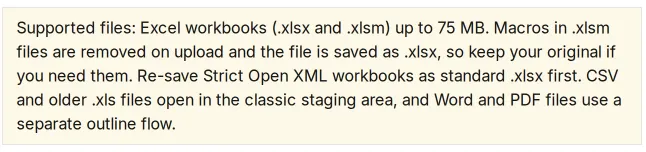
Iris’s Excel staging guide says “Macros in .xlsm files are removed on upload and the file is saved as .xlsx, so keep your original if you need them.” Automatic markup “reads the first 2,000 content rows of each sheet,” covers up to 25 sheets, and leaves the rest to be marked by hand. Its first RFP guide adds that “.xls files cannot be marked up automatically,” that Word .doc and PowerPoint files are not accepted as questionnaires, that “Iris cannot read scanned PDFs,” and that Excel’s Strict Open XML format “cannot be read yet.” Its GovSpend import guide says “ZIP files are not supported.” Projects over 600 questions export by emailed link within about 15 minutes.
AutoRFP.ai holds on to the file the issuer sent. On import it suggests which cells are questions, answers, and compliance fields, you confirm the mapping, and original-file export writes approved answers into the same Excel cells and Word paragraphs with formulas, macros, and validation dropdowns intact. Public pages document 5,000+ requirements, 500+ page Word files, multi-tab workbooks, hidden tabs, nested tables, compliance matrices, and ZIP bundles of several files. IMTC runs questionnaires of up to 900 questions, and SugarAI answers 2,000-question security questionnaires with one person. PDFs import for answering in the product and export as Word. Like Iris, AutoRFP.ai does not round-trip legacy .xls or accept .doc files.
Upload limits matter on the knowledge side as well. Iris’s Knowledge Map guide caps uploads at “75 MB per file and 75 MB per upload,” and its integration guides note “You can upload up to 10 files at a time.” Sync rules cover one folder or page each: “You cannot create a sync rule for an entire Sharepoint Site.”
Workflows and automation
Iris’s own comparison page positions Iris for “cross-functional, high-stakes workflows.” Its documentation describes a narrower system. The multi-step workflow guide allows “up to 8” approval steps, says “There is no branching,” and notes “Iris doesn’t send separate due-soon or overdue messages.” Several workflow features, including proposals, Win/Loss (in beta), and the newer Excel staging, are switched on per organization by request.
AutoRFP.ai goes further in three ways:
- Automations. Teams automate complex, multi-step response workflows and AI runs them, so routine steps between intake and submission happen without someone chasing them.
- Governed review. Multiple reviewers and sequential approval layers, assignments with deadlines, and reminders, review requests, and @mentions in Slack, Microsoft Teams, or email. Every answer keeps its full history: each edit, review, approval, and export, with a name and a time.
- Agents in the work. The Project Agent proposes edits inside a project as changes you accept or reject, and leaves approved answers locked. The Q&A Agent answers from the library in Slack and Teams and shows its sources. Go/No-Go screening reads each new RFP against your own checklist before drafting starts.
Users are never metered, so every reviewer, approver, and security stakeholder can work in the platform.
Keeping the library current
AutoRFP.ai gives you a library that maintains and improves itself. Approving a response saves it for reuse automatically, with customer names stripped out, and near-identical approvals reuse the existing entry instead of piling up duplicates. Connected sources such as SharePoint, Google Drive, OneDrive, Box, Confluence, Notion, Zendesk, and Intercom sync selected content into the library. Content owners keep control: edits can be suggested and approved, and confidential projects stay out of automatic capture.
Iris keeps content current through review cadences, expiry reminders, and sync rules. Its Approved Answers Library sets new library answers to “Auto-Approve (Recommended)” by default, and its duplicate grouping is “shown when enabled for your organization.” Weekly web crawls cover up to 200 pages and skip pages behind a login with no error shown.
MCP and integrations
Both platforms run an MCP server, and the difference is what an assistant can do through it. Iris’s MCP guide lists 14 tools, 12 read-only and 2 that add content. Its release notes say project access “is read-only” and that an assistant “cannot edit or delete anything already there.” Iris does not document an MCP client.
AutoRFP.ai’s MCP server reads and writes. With the full scopes granted, Claude, ChatGPT, and Microsoft Copilot can write to AutoRFP.ai projects and content, acting as the signed-in user within that person’s permissions, so a bid manager can run response work from the assistant they already use. AutoRFP.ai is also an MCP client: it reaches out to Gong, HubSpot, Highspot, Vanta, Drata, DealCloud, Outlook, Dynamics 365, and custom MCP servers for deal context while drafting.
Native connectors tell a similar story. Iris connects SharePoint, Google Drive, Confluence, Notion, Seismic, Highspot, Salesforce, HubSpot, Dynamics 365, Slack, Teams, Gong, Vanta, Drata, SafeBase, and Heretto. Some connections only read: the HubSpot guide says “Iris never writes back,” and the Dynamics 365 guide says “the connection is one-way.” OneDrive, Box, Zendesk, Intercom, DealCloud, SAP Ariba, and UpGuard do not appear anywhere in Iris’s documentation.
AutoRFP.ai has the most integrations of any RFP platform, and each one does a specific job. The Salesforce package shows live RFP status on the opportunity and writes status changes back. The Portal Agent docks beside the portal in Chrome and Edge, recognizes SAP Ariba, OneTrust, UpGuard, and DiligenceVault, and runs AI-assisted import on portals it has not seen before. SSO and SCIM run through Okta, Microsoft Entra, and Google Workspace.
Security, hosting, and contract terms
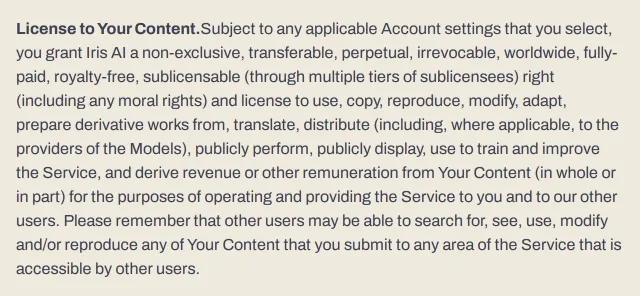
Iris’s security page says its SOC 2 Type II report and penetration test reports are “available under NDA.” No ISO 27001 claim appears on its public pages. Its privacy policy (effective January 26, 2026) says Customer Data is “primarily stored and processed in the United States,” and names AWS and Databricks as subprocessors before “[Other sub-processors as applicable].”
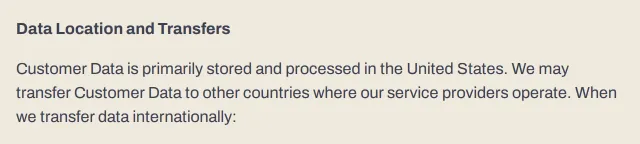
The public Terms of Service (last updated March 10, 2025) are worth reading before you upload a library. They grant Iris a “perpetual, irrevocable” license to Your Content that includes the right to “use to train and improve the Service, and derive revenue or other remuneration from Your Content,” for “operating and providing the Service to you and to our other users.” The security page says “Your data never trains our models.” A signed order form may override the public terms, so ask Iris which document governs your contract.
ISO 27001:2022 and SOC 2 Type II reports for AutoRFP.ai download from a self-service Trust Center, so your security team can clear the vendor without waiting on an NDA. Production runs in separate US, EU, and APAC deployments, which matters when the questionnaires you answer carry customer data under GDPR or regional rules. The Master Services Agreement states that the customer owns its data and outputs and that customer data is not used to train AutoRFP.ai or third-party models. The DPA, SLA, and subprocessor register are public.
Support and implementation
Iris says “All Iris customers receive priority support, a dedicated Customer Success Manager,” and a private Slack channel. It does not publish support hours, response targets, or regional coverage. The “24/7” on its security page is labeled monitoring. Its terms list one office, in Brooklyn, New York, and its about page describes a team of 25.
AutoRFP.ai runs support and implementation from Stockholm for Europe, Vancouver for North America, and Brisbane for Asia-Pacific, with an office in New York, so a team in any region works with people in its own working day. Implementation is part of the proof of concept: our team connects your sources and works alongside your reviewers from the first project, and the platform works in 44+ languages.
Customers and track record
Iris’s homepage shows Ashby, Attune, Beehiiv, Black Duck, BuildOps, Class, Corelight, Cresta, Hazel Health, MedRisk, PERSUIT, Sanas, Specright, and Tabs, and its about page says over 300 companies use it.
AutoRFP.ai is trusted by bid teams in 44+ countries, including Partners Group, FintechOS, Perk, SugarAI, Workforce.com, HEPTAGON Capital, Red Rover, Jobylon, IMTC, and ecoPortal. Fourteen published customer stories document results on live work, among them Passport Technology, MedeAnalytics, and a Pacific Northwest utility. AutoRFP.ai is rated 4.9/5 on G2 across 60 reviews.
Pricing
Iris’s pricing page says it is “priced per user, not per submission” and asks buyers to “Contact sales for pricing.” No dollar figures or plan tiers are published.
AutoRFP.ai lists its plans publicly: Scale costs $899 a month and Accelerate $1,299 a month, both billed annually and both with unlimited users. Adding a reviewer from legal or security never changes the bill.
What Iris users raise
Iris’s G2 reviews are positive overall. Reviewers most often praise ease of use, time saved, and a support team that responds quickly, and several value that Iris says “not enough info” instead of inventing an answer. The criticism clusters around the same areas this comparison covers, so it is worth testing in a pilot. Quotes below are from reviews read on November 5, 2026.
Complex spreadsheets. An enterprise reviewer in computer and network security (July 29, 2026) wrote that “some Excel sheets requests are very complex,” which “takes quite a bit of modification of the sheet before uploading.” Another reviewer (January 15, 2026) asked for “being able to deal with more complex spreadsheet-based RFP templates.” An enterprise user (August 3, 2026) described exporting a submission spreadsheet where “only one docs links came through,” leaving the team to “manually add all of the documentation links back in.”
Multi-part questions. The same August 3 reviewer wrote that “if some of the RFP questions are quite long or they have multiple parts, like a, b, c, d,” Iris “often says, like, not enough information to answer this question,” even for parts it could answer. This is the case AutoRFP.ai’s Feedback Score is built for: it checks whether each part of the requirement was answered and tells the reviewer what is missing.
Answer accuracy and tone. Reviewers mention responses that “sound overly robotic” and that Iris “tends to aggregate multiple responses rather than selecting a single, relevant answer” (November 25, 2025), output that “mixes up information about the company with information about the platform when it comes to security controls” (February 19, 2026), and “Instructions don’t always work” (October 26, 2026).
Integrations and scope. Integration gaps recur across reviews from December 2024 to October 2026, from “I miss integration with other platforms” (October 28, 2026) to “Lacks certain integrations” (November 11, 2025). One reviewer (November 3, 2026) noted that “RFPs with checklists or pricing aren’t a great use case for Iris,” and another (February 10, 2026) asked for contributors to be able “to answer questions directly from Slack/email.”
How Iris describes AutoRFP.ai
Iris publishes its own comparison of Iris, Inventive AI, and AutoRFP.ai, updated August 4, 2026. It calls AutoRFP.ai “fast AI drafting and response acceleration for teams that want to reduce manual library maintenance and move quickly,” and casts Iris as the choice for “cross-functional, high-stakes workflows.”
The library point is right. The rest does not match either product’s documentation. The high-stakes work in this category is a 2,000-question security questionnaire, a macro-enabled workbook from a bank, a DDQ that legal signs off line by line, and a buyer’s security team asking where the data lives. Those are the rows where the table above shows AutoRFP.ai ahead: two scores and sentence-level citations, original files returned intact, automations and sequential approvals, write-capable MCP, ISO 27001:2022, and US, EU, and APAC hosting.
A proof-of-concept scorecard
Run one recent questionnaire through both products and keep the outputs.
- Your hardest file. A macro-enabled workbook with more than 2,000 rows, hidden sheets, and dropdowns. Compare the returned files cell by cell, macros included.
- Conflicting sources. Two approved files with different data-retention periods.
- No source. A certification you do not hold. Confirm each product routes it to a person.
- Completeness. A three-part question your content covers only two-thirds of. Check which product tells the reviewer what is missing.
- Citations. For five answers, check whether each sentence traces to a passage and a person.
- Workflow. Your real approval chain, with a deadline and one reviewer removed from your identity provider.
- Assistant. Ask Claude or ChatGPT to update a project answer over MCP.
- Security. Request the SOC 2 report, ISO certificate, hosting region, DPA, and the contract clause on training.
Final decision
Start with Iris if US public-sector discovery through GovSpend is the core of your pipeline and your files and buyers are simple.
Start with AutoRFP.ai for everything else a bid team is judged on: drafts checked twice and cited sentence by sentence, the hardest Excel and Word files returned intact, workflows that AI automates and reviewers govern, assistants that can work inside projects, the certifications and regional hosting procurement asks for, and people supporting you in your own region.
- Step
- End state
We’d rather show you than tell you: bring a fortnight of your real RFPs and questionnaires to a free two-week proof of concept, with unlimited access and our team alongside you, and count how much your experts had to change.
About the author

Ops Lead at AutoRFP.ai. Designs the pipeline, content, and handoff systems bid teams use to run RFPs end-to-end, and co-hosts live sessions on winning workflows.
LinkedIn