
Latest RFP Software Pricing Insights: What to Expect and Look Out For
Compare RFP software pricing in 2026, from $60/user/year to $125,000/year. Explore pricing models, hidden costs, and AutoRFP.ai plans starting at $899/month.

Technical Account Manager, AutoRFP.ai··17 min read
RFP software gets surprisingly difficult to price once you move beyond the license fee. One vendor charges by user, another by project or usage, and another will not show you a number until the sales call.
This guide makes those models easier to compare, including published and quote-only vendor pricing, hidden costs, realistic team scenarios, ROI, and the questions worth asking before you sign a contract.
How Much Does RFP Software Cost?
Published RFP software prices range from approximately $60 per user annually for basic, usage-limited plans to $125,000 annually for an enterprise package, with customized deployments potentially costing more. Between those endpoints, published team plans from Bidara, 1up, and AutoRFP.ai span roughly $3,588 - $15,588 annually, while limited free plans are also available.
Your budget depends on whether you need individual drafting assistance, a shared response workspace, or a larger enterprise deployment. The examples below show that spread; per-user prices must be multiplied by the number of paid users.
| Price tier | Annual cost based on published plans | Who it suits |
|---|---|---|
| Entry-level and individual tools | $60 - $1,490 per user. Examples range from VeriRFP’s metered Starter plan, annualized from monthly billing, to DeepRFP’s Elite annual subscription. | Individuals and small teams needing drafting or questionnaire support. Check usage allowances carefully. |
| Team response platforms | $3,588 - $15,588. Bidara’s annual plans and AutoRFP.ai’s plans sit within this band; 1up’s monthly Starter and Plus subscriptions annualize to 3,600 - 10,800 before annual-billing discounts. | Teams handling recurring proposals and questionnaires with several contributors. |
| Enterprise deployments | Published examples extend from Responsive’s $10,000 starting annual platform fee, with user licenses and extras priced separately, to Anchor’s $125,000 annual enterprise listing. Final quotes depend on scope. | Organizations needing complex workflows, governance, integrations, or deployment requirements. |
Before comparing quotes, check what determines your final bill:
- Users: Does adding subject matter experts or occasional reviewers increase the subscription cost?
- Usage: Are you paying for projects, questionnaires, individual answers, or AI credits?
- Extras: Are onboarding, integrations, security features, and support included?
- Contract terms: Is the advertised monthly price conditional on annual payment, and what happens at renewal?
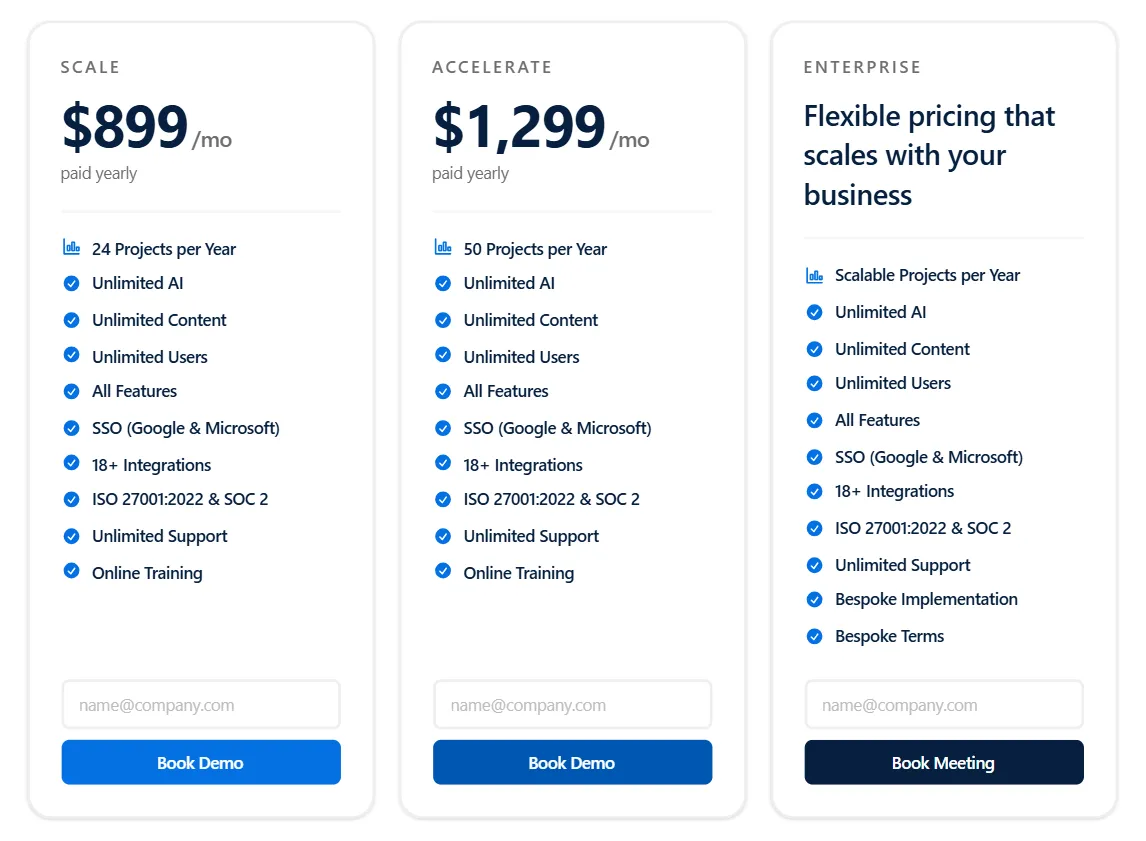
For example, AutoRFP.ai includes unlimited users and all features, with its published plans differentiated by project allowance. That can simplify budgeting when many colleagues contribute, but you still need to match the allowance to your response volume.
To compare what these platforms offer alongside their costs, explore our best RFP software guide.
RFP Software Pricing Models Explained
RFP software pricing usually depends on users, project volume, AI consumption, or a bundled subscription. Some vendors combine these models, so the most useful question is: what change in your team or workload would increase the bill?
1. Per-User Pricing
You pay a monthly or annual license fee for each person who needs access. Some platforms distinguish between administrators, writers, and occasional reviewers.
This model can suit a small, consistent group handling a large response volume, particularly when usage is unlimited. It becomes more expensive when security, legal, product, and other specialists each need paid access despite contributing only occasionally.
Check which roles require a full license before counting every contributor as a paid user.
2. Per-Project Pricing
You pay for individual RFPs or questionnaires, or subscribe to a package containing a project allowance. Where users are unlimited, adding contributors does not increase the subscription.
This can suit teams with broad participation and predictable response volumes. Costs increase when you exceed the allowance, while quieter periods can leave prepaid capacity unused.
Check what counts as a project, whether follow-up questions remain part of it, and whether allowances reset monthly or annually.
3. Usage-Based or Credit-Based Pricing
Charges follow consumption, such as answered questions, generated responses, document processing, or AI tokens. A base subscription may apply before usage charges begin.
This can suit occasional workloads or teams that can measure consumption accurately. Long questionnaires, repeated generation, and additional processing can increase costs, depending on what the vendor meters.
Ask for the cost of completing a representative RFP, including revisions, rather than comparing credit prices alone.
If you plan to assemble an internal AI workflow, include engineering and ongoing maintenance in your build-versus-buy RFP software comparison.
4. Flat-Rate and Tiered Subscriptions
You pay a fixed monthly or annual amount for a package of features and capacity. Higher tiers may increase user limits, project allowances, storage, or access to advanced capabilities.
This suits teams whose requirements fit comfortably within a package. Costs rise in steps when a single limit or required feature forces an upgrade. A flat subscription makes spending predictable within its allowances; it does not necessarily mean unlimited use.
5. Platform Fee Plus licenses and Add-Ons
You pay a base platform subscription, then separate charges for users, modules, integrations, or services. The final contract combines these components.
This can suit organizations that need a tailored deployment and can negotiate the scope. It gets expensive when the starting platform fee excludes capabilities needed for everyday work. Request an itemized quote covering your actual users, required features, implementation, and renewal terms.
- Worked example: the same 15-person team
Assume all 15 people need access, and the team completes 24 RFPs annually, averaging 250 questions each, or 6,000 answered questions. These are illustrative workload assumptions.
The examples show how billing works across different products. Features differ, and any unpriced costs or remaining allowances are identified alongside the totals.
| Pricing model | Calculation for the example team | Annual software cost | What to check |
|---|---|---|---|
| Per user | DeepRFP Pro: 15 users × $89 monthly × 10 paid months under its annual offer. | $13,350. | This assumes every person needs a paid account. The plan advertises unlimited usage. |
| Per project | AutoRFP.ai Scale: $899 monthly, billed annually × 12. Includes 24 annual projects and unlimited users. | $10,788. | The assumed workload fits Scale’s allowance. Include any separate DDQs or security questionnaires when calculating total project requirements. |
| Usage-based | 1up’s MCP connector: ($50 monthly × 12) + (6,000 answered questions × $0.05). | $900 for the connector and automation, plus external AI costs. | Confirm access arrangements for all 15 people through the company’s AI platform. Its subscriptions and any additional billable answers are excluded. |
| Flat-rate package | RFP.co Business: its published $1,990 annual subscription, including 15 users. | $1,990, within package limits. | Check concurrent projects, document processing and AI-generation limits. Annual RFP count alone does not establish that every allowance fits. |
| Platform plus licenses | Responsive Emerging: starting $10,000 annual platform fee, plus quoted licenses and required extras. | $10,000 base fee + quoted charges. | A complete total for 15 users requires a quote because license and add-on rates are not publicly listed. |
Lower-priced options can be sensible starting points: 1up’s MCP plan relies on an existing AI platform and charges per answer, while RFP.co Business caps users and monthly AI generation. AutoRFP.ai can be a stronger long-term fit as collaboration and drafting demands grow, combining unlimited users, AI usage and content with included integrations, implementation and support, with pricing tied to annual project volume.


Video transcript
AutoRFP.ai is like having a team member that never sleeps. We've responded to more than double the number of RFPs after implementing AutoRFP.ai than we did the year before. I'll look back on 2025, we'd saved something like 949 hours. It was mind-blowing. Oh my gosh, this can be done automatically. Being able to answer those consistently and accurately puts us in a position to be a trusted vendor for our clients.
Using AutoRFP.ai has definitely helped me increase my closing ratio. Before, we were using Google Drive to store all of our library content and previous responses. It was a very manual process. If the keyword was there, you would find it. If not, then you wouldn't. I would say 60% of the deals that come through in my market are RFP bids.
But as the team was scaling, it quickly became apparent that this wasn't sustainable. I, of course, looked at tools that we had available to us in-house. Became clear that it worked in some ways, but it wasn't built to respond to complex RFPs with multiple questions and moving parts. So what was different about AutoRFP.ai is that we're able to upload multiple documents in all different formats, PDF, Word, Excel, and it will ingest all of those documents and pull out the requirements, even tables within documents instantly.
The Excel sheets just blew our mind because we hadn't seen this anywhere else. As we work in multiple regions, the ability of AutoRFP.ai to translate into multiple languages is really impressive, and it really felt like it was going to be a partnership rather than a transaction. We spend a lot more time now focusing on the strategy for a bid.
The bids are a lot more tailored and a lot more focused on the prospect in a way that we couldn't do before. The quality of our output is just completely different. Do you feel like it's gonna blow their mind because they're like, "Oh, you've said exactly what we needed to hear." Thinking back to that particular deal in Q3, the deadline was coming up.
Having missed the deadline would have meant for me not hitting my quarter, but I also didn't wanna let down my team. Having a bank of information of answers that I could trust really allowed me to just push everything out as quickly as possible, knowing that what I was saying was accurate and true.
Trusting that when that is submitted, more than 50% of the job is done, and I'm really excited to say that, yes, we did win the deal, made me look like a hero, so thank you. We've been able to respond to 20 to 30% more RFPs quarter on quarter. We've been able to increase the capacity of the team. We've saved 45% of the time it would've taken us to respond to the same number of RFPs.
Our shortlist rate has been outstanding, and it just gets better and better I would say don't wait until volumes spike and quality starts to drop. Every bid that your team submits manually is costing you more than you think, not just in hours, but in quality and consistency There's absolutely no way we would want to go back to the previous way AutoRFP.ai is like having a team member that never sleeps, keeps getting smarter, and allows my team to focus on the stuff that they're really good at
Legacy RFP Platform Pricing
Established platforms such as Loopio, Responsive and Qvidian offer content management, review workflows and integrations that can suit complex proposal operations. Their pricing depends on the package, user access and services included, so compare the complete deployment cost alongside any advertised starting price.
| Vendor | Pricing model | Published or quoted only? | Starting price |
|---|---|---|---|
| Loopio | Tiered subscription with seat allowances and optional add-ons | Quote only | No published starting price. For budgeting, Vendr reports a $24,100 annual median. This is a third-party benchmark, not an entry-level quote. |
| Responsive, formerly RFPIO | Annual platform fee, user licenses, and add-ons or services | Published starting fee; complete deployment quoted | Emerging Edition starts at a $10,000 annual platform fee. User licenses and additional services affect the total. |
| Qvidian | Custom enterprise subscription, with scope agreed during quoting | Quote only | No verified public starting price. |
1. Loopio
Loopio’s Foundations plan includes 10 seats, unlimited projects and unlimited library entries. Higher tiers introduce capabilities such as multilingual content libraries, multistep reviews and separate business units. Its current pricing page requires a sales conversation for each tier.
Those features can make Loopio a strong fit for established proposal teams that need consistent content reuse and coordinated approvals. Unlimited projects also provide room for response volumes to grow without moving through project allowances.
When comparing a quote, check the included seats, access rights and services. Loopio lists onboarding packages, project translations and industry integrations as add-on options, so the subscription figure alone may not describe the complete deployment.
2. Responsive
Responsive publishes an entry platform fee, but buyers still need a quote for the complete configuration. Its pricing structure separates the platform subscription, user licenses, and add-ons or services.
Its strength is the breadth of its response-management workflow. Emerging includes unlimited response projects, AI assistance and collaboration; higher editions add capabilities such as intake management, advanced access controls, premium connectors and flexible hosting. That makes it worth considering when proposals involve several departments or require extensive governance.
Ask which user roles need paid licenses and which integrations your edition includes. A useful comparison should price the complete workflow your team needs, including deployment and support.
3. Qvidian
Qvidian does not publish a verifiable starting price. Qvidian deserves consideration for teams producing structured, branded proposals in Microsoft Office. Upland highlights Word and PowerPoint workflows, reusable templates and Salesforce-connected proposal creation. Those capabilities can be valuable when document consistency and controlled assembly matter as much as drafting speed.
Request an itemized proposal covering author and contributor access, template configuration, content migration, integrations and support. This makes it possible to compare Qvidian fairly with tools whose prices are published.
Hidden Costs That Raise the Real Price
The subscription is only part of an RFP software budget. Your team may also spend time preparing content, learning workflows, reviewing answers and administering access. Some vendors include implementation or support; others quote additional services. Either way, internal work still has a cost.
Separate vendor invoices from employee time when estimating ownership costs. The worked examples below use an assumed loaded labor cost of $75 per hour, including salary, employer contributions and benefits. These are illustrative calculations, rather than industry averages. Replace the assumptions with your own costs and measured workload.
1. Implementation, Content Migration and Training
Getting started can involve reviewing existing answers, removing duplicates, assigning content owners, configuring permissions and testing document exports. Training also takes employees away from their usual work, even when the vendor supplies the sessions at no additional charge.
For an illustrative team with 15 users, allow 20 person-hours for setup and content preparation, plus 2 hours of training per user. That produces:
20 setup hours + 30 training hours = 50 person-hours × $75 = $3,750 in internal implementation costs.
These are planning assumptions, not a claim about how long a particular platform takes to deploy. Across the scenarios below, the assumed workload ranges from 20 to 100 person-hours, worth $1,500 - $7,500.
Keep any vendor implementation fee separate. For example, Loopio lists onboarding packages among its add-on options, but does not publish their prices.
Before signing, agree who handles content cleanup, template conversion and integration testing. Ask what counts as completed implementation and whether additional training requires another purchase. This helps prevent a short technical setup from being mistaken for a fully prepared team.
2. Content Library Upkeep
A content library needs owners who can verify product details, update security statements and retire outdated answers. Automated suggestions and review reminders can reduce the work, but someone still needs to approve changes.
One Qvidian reviewer on Capterra describes the burden directly:* “Maintaining content is time consuming and difficult.” *That individual experience illustrates a cost to investigate during evaluation; it does not establish an average workload for every customer.
Estimate the labor cost with:
Annual library upkeep = average weekly maintenance hours × 52 × loaded hourly cost.
Using our assumed rate, 2 hours per week × 52 × $75 = $7,800 annually. The scenarios below allow 1-4 hours per week, producing an illustrative range of $3,900 - $15,600 per year.
Include time spent checking answers, resolving conflicting versions and obtaining subject-matter approval. Measure these activities during a pilot instead of assuming that every platform requires the same effort.
For an ROI calculation, compare this workload with your existing process. Content maintenance that your team already performs should not automatically be treated as a new expense created by the software.
3. Plan Expansion, Add-ons and Administration
Growth can raise the subscription through additional seats, higher project allowances or features outside the original package.
For example, DeepRFP Pro’s annual offer costs $890 per user per year, calculated from its published monthly rate and annual-billing discount. Each additional full-year paid seat increases the license budget by that amount.
With AutoRFP.ai, moving from Scale to Accelerate increases the annual subscription from $10,788 to $15,588, a $4,800 difference, while increasing the allowance from 24 to 50 projects annually. Both include unlimited users. Confirm how an upgrade would be billed during an existing contract.
Integrations and services can also affect the quote. Responsive explicitly separates these from its platform and user-license components. Request prices for the connectors and support level you actually require.
Finally, budget for internal administration: managing access, reviewing usage and checking connected systems. Our scenarios assume 1-4 hours per month, equivalent to $900 - $3,600 annually at the assumed hourly rate. Check renewal terms and expansion charges alongside these operating costs.
What RFP Software Costs by Team Size
Team size affects per-user pricing directly. Under project-based pricing, annual response volume determines which allowance you need.
The following worked budgets compare published per-user and project-based plans using identical labor assumptions for each team size. They illustrate ownership costs; feature requirements still need to be assessed separately.
The assumptions are:
- Access: Every team member receives access.
- Setup and training: 20, 50 or 100 person-hours for teams of 5, 15 or 30.
- Library upkeep: Respectively, 1, 2 or 4 hours weekly.
- Administration: Respectively, 1, 2 or 4 hours monthly.
- Labor rate: $75 per hour throughout.
- Scope: Published plans without separately purchased services, paid add-ons or usage beyond the selected allowance; taxes excluded.
| Team / annual RFPs | Example plan | Annual licenses | Setup and training | Annual library upkeep | Annual administration | First-year total | Cost per RFP |
|---|---|---|---|---|---|---|---|
| 5 people / 12 RFPs | DeepRFP Pro | $4,450 | $1,500 | $3,900 | $900 | $10,750 | $896 |
| 5 people / 12 RFPs | AutoRFP.ai Scale | $10,788 | $1,500 | $3,900 | $900 | $17,088 | $1,424 |
| 15 people / 24 RFPs | DeepRFP Pro | $13,350 | $3,750 | $7,800 | $1,800 | $26,700 | $1,113 |
| 15 people / 24 RFPs | AutoRFP.ai Scale | $10,788 | $3,750 | $7,800 | $1,800 | $24,138 | $1,006 |
| 30 people / 48 RFPs | DeepRFP Pro | $26,700 | $7,500 | $15,600 | $3,600 | $53,400 | $1,113 |
| 30 people / 48 RFPs | AutoRFP.ai Accelerate | $15,588 | $7,500 | $15,600 | $3,600 | $42,288 | $881 |
Calculated from the published license prices and stated labor assumptions. Cost per RFP is rounded to the nearest dollar.
Cost per RFP = annual software ownership cost ÷ completed RFPs. Here, ownership includes licenses and the operating costs shown; ordinary proposal-writing labor remains outside the table.
Scale covers the example with 24 annual projects regardless of its team size. The 48-project scenario uses Accelerate because of its higher project allowance. Count other chargeable projects, including DDQs and security questionnaires, when choosing a plan.
Use AutoRFP.ai’s ROI calculator as your business-case template. Enter your response hours, annual volume, hourly cost and existing software spend, then include the internal costs above when assessing the result. Treat projected win-rate gains as a separate scenario.
Lisa Ryerson, Director, Marketing at BDS Solutions, said: “Since we started using AutoRFP six months ago, we’ve seen a +50% reduction in the time spent compiling RFP responses.”
Is RFP Software Worth the Cost?
RFP software can justify its cost when measurable time savings exceed the full cost of ownership. In an illustrative scenario, saving 20 person-hours per RFP at $75 per hour creates $1,500 in capacity value per response, or $36,000 across 24 annual RFPs.
Using the 15-person AutoRFP.ai Scale budget above:
- Annual capacity value: 24 × 20 hours × $75 = $36,000.
- First-year ownership cost: $24,138.
- Modeled net value: $36,000 − $24,138 = $11,862.
- Modeled return: $11,862 ÷ $24,138 = approximately 49%.
This value becomes a cash saving when it reduces spending on overtime, contractors or additional hiring.
RFP automation can deliver meaningful time savings. For example, FintechOS reported a 60% reduction in time spent responding to RFPs, according to an AutoRFP.ai customer story.
Automation may also be linked to better win rates. The 2026 Proposal Win Rate Report by AutoRFP.ai and Stargazy found that 29% of teams using content automation won 25% or fewer of their bids, compared with 51% of teams not using automation. While these findings suggest a positive relationship, the survey was self-reported and does not establish that automation directly improves win rates.
Software may be harder to justify for teams answering only a few RFPs annually. Under the same savings assumptions, 3 RFPs produce $4,500 in annual capacity value, below Scale’s subscription cost before overheads. A lower-cost per-user tool or an improved template process may make more financial sense at that volume.
How to Compare RFP Software Quotes
Ask every vendor to price the same users, workload and integrations. Then get written answers to these questions so you can account for costs beyond the initial subscription.
Who Needs a Paid license?
Confirm whether subject-matter experts, occasional reviewers and administrators need paid accounts. Ask how additional users are billed and whether you can reduce license numbers when your team changes.
What Happens If We Exceed a Usage Limit?
Check what counts toward project, question, document and AI allowances, including revisions and regenerated answers. Request overage rates, upgrade thresholds and any rules about unused capacity.
Which Required Features and Integrations Cost Extra?
Ask vendors to itemize charges for single sign-on, CRM connections, API access and other required capabilities. Confirm whether connecting another system also requires a separate subscription or paid setup.
What Will Implementation, Training and Support Cost?
Establish who handles content migration, template conversion and configuration. Confirm the services included in the quote and the charges for additional training, technical assistance or faster support.
How Much Ongoing Administration Will Our Team Handle?
Ask what remains manual, including content cleanup, answer reviews and access management. Use a pilot to estimate the staff time required, then include that labor in your annual budget.
What Will Renewal or Leaving the Platform Cost?
Check whether introductory discounts expire, how renewal increases are calculated and when cancellation notice is due. Confirm whether exporting your content or receiving migration assistance carries an additional fee.
Evaluate RFP software vendors on more than pricing with our free Example RFP for RFP Software. The editable XLSX includes ready-to-send questions covering functional and non-functional requirements, including automation, integrations, security and AI capabilities.
Reweight the sections to match your priorities and send the spreadsheet to shortlisted vendors, helping you prepare a rigorous evaluation in hours instead of building one from scratch.

Download the Example RFP for RFP Software
Accurate RFP Responses, Without Per-Seat Fees With AutoRFP.ai
AutoRFP.ai combines accuracy-first AI with transparent, project-based pricing. Starting at $899 per month (billed annually), every plan includes unlimited users, AI, content, integrations, onboarding, and support, with no paid feature add-ons.
You can also try AutoRFP.ai risk-free for 30 days. Get immediate account access, import your previous RFP responses with white-glove onboarding in as little as 48 hours, and receive hands-on training to complete your first real project.
If the platform doesn’t meet your expectations, AutoRFP.ai offers a 30-day money-back guarantee, subject to its evaluation requirements.
Book a demo to see how AutoRFP.ai delivers source-grounded responses while keeping your software costs predictable.
FAQs
1. Can one RFP software subscription cover multiple subsidiaries?
That depends on the vendor’s licensing agreement. Before purchasing, confirm whether separate legal entities can maintain their own content, branding, permissions, and approval workflows under one subscription. Ask whether additional workspaces require separate licenses or fees. Unlimited users does not necessarily mean unlimited business entities.
2. Does choosing a specific data-hosting region increase RFP software costs?
Not necessarily. Regional data hosting and dedicated private deployments are different requirements, and vendors may price them separately. If your organization requires data residency in the US, EU, or another jurisdiction, confirm whether your preferred location is included in the subscription and whether additional hosting arrangements carry a premium.
3. Are sandbox and testing environments included in RFP software pricing?
It depends on the provider. Some evaluation arrangements may offer limited functionality rather than a separate environment for testing integrations, SSO, and approval workflows. Ask whether sandbox access is included, whether it mirrors production capabilities, and whether keeping that environment active incurs additional charges.
4. How does AutoRFP.ai’s 30-day money-back guarantee work?
AutoRFP.ai offers a full refund within the first 30 days if the software does not meet expectations, provided you complete its evaluation requirements:
- Import three previous responses.
- Invite two users.
- Create one project.
- Approve five responses.
- Export one project.
After the initial 30-day period, AutoRFP.ai contracts have a minimum 12-month term.
5. Does AutoRFP.ai charge extra for multilingual RFP responses?
No. AutoRFP.ai includes translation in every subscription tier without paid feature add-ons. The platform supports translation into more than 40 languages, allowing teams to prepare responses for international opportunities without purchasing a separate translation module. Your chosen plan’s annual project allowance still applies.
About the author

Technical Account Manager
Technical Account Manager at AutoRFP.ai. Background in asset management completing institutional RFPs and DDQs; now implements AutoRFP.ai for some of the company's largest accounts.
LinkedIn
